Cape Open Interface Common Specification: Chemical Reactions

Archival Information
| Title | Chemical Reactions |
| Owner | Thermo SIG |
| Location | https://www.colan.org/wp-content/uploads/2024/10/Chemical-Reactions-Interface-Specification.pdf |
| Document Unique Identifier | D0657BC0-8224-11EF-8C1E-0800200C9A66 |
| Distribution | Public |
| Status | Approved |
| Document Version Number | 1.1 |
| Created Date | 2023-10-24 |
| Revision Date | 2024-12-01 |
Version History
| Version Number | RFC Date | Release Date | Comments |
|---|---|---|---|
| 0.9 | 2021-10-01 | - | First RFC |
| 1 | 2024-10-01 | - | Incorporate Manager Changes, Second RFC |
| 1.1 | 2024-12-01 | 2024-10-01 | Released |
Summary
This document contains the CAPE-OPEN textual specification of the interfaces for Chemical Reaction. The document replaces version 1.0 of the CAPE-OPEN Chemical Reactions interface specification (i) and is designed to allow thermodynamics and reactions to be served from the same source.
The document starts with an introduction on chemical reaction engineering concepts that are necessary to describe the chosen design. The remainder of the document is sub-divided in three major sections: a section on Chemical Reaction Server that describes a general concept of server of chemical reactions, a section on Reactive Phase Equilibria, i.e. on phase equilibrium coupled with reactive equilibrium, and a section on Compound Slates which describes multiple and consistent representations of the same mixture. An additional chapter, describing scenarios of use, deals with combining these three concepts.
The document is intended to be used only in conjunction with version 1.1 (iii) of the Thermodynamic and Physical Properties interface specification. Software components that serve reaction data implement a combination of new interfaces described in this document and of interfaces previously described in version 1.1 (iii) of the Thermodynamic and Physical Properties interface specification document.
Acknowledgements
Many individuals and organizations have contributed to this document. The following are among the main contributors:
| Jasper van Baten | AmsterCHEM |
| Sergej Blagov | BASF SE |
| Michel Pons | CO-LaN |
| Mark Stijnman | Shell Global Solutions |
| Bjørn Maribo-Mogensen | Hafnium Labs |
The CO-LaN Thermodynamics Special Interest Group has been active in reviewing and improving the specification and has provided a great deal of valuable input.
Introduction
Scope
The Chemical Reactions interface specification has been developed to provide developers of Property Packages and Material Objects with a flexible system that can handle many relevant cases of Reactive Systems, involving both rate-limited and equilibrium reactions as well as electrolytes. The document presents three new concepts, each serving different business cases and needs for simulation of reactive processes, allowing the simulation of important processes including but not limited to:- Sulphur recovery from sweet gases through the Claus process
- Production of liquid fuels from syngas and Fischer-Tropsch
- Removal of CO₂ from acid gas using e.g., alkanolamines
- Prediction of pH and corrosion potential in streams
- Upgrading of heavy oil and production of olefins through thermal or catalytic cracking
- Effect of pH on liquid-liquid extraction
- Prediction of acid dew point in wet gas streams containing weak electrolytes
- Precipitation of volatile salts, such as quaternary ammonium salts from gas streams
- Production of lithium carbonate through fractional crystallization
- Electrochemical or light-induced reactions (where electrons or photons are modelled as Compounds)
In particular, Chapter 4 describes interfaces supporting the definition of rate-limited (kinetic) and equilibrium reactions. These interfaces:
- allow for using external reaction models,
- allow for using a common definition of reactions shared between reactors present in a flowsheet,
- can be used for proprietary reaction models that may be provided to e.g., subcontractors, clients.
In Chapter 4, for solving its own model, a Reactor sets up a Material Object with phases at conditions it defines. The Reactor requests reaction property calculations on the Material Object. But a Reactor does not directly specify which phases are present in the outlet streams. Instead the Unit Operation interface specification requires a Reactor, for each outlet stream, to request an equilibrium calculation, which is performed by the Thermodynamic sub-system associated with that outlet stream.
In contrast, Chapter 5 describes the Reactive Equilibrium Server that makes Chemical Reactions part of the Equilibrium Server of the Thermodynamic Sub System. Therefore, in Chapter 5 the Chemical Reactions apply to streams, and to Unit Operations that are not Reactors such as mixers. However, Chapter 5 is limited to Equilibrium Reactions only and cannot take into account kinetics and flow patterns; such calculations are typically done by Reactors.
A Reactive Equilibrium Server implements interfaces, that:
- allow for plugging in customized property models that involve reactive systems (e.g., where the overall molar balances may change),
- can be used to define e.g., a reactive thermodynamic model, handling multiple phases (gas, multiple liquid, multiple solids) with speciation of electrolytes in the liquid phase, dimerization in the gas phase, and conversions between different solid phases,
- can be used for proprietary physical property models that may be provided to e.g., subcontractors, clients. Often, electrolyte models can be very large and involve hundreds of compounds, which lead to long and detailed component lists, of which many compounds are not of direct interest. Therefore Chapter 6: Compound Slates describes a concept that allows a Reactive Property Package to provide different representations of the components; e.g. on a true (detailed) and apparent basis.
The following types of reaction systems are currently out of the scope addressed by the design proposed :
- systems based on population balance approaches such as polymerization, size changes like in crystallization, since the current thermodynamic approach is based on compound balances,
- field-induced reactions because of absence of external potential in the current thermodynamic approach. Introduction of such reactions requires additional properties describing these potentials and a way to describe derivatives of reaction properties with respect to these potentials. Examples: electromagnetic field, acceleration....,
- production and consumption of anything which is not covered by the current thermodynamic approach as defined in the Thermodynamic and Physical Properties interface specification,
- petrochemical reactions: conversion is described in terms of stoichiometry. Stoichiometry applies to compounds. Anything that is not captured as compounds, which includes properties within the compounds, for example sulfur content, cannot be described in terms of production or consumption.
In order to support most flexible handling of reactive systems, this Chemical Reactions interface specification introduces and specifies several kinds of software components that provide Chemical Reaction data and reaction property calculations: the Chemical Reaction Package is fully specified and described in this document whereas the concepts of Material Object and Property Package supporting reactive systems are only extended here by a number of additional interfaces compared to their original definitions in the Thermodynamic and Physical Properties Interface specification (iii). These extensions are described in chapters 4, 5 and 6.
Relation to thermodynamic interfaces
This specification extends the existing functionality of Thermodynamic Servers (Material Objects and Property Packages). Reactive Phase Equilibrium calculations are introduced. Support is introduced for systems with multiple Compound Slates such as used by the true and apparent compound approaches.Software components that serve Reaction Property calculations show a considerable overlap with software components that serve thermodynamic property and Phase Equilibrium calculations. In version 1.0 of both the Thermodynamic and Physical Properties (ii) and of the Chemical Reactions (i) interface specifications, similar functionality was accessed through different interfaces. In version 1.1 of the Thermodynamic and Physical Property interface specification (iii), the overall interface design was much improved, leading to more but smaller interfaces that were used by several kinds of software components. For example, software components like Equilibrium Servers, Property Calculators and Property Packages provide information on Compounds and implement ICapeThermoCompounds.
The revision of the Chemical Reactions interface specification was in part motivated by compatibility with version 1.1 of the Thermodynamic and Physical Properties interfaces and reuse of those interfaces to describe similar functionality in the context of reactions.
This document describes version 1.1 of the Chemical Reactions Interface specification as an extension of the 1.1 Thermodynamic and Physical Properties Interface specification.
Version 1.0 of the Thermodynamic and Physical Properties interface specification has been deprecated and therefore has not been considered within the design of this new version of the Chemical Reactions interface specification.
Relation to version 1.0 of the Chemical Reactions interface specification
At the time of writing of the Chemical Reactions interface specification (version 1.0), only the Thermodynamic and Physical Properties interface specification in its version 1.0 was available. Currently, two versions of the Thermodynamic and Physical Properties interface specification are available. CO-LaN promotes the use of version 1.1 of the Thermodynamic and Physical Properties interface specification, which is an improvement in many facets over version 1.0 of the same interface specification, and the two versions are not binary compatible. Consequently, this document is not providing an update for the Chemical Reactions interface specification in its version 1.0. This document is intended to be used solely in conjunction with version 1.1 of the Thermodynamic and Physical Properties interface specification.Version 1.0 of the Chemical Reactions interface specification required complete separation between software components that provided physical and thermodynamic property calculations, and software components that provided chemical reaction calculations. In this version, such software components may or may not be combined in a single software component that provides thermodynamic and physical property calculations as well as Reaction Property calculations. In addition to defining a dedicated Chemical Reaction Package, it is described how a version 1.1 Property Package can be modified to also provide for Reaction Property calculations, or support for chemical equilibria and/or multiple compound slates.
On the PME side, the role of the Reaction Object in version 1.0 of the Chemical Reactions interface specification (i) is taken over by the Material Object defined in version 1.1 (iii) of the Thermodynamic and Physical Properties interface specification. This implies that software that supports the interfaces from the revised Chemical Reactions interface specification requires additional functionality of the Material Object, as described in this document. Combination of the Reaction Object with the Material Object obviates the need to separately set a Reaction Object on a Reactor Unit Operation, as was needed for version 1.0 of the Chemical Reactions interface specification. This significantly simplifies the software design and obviates the need for Reaction (Package) Context.
Centralized source of reactions
To treat, in a general manner, different software objects that provide reaction data like stoichiometry and reaction property calculations, this document introduces the concept of a Chemical Reaction Server. Chemical Reaction Packages, Property Packages or a Material Object that supports reactions are referred to as Chemical Reaction Servers. As for thermodynamics, from the point of view of Unit Operations, the Material Object is the Chemical Reaction Server. The Material Object itself may delegate reaction property calculations to a Chemical Reaction Package or to a Property Package.All Process Modelling Components that are associated with a Material Template will be able to use the Chemical Reactions which are configured within this Material Template. With this concept, configuration of Chemical Reactions is shared within the Flowsheet, as for thermodynamics.
Reaction engineering background
In this chapter, several concepts are introduced that are at the basis of the design of the new interfaces. This chapter does not aim to replace a textbook on chemical reaction engineering, nor is it intended to be a reference on reaction related terminology.Chemical reaction
A Chemical Reaction is any process in which some Compounds are converted into other Compounds.One such example of a Chemical Reaction is the Deacon reaction:
(1)
This Chemical Reaction can be represented in a canonical form by:
(2)
The vector A of Compounds involved in this reaction is:
(3)
and the corresponding stoichiometric vector:
(4)
Note that reactants and reaction products can appear in any order, as long as the order of the stoichiometric coefficients matches the order of Compounds. If charge data, elemental composition and molecular weights are defined in a consistent manner, stoichiometric coefficients satisfy elemental, charge, and mass balances (except in case of nuclear reactions).
In a general from, considering a set of Chemical Reactions and a list of all Compounds involved, the stoichiometric relationship in a matrix form N=(ν) is formulated as:
(5)
where is the stoichiometric coefficient of each compound in reaction k, is the total number of compounds and is the total number of reactions. For a forward reaction, reactants are identified by a negative stoichiometric coefficient. Reaction products have a positive stoichiometric coefficient. Compounds that are not present in a Chemical Reaction have a stoichiometric coefficient equal to zero.
Amounts and material balances
Let us consider a simple closed thermodynamic system that may involve several phases.There are nᵢ of moles of compound i in the system distributed over the different phases. The overall amount of compound i must be equal to the sum over the phases, therefore:
(6)
Here is the number of moles of i in each phase j for all phases. The overall mole amount may change because of chemical reactions, and is still subject to material balance such that:
(7)
In equation 7 we introduce for each reaction k, the extent of reaction ξₖ, which describes how far the reaction has evolved from a given starting point (superscript 0). A small change in extent of reaction k leads to a small change in the amount of all species involved in reaction k:
(8)
ξ has the unit of moles in the system considered here.
Energy balance
This section is relevant when the Reactor is calculating the energy balance around the system that is defined as the Reactor. For the sake of clarification, we consider the case where energy balance reduces to an enthalpy balance. Energy balance can be used, for example, to calculate the temperature at which the system is or to calculate the heat exchanged by the Reactor with its environment to keep the Reactor at a target temperature.Given accurate and consistent thermodynamics, the generic enthalpy balance over any domain (with or without reactions taking place) is:
(9)
where and are referring to enthalpy carried by material flowing in and out of the domain considered. The accumulation term on the left-hand side is the transient heat uptake which is zero under steady-state conditions, represents heat flux into the domain as well as other source terms such as those resulting from mechanical work.
Transformation of reactants into products usually gives rise to a change of mixture enthalpy (decrease or increase). From a physical point of view, the heat of an individual Chemical Reaction, i.e., heat of reaction, is the amount of energy added or removed to keep the system at the same temperature and pressure, when system transformation is caused by the Chemical Reaction.
Use of equation (9) requires that the change in mixture enthalpy due to reactions is accounted for in the enthalpy calculations, for example via inclusion of enthalpy of formation in the reference state for each compound (enthalpyF). The enthalpy calculations are performed according to the enthalpy model of the thermodynamic subsystem The enthalpy model may or may not describe sufficiently accurately enthalpy changes as a result of reaction. The reaction model may therefore define a correction term on the enthalpy calculated from the enthalpy model alone. The enthalpy balance over a given domain, equation (9), is therefore modified as:
(10)
The enthalpy model and the reaction model may or may not be defined by the same software component.
For each Chemical Reaction k, the reaction extent per time is multiplied by the enthalpy balance correction term for the Chemical Reaction. A reaction property is introduced to describe this enthalpy balance correction term: enthalpyOfReactionBalanceCorrection. Note that this property is not equal to the heat of reaction. It accounts for the effect of the Chemical Reaction on the heat balance, correcting for the dependence of the enthalpy calculation on chemical transformations performed by the Chemical Reactions.
To close the enthalpy balance over any domain, the Reactor uses enthalpyOfReactionBalanceCorrection in combination with the thermodynamic property enthalpy (not enthalpyF or enthalpyNF) in equation (10). It is advised that all Chemical Reaction Servers expose the property enthalpyOfReactionBalanceCorrection for all Chemical Reactions.
If, however, enthalpyOfReactionBalanceCorrection is not available and if enthalpyF is available, the Reactor may choose to assume that heats of formation are sufficiently accurate to use enthalpyF in calculating the enthalpy balance using equation (9). Alternatively, the Reactor may choose to fail validation or omit the heat balance altogether.
Several examples are provided below to explain how to calculate the property enthalpyOfReactionBalanceCorrection in detail.
In all below examples, even if the Chemical Reaction Server is also a Property Package, the Chemical Reaction Server may not assume that it is also configured to be used as the Property Package on the Material Object. Consequently, it should always exercise the Material Object to calculate enthalpy values.
Example 1: heat of reaction known as a single value at fixed conditions
The first example is the common case where a single (experimental) value of heat of reaction at fixed conditions in a given phase is known to the Chemical Reaction Server for each Chemical Reaction k.
Given that the Chemical Reaction Server knows the temperature T*, pressure P* and composition X* of one mole of the homogenous phase j at which the heat of reaction is known, the enthalpy effect of transforming the compounds according to the thermodynamic sub-system accessed through the Material Object follows from:
(11)
Here, is the stoichiometric coefficient of compound i in the Chemical Reaction k, is the molar enthalpy value obtained from the enthalpy model and corresponds to enthalpy.Dmoles for compound i. Also, H equals nh and the expression is evaluated at a total number of moles n equal to 1, consistent with the definition of mole number derivatives in the Thermodynamic and Physical Properties interface specification.
The enthalpy effect calculated above is most often not even close to the single value available , obtained for example from a measurement.
Now, the enthalpyOfReactionBalanceCorrection follows from
(12)
The value from equation (12) is a constant value for a given configuration of the thermodynamic sub-system, for a given configuration of the Chemical Reaction Server and does not depend on T, P or X.
In many cases, experiments result in an average value of over the entire composition path of the experiment, and therefore the dependency of on composition is not known and composition X* is not available. If it is further assumed that the heat of reaction holds for all composition values, the value for becomes composition dependent; equation (11) becomes
(13)
and X corresponds to the current composition for phase j. The expression above is evaluated at a total number of moles n equal to 1.
Implementation hint: an external Chemical Reaction Package can assume that the Property Package configuration remains unchanged between two calls to ICapeMaterialContext::SetMaterialObject, and can cache the left hand side of equation (11) to increase performance. The Chemical Reaction Package could cache the value using the Custom Data functionality if present on the Material Object.
Example 2: heat of reaction known from a single value at reference conditions
Another common scenario is that heat of reaction was measured, and then a thermodynamic model was applied to transform the measured value back to some reference state known to the Chemical Reaction Server. The resulting value is what is known by the Chemical Reaction Server and is at reference conditions that are internal to the Chemical Reaction Server.
Now, the enthalpyOfReactionBalanceCorrection follows from
(14)
Typically, the reference conditions are at the pure state for each Compound. The reference phase, temperature and pressure ᵢ may differ for each Compound i, so that
(15)
For each of the Compounds involved in Chemical Reaction k, the enthalpy value from the enthalpy model at reference conditions of the Chemical Reaction Server, , needs to be evaluated. If the reference phase for compound i is a real phase, the values can be obtained from an enthalpy calculation for the reference phase at a composition corresponding to pure compound i, at T = ᵢ and at P = ᵢ. If the reference phase is the ideal gas phase, the temperature dependent property idealGasEnthalpy can be used, evaluated at T = ᵢ. If this temperature dependent property is not available, ideal gas enthalpy of Compound i may be approximated by a vapor phase enthalpy calculation in the limit of low pressure.
Also, in this scenario, the value of the correction obtained from equation (14) is constant for any Property Package configuration, and does not require recalculation for the current T, P and X at which the Reactor performs its calculation.
Example 3: heat of reaction is based on enthalpies of formation internal to the Chemical Reaction Server
The Chemical Reaction Server internally bases the heat of reaction k on enthalpies of formation as follows:
(16)
The enthalpies of formation are known internally to the Chemical Reaction Server for each of the Compounds i. The enthalpyOfReactionBalanceCorrection follows from
(17)
Here, are calculated from equation (15) using reference phase, temperature and pressure that correspond to the reference state for which the enthalpies of formation are known.
Also, in this scenario, the value from equation (17) is a constant value for any Property Package configuration, and does not depend on T, P or X.
Example 4: Chemical Reaction Server assumes that enthalpyF is sufficiently accurate
If the Chemical Reaction Server does not have any knowledge on enthalpy of formation, it may choose to depend on the enthalpies of formation known to the thermodynamic subsystem. These enthalpy of formation terms are included in the property enthalpyF and may or may not be included in the values of the property enthalpy. Therefore, for a single-phase reaction in phase j,
(18)
Here, follows from
(19)
In the equation above, the expression is evaluated at a total number of moles n equal to 1 and hⱼ represents the property enthalpy evaluated for the reaction phase j at T, P and X. The property corresponds to enthalpy.Dmoles. Similarly:
(20)
where the expression is evaluated at a total number of moles n equal to 1 and enthalpy is replaced by enthalpyF.
If enthalpy and enthalpyF are numerically equal, then the enthalpy balance is effectively done using enthalpyF and the value for is zero.
For a multi-phase reaction (as well as for a single-phase reaction), the Chemical Reaction Server could work from the assumption that enthalpyF and enthalpy are consistent with each other, except for reference state of each of the compounds, so that the difference between enthalpy and enthalpyF between two given states is given at most by reference state differences. This implies that phase transition contributions and mixing contributions are equal for enthalpyF and enthalpy. Under these assumptions, the value from equation (18) is constant, and can be rewritten as
(21)
where and hᵢ are the values for enthalpyF and enthalpy respectively at composition that corresponds to pure compound i and in principle, for any phase, temperature or pressure.
Example 5: heat of reaction is based on a model internal to the Chemical Reaction Server
If the heat of reaction is based on a model internal to the Chemical Reaction Server, it can be calculated at any given temperature, pressure and composition.
The value of the correction term property follows from the difference between the heat of reaction and the equivalent value based on the enthalpy model of the thermodynamic subsystem:
(22)
Here, follows from equation (19) and follows from a model internal to the Reaction Server. The value from equation (22) depends on temperature, pressure, and composition.
Equation (19) is formulated for a single-phase reaction; to calculate the equivalent for a multi-phase reaction, the enthalpy changes in all phases involved in the reaction need to be taken into account, along with the changes of phase amounts.
Example 6: standard heat of reaction based on equilibrium constant using van ’t Hoff equation
The Chemical Reaction Server uses the van ’t Hoff equation to relate the standard heat of reaction to the equilibrium constant model used by the Chemical Reaction Server:
(23)
The enthalpyOfReactionBalanceCorrection follows from the difference between the heat of reaction and the equivalent value based on the enthalpy model of the thermodynamic subsystem:
(24)
where
(25)
and is the enthalpy calculated by the thermodynamic subsystem for pure Compound i in the standard phase at standard pressure. The value from equation (24) depends on temperature only.
Chemical potential
Computing the chemical potentials depends on the thermodynamic modelling approach chosen. In the following example, we are using fugacities. Then, in that case, the expression for chemical potential is:(26)
Then the various quantities in this expression have the following meaning: is the Gibbs free energy of formation of pure species i at the ideal gas state, at temperature T and arbitrary fixed reference pressure ; is the fugacity of species i in phase j. The fugacity of component i in phase j accounts for the physical interactions of the system
(27)
Here are mole fractions:
(28)
The species are distributed over different phases. Summing within one phase over all species, we obtain the total amount of moles present in the phase:
(29)
The factor is the fugacity coefficient, which can be computed from the equation of state through a standard thermodynamic procedure.
Alternative expressions of chemical potential can be derived using activity coefficients.
Reaction kinetics
Reaction kinetics model the extent of a reaction by considering the rate at which the reaction takes place on a Reaction Domain which is known to the Reactor. The reaction rate rₖ is the rate of change in the reaction extent ξₖ. Alternatively reaction kinetics may be expressed in terms of compound reaction rate that are products of the reaction rate rₖ times the corresponding stoichiometric coefficient.For example, for homogenous reactions, the reaction rate is often expressed in mole/s per cubic meter of the phase in which the reaction takes place.
Other Reaction Domains may involve phase boundaries or active surfaces. Reaction Domains may also be measured in terms of mass. For example, for heterogeneous reactions, reaction rate is often expressed in mole/s per kg of catalyst involved.
Reaction rate is formally proportional to the driving force, which is the difference in chemical potentials. But, as chemical potentials cannot be directly measured, other, simpler approaches are often used. Reaction rates are expressed as a function of temperature, pressure and composition and perhaps other conditions. For example, a common approach to modelling the temperature effect on reaction rates is using an activation energy model such as the Arrhenius law.
Chemical Equilibrium
The chemical equilibrium conditions are achieved when forward reaction rate equals backward reaction rate and effective reaction rate is zero. The assumption of Chemical Equilibrium is often used if the reaction kinetics are sufficiently fast, or residence time is sufficiently large, or the Reaction Domain is sufficiently large.For each Chemical Reaction k that is possible, the following equation holds at chemical equilibrium in phase j:
(30)
Equilibrium reactions are commonly described quantitatively through chemical equilibrium constants. If we substitute the general expression of the chemical potential, using the above example approach, in the conditions of chemical equilibrium, for each reaction k we obtain:
(31)
We now introduce the chemical equilibrium constant for reaction k. In order to have the chemical equilibrium constant depend on temperature only, a common formulation is:
(32)
By substituting the expression for chemical equilibrium constant in equation (31), the following condition for chemical equilibrium is obtained:
(33)
Other formulations for the chemical equilibrium constant exist, for example using activity coefficients. It is also common to express chemical equilibrium constants for example in terms of composition, concentrations, or partial pressures. For non-ideal systems, such simplistic approaches do not satisfy equation 30. The Chemical Reaction Server is responsible for selecting the appropriate model for chemical equilibrium. Satisfying equation 30 is not required.
Because there are several ways to describe chemical equilibrium, we use a generic concept of equilibrium deviation without attempting to standardize how chemical equilibrium constants are expressed. Equilibrium deviation is a continuous differentiable function of temperature, pressure, and composition.
A Chemical Reaction can take place if all Reaction Compounds involved are defined and if all the Reaction Compounds, at least on one side of the reaction, are present. For any Chemical Reaction that can take place, Equilibrium deviation is zero when chemical equilibrium is satisfied and non-zero otherwise.
Note that for Chemical Reactions that can take place, Equilibrium deviation function may reach asymptotic infinity at the non-negativity boundaries of the composition domain, where xᵢ = 0 for any reaction compound i. At this boundary, an undefined value for the equilibrium deviation is acceptable. For example, equations 30, 31 and 33 are all valid formulations of an equilibrium deviation function.
A Chemical Reaction cannot take place potentially for two reasons. The first reason is that one or more Reaction Compounds are not defined. Such Chemical Reactions are never considered and are therefore removed during the configuration of the Material Object.
The second reason for a Chemical Reaction not being able to take place is that some Reaction Compounds are absent from the feed of the Reactor, which implies that the feed lies on the boundary of the physical domain. In case this situation occurs, Equilibrium deviation function returns either zero or undefined at the feed conditions, depending on how it is implemented. Because of this uncertainty, this situation should be avoided and is one of the reasons for introducing the concept of Reduced Reaction Set later in the chapter.
Moreover, the solution for a Chemical Reaction that cannot take place, is always at the intersection of at least two non-negativity boundaries of the composition domain (because at least two Reaction Compounds, one on the left-hand side, one on the right-hand side are not present).
Implementations of Equilibrium deviation are expected to be reasonably scaled. An acceptable absolute tolerance on Equilibrium deviation is comparable to a relative tolerance on unity. More rigorous error control can be achieved through derivatives.
Because the exact formulation of Equilibrium deviation is not known to the consumer of Equilibrium deviation, the tolerance to zero of the Equilibrium deviation function needs to be provided as a reaction attribute: EquilibriumDeviationTolerance. See table in section 4.4.5.
If a reaction is at equilibrium very close to, or even numerically indistinguishable from, the non-negativity boundary of the composition domain (one or more reactants disappear almost completely), it may be difficult to numerically reach a solution for this equilibrium. To ease this difficulty, the concept of a full conversion reaction is introduced as an approximation. A full conversion reaction is considered as an Equilibrium Reaction: a full conversion reaction goes to full extent instantaneously. A Reactor can optimize its solution strategy by considering the knowledge of which reactions are full conversion reactions: the solution lies at a boundary of the composition domain. To cater for Reactors that do not treat a full conversion reaction as a special case, its Equilibrium deviation must be defined, continuous and differentiable over the entire domain except at the boundaries of the composition domain. Reaction Attribute FullConversion is defined for this purpose.
The Unit Operation is not responsible for checking the physics of the solution. In case a Chemical Reaction Package contains two or more Chemical Reactions modelled as going to full extent and consuming the same limiting reactant, this model may offer an infinite family of solutions in some domains. Any solution that satisfies the reaction descriptions is a valid one. Responsibility to avoid an ill-poised reactive equilibrium problem lies with the software component that defines the Chemical Reactions.
Reduced set of Chemical Reactions
When considering equilibrium reactions, if one or more Compounds have zero concentration, some Chemical Reactions may not be possible. However, a linear combination of these Chemical Reactions may still take place, leading to a new, smaller set of Chemical Reactions. This situation must be handled during Reactor calculation.To illustrate the concept of a reduced set of Chemical Reactions, let us consider the following example: ethanol (C₂H₅OH) and ammonia (NH₃) react to produce monoethylamine (C₂H₅NH₂), diethylamine ((C₂H₅)₂NH) and water (H₂O) according to the reaction set:
(34)
And its follow-up reaction:
(35)
For the sake of simplicity, we omit the formation of triethylamine in this example.
After separation of the ethylamine products, water and ethanol may be absent (zero-concentration). Inspection of the above reaction formulations would make it appear that no reactions are possible in this case. However, one can subtract equation 35 from two times equation 34 from to obtain
(36)
This reaction is still to be considered as the equilibrium may shift with changes in temperature and pressure.
Trying to solve this system of equilibrium reactions using the original reactions is difficult, as the extent of reaction 34 must be exactly minus two times the extent of reaction 35, presenting a singularity (or rather rank deficiency) in case the problem is solved in terms of reaction extents using a Newton solution approach. Also, when trying to resolve the system in terms of compositions under non-negativity constraints of water and ethanol will yield a singular system. Therefore, solving the Reactor is more conveniently done using a set of “reduced” Chemical Reactions containing only reaction 36, instead of the full reaction set containing reactions 34 and 35. The Reactor could further simplify the system by not considering water and ethanol altogether.
Note that reaction 36 can also take place in case ethylamine is the only compound in the feed. If water and ethanol are present in the feed, both reactions 34 and 35 can occur. Also, in case either of the amines is present and water or ethanol is present, all reactions can take place. For streams containing only water or only ethanol or only dimethylamine, neither reaction can take place and the “reduced” set of reactions is empty.
The situation in which diethylamine is not present (feed composition is zero) is a different situation from diethylamine being undefined (not defined by the thermodynamic subsystem). If diethylamine is undefined, reaction 36 can also not take place, and the “reduced” set of Chemical Reactions is empty again.
To avoid singularities and error conditions in resolution, we introduce the concept of a Reduced Reaction Set. Let us first denote the set of Chemical Reactions considered in a particular context (e.g., configuration process, Material Object, Reactor) as the original Reaction Set. Reduced Reaction Set is an unordered set of all the Chemical Reactions in the original Reaction Set that may take place (Equilibrium or other Reactions), plus possibly linear combinations of the original Equilibrium Reactions that have been eliminated due to zero concentration of Compounds involved in Chemical Reactions, or because Compounds are not defined. The Reduced Reaction Set should not contain Chemical Reactions that rely on Phases which are not defined (as returned by ICapeThermoPhases::GetPhaseList) on the associated Material Object.
Reaction Compounds that are defined but initially absent, may or may not be formed by Reactions that are not Equilibrium Reactions, for example Kinetic Reactions. It depends whether there is time or space for these Reactions to take place. This in turn depends on the type of Reactor and how it is modelled and solved. For example, for a plug flow reactor, if the Reactor considers an infinitesimal small slice for the integration over length, such Reactions cannot take place in the very first slice. At the next slice, after integration over a finite length, new Compounds may have formed from these Reactions and a new Reduced Reaction Set needs to be considered. On the other hand, for a steady state stirred tank reactor, such Reactions will likely take place and consequently Compounds formed by these Reactions should be considered. The Reactor decides when to obtain a Reduced Reaction Set and when it does, to consider or not the Compounds formed by the non-Equilibrium Reactions.
In the case Reactions that are not Equilibrium Reactions, are allowed to form the Compounds initially absent, the Reactor should take into account that the Equilibrium Deviation functions, at initial conditions where these Compounds are absent, will yield undefined values. The Reactor may need to adjust initial conditions to deal with this situation.
If all the Compounds of the Chemical Reaction Server are present (defined and non-zero fraction) and all the Phases of the Chemical Reaction Server are defined, the Reduced Reaction Set is strictly equivalent to the original Reaction Set.
Hence, a Reduced Reaction Set of Chemical Reactions depends on:
- the full set of Chemical Reactions to be considered,
- the Compounds that are defined,
- the Compounds that are not present (if it were not for reactions).
Therefore, it may be required to determine a Reduced Reaction Set at configuration time (when the Compounds are defined) as well as at run-time (when it is known which Compounds appear in the feed to a Reactor).
For a finite Reaction Domain, any reactions considered that are not Equilibrium Reactions may affect the reduction process as Compounds, that are not present at the feed, may be formed by such reactions. The Reactor knows whether the Reaction Domain is finite or not. Reactions that are not Equilibrium Reactions are not combined. Any reaction that is not an Equilibrium Reaction and that can take place must appear in the resulting Reduced Reaction Set as it appears in the full, original Reaction Set.
To be able to generate reaction 36, a reduction is typically based on a sophisticated linear analysis that must be performed. The software component that provides the Chemical Reactions may be unable to perform such an analysis.
Even if such an analysis is performed, it is still not always possible to linearly combine the equilibrium deviation expressions for two or more Equilibrium Reactions. For example, because the Chemical Reactions to be combined have their equilibrium deviation expressions defined in incompatible bases (e.g., activity, partial pressure) or are merely known as correlations. Keeping the original reactions which cannot be linearly combined, would lead to an under-reduced Reaction Set.
In the scenario where producing reaction 36 is not possible, options include:
- The software component providing Chemical Reactions raises an error to the PME describing the reason why the reduction cannot take place. If this happens during the configuration, to get a successful configuration, the Process Engineer must adapt the Reactive System by either adding missing Compounds or removing Chemical Reactions. If this happens during evaluation of the Reactor, the ICapeUnit::Calculate (iv) may not succeed, or the Reactor may try to recover the situation by, for example, introducing small amounts of missing Compounds or by treating the Equilibrium Reactions as Kinetic Reactions with sufficiently high reaction rates compared to reaction rates of other Kinetic Reactions.
- Reactions 34 and 35 are omitted from the Reduced Reaction Set and no linear combination of reactions 34 and 35 is included. For this example, the Reduced Reaction Set will be empty. The Reactor can then be solved but the results may be incorrect.
In these circumstances returning the original Reaction Set is not allowed as it is insufficiently reduced (under-reduced).
Calculation of the Reduced Reaction Set is the responsibility of the Chemical Reaction Server.
Dealing with over-reduction
In the second scenario above, if too many original Chemical Reactions are removed to form the Reduced Reaction Set, we are speaking of over-reduction. The software component providing Chemical Reactions must inform the Reactor (using ICapeThermoReactions::GetReducedReactionSet) that over-reduction may have taken place: the Reactor may try to compensate the situation by, for example, introducing small amounts of missing Compounds within solution tolerance of the Reactor.Dealing with Reactions referring to Compounds and Phases that are not defined
In section 3.5.7, the absence of Compounds is discussed.Another scenario exists where the Material Object on which the Reactions take place has a list of Compounds that does not include one or more reactant or reaction product. In the above example, if water does not appear in the list of Compounds on the Material Object, reactions 34 and 35 must be eliminated but reaction 36 may still take place.
On the other hand, if ammonia does not appear in the list of Compounds, reactions 34, 35 and 36 have to be eliminated from the Reduced Reaction Set.
Similarly, if any Phase that takes part in a Chemical Reaction is not defined, the Chemical Reaction cannot take place.
In conclusion to 3.5.7, 3.5.8 and 3.5.9, a Reduced Reaction Set is constructed considering the list of absent compounds and a list of compounds and phases defined on the Material Object.
Chemical phase equilibrium
At phase equilibrium for given temperature and pressure, the total Gibbs free energy is at a global minimum which determines the present phases, the split between phases and the composition of each phase. Without reactions, the compound balances are satisfied as well.The requirement for minimum Gibbs energy leads to the condition that for each Compound, the chemical potentials are equal in all phases. In usual practice, this condition is used to determine phase equilibrium.
When considering chemical phase equilibrium, the compound balances are affected by reactions. The total Gibbs free energy is then also a function of the reaction extents and hence equation (33) has also to be satisfied in every phase. If equation (33) is satisfied for any phase at phase equilibrium, it will be implicitly satisfied for all co-existing phases due to the equality of chemical potentials.
The above formulation holds if the description for phase equilibrium is thermodynamically consistent with the description for reaction phase equilibrium.
Apparent composition
When working with Chemical Reactions, it is often useful to hide a part or all the complexity of reactions and changing compositions and use the apparent composition (also referred to as transformed composition as in (v)). The apparent Compounds are typically a subset of the true compound slate, chosen such that their apparent composition remains constant, regardless of the extent of the Chemical Reaction. The true composition and the apparent composition are related. For the transformation from true composition to apparent composition, only reaction stoichiometries are required. The transformation from the apparent composition to the true composition requires calculation of chemical equilibrium.One can also define Compound Slates that are composed of a mix of Apparent and True Compounds. For compound slates which are fully apparent, the associated phase equilibrium appears as non-reactive.
Common examples are pairs of apparent Compounds that react into a “hidden” third component, such as H₂O + SO₃ = H₂SO₄, treating as if it is a simple binary mixture. Another is a Compound that dissociates into “hidden” Compounds, such as 2 H₂O = H₃O⁺ + OH⁻, removing the need to deal with ions and charges outside of the equilibrium calculation itself. While input and output is generally given in apparent composition, the equilibrium calculation will take all Compounds and Chemical Reactions into account. The effects of the Chemical Reactions will be accounted for in adjusted values of the apparent fugacity coefficients, the apparent molar enthalpy, etc.
At other times, however, the true composition will be required, for example for reporting purposes, or for calculating properties like the pH value or ionic strength.
The Chemical Reactions interface specification should allow the Process Engineer to define several Compound Slates, both apparent and true, and be able to switch between them. Care must be taken when converting between Compound Slates. Not all true compositions will map to apparent compositions with all fractions in the [0,1] range. Similarly, a composition that is valid in one apparent Compound Slate may be invalid in another. Also, a phase equilibrium calculation for which overall apparent compositions are all in the [0,1] range, may result phase compositions that are not all within the [0,1] range.
Some Compound Slates may disallow (mole-) fractions outside of the [0,1] range. This is a requirement for example for the Default Compound slate, which is used by software components that are unaware of Compound Slates. For such compound slates, operations that would result fractions outside of the [0,1] range must raise an error.
Outline
The remainder of this document is divided into three parts. The first part describes what is a centralized server of chemical reactions. The second part describes the handling of chemical reactive equilibria, and the third part describes multiple representations of mixtures. These three parts are globally independent one from another.Document Roadmap
This document is a textual specification document for a set of business interfaces targeted at handling chemical reactions in process simulation software. The document belongs to the documentation set of CAPE-OPEN interface specifications in its version 1.1. This imposes that for software components of Chemical Reaction Package and Chemical Reaction Package Manager classes implementing the interfaces defined in this document, the CapeVersion registration key value must be set to “1.1”.
The document makes numerous references to the Thermodynamic and Physical Properties interface specification in its version 1.1 (iii). Therefore, it is recommended for a developer to start with reading the document on the Thermodynamic and Physical Properties interface specification in its version 1.1.
When version 1.0 (i) of the CAPE-OPEN Chemical Reactions interface specification was established, only version 1.0 (ii) of the Thermodynamic and Physical Properties interface specification was available; currently, also version 1.1 (iii) of the Thermodynamic and Physical Properties interface specification is available and the overlap of the Chemical Reactions interface requirements and Thermodynamic and Physical Properties interface requirements is considerable: in both cases compound data are required and version 1.0 (i) of the Chemical Reactions interface specification introduced the concept of a Material Context, which is also available in version 1.1 (iii) of the Thermodynamic and Physical Properties interface specification.
This document replaces version 1.0 (i) of the CAPE-OPEN Chemical Reactions interface specification. Consequently version 1.0 (i) of the CAPE-OPEN Chemical Reactions interface specification is deprecated.
Audience
This document is intended primarily for software developers who want to build CAPE-OPEN Chemical Reaction Servers, or who want to extend the functionality of existing Property Packages or Material Objects to include support for Chemical Reactions, Reactive Phase Equilibrium calculations or multiple Compound Slates. The document also applies to developers of any piece of software that uses reaction data, Reaction Property calculations, Reactive Phase Equilibrium or multiple Compound Slates, particularly Process Modelling Environments and Unit Operations (iv).
For any reader, an understanding of UML diagrams is assumed. Also, the reader should consult the CAPE-OPEN Thermodynamic and Physical Properties interface specification document in its version 1.1 (iii) for a description of terms not included in this document.
This document is not intended for Process Engineers who are end-users of CAPE-OPEN process simulation components or process simulation environments.
Chemical Reactions
Architecture
This document describes two new primary CAPE-OPEN Process Modelling Components (ix):
- Chemical Reaction Package – A Chemical Reaction Package component defines one or more Chemical Reactions involving a specific set of Compounds and Phases. The Chemical Reactions are defined in terms of stoichiometry, reaction attributes and / or reaction properties, such as reactionRate, compoundReactionRate, equilibriumDeviation and enthalpyOfReactionBalanceCorrection.
- Chemical Reaction Package Manager – A Chemical Reaction Package Manager is similar in scope to a Property Package Manager component. A Chemical Reaction Package Manager is a single software component that exposes multiple Chemical Reaction Packages. The Chemical Reaction Package Manager is responsible for instantiating Chemical Reaction Packages on request and may allow packages to be edited and/or created.
Like a Property Package, a Chemical Reaction Package can be designed as a stand-alone software component, or it can be provided through a Chemical Reaction Package Manager.
In addition to the above new software components, this document describes the extension of version 1.1 Property Packages to include reaction data, the extension of version 1.1 Material Objects to cater for reaction data and reaction property calculations, and the use of Chemical Reactions by Unit Operations that use version 1.1 of the Thermodynamic and Physical Properties interface specification. A Property Package that supports Chemical Reactions exposes all functionality of a Chemical Reaction Package.
From the point of view of the PME, a Chemical Reaction Package provides the Chemical Reactions and is a Chemical Reaction Server. Similarly, a Property Package that supports Chemical Reactions is a Chemical Reaction Server. From the point of view of a Reactor, the Material Object provides Chemical Reactions and is therefore a Chemical Reaction Server. All Chemical Reaction Servers implement a common set of interfaces: ICapeThermoReactionSet, ICapeThermoReactions, and optionally ICapeThermoReactionRoutine.
This section describes the following interfaces:
- ICapeThermoReactionSet – This is a mandatory interface for any Chemical Reaction Server and for any object that provides a Reduced Reaction Set. The interface exposes a set of Reaction identifiers.
- ICapeThermoReactions – This is a mandatory interface for any Chemical Reaction Server. The interface describes the Chemical Reactions, their attributes, and their relation to each other.
- ICapeThermoReactionRoutine – Any Chemical Reaction Server that can calculate values of reaction (or reaction related) properties implements this interface. Therefore, this optional interface must be implemented by Chemical Reaction Servers to allow for reaction property calculations to be requested. Similar in scope to ICapeThermoPropertyRoutine (iii).
- ICapeThermoReactionProperties – A Material Object that supports reactions implements this interface. This interface allows to store and retrieve results of reaction property calculations. Similar in scope to ICapeThermoMaterial (iii).
As shown in Figure 4-1, the Chemical Reaction Package Manager is a Manager and therefore implements the ICapeManager interface (xiii) as well as CAPE-OPEN common interfaces related to identification and utilities since a Manager is a Primary Object. The Chemical Reaction Package Manager must handle its errors through CAPE-OPEN defined means (xii).
Figure 4-1 Class diagram: Chemical Reaction Package Manager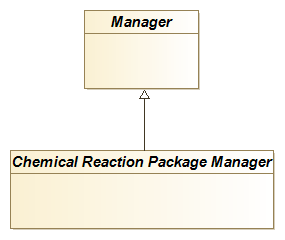
A Reactor (and other PMCs that are Chemical Reaction Clients, such as Flowsheet Monitoring Components, but neither Property Packages nor Chemical Reaction Packages) does not need to implement reaction-related interfaces; a Reactor does not communicate directly with either a Property Package or a Chemical Reaction Package. The Reactor obtains both thermodynamics, reaction data and reaction property calculations from the Material Object.
The minimal set of interfaces implemented by a Material Object is described in the Thermodynamic and Physical Properties Interface specification 1.1 (iii). A Material Object that supports Chemical Reactions therefore implements the ICapeThermoReactionSet, ICapeThermoReactions, ICapeThermoReactionProperties and ICapeThermoReactionRoutine interfaces (see Figure 4-2) in addition to the interfaces required for Material Objects that do not support Chemical Reactions. A Material Object that supports Chemical Reactions plays the role of a Chemical Reaction Server for example with respect to a Unit Operation accessing the Material Objects connected to its Ports.
Figure 4-2 Material Object supporting reactions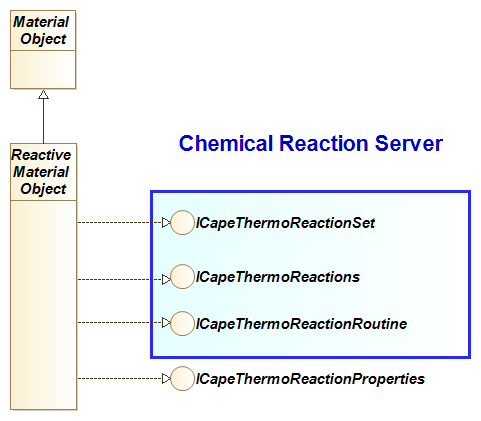
In Figure 4-2, the Material Object provides thermodynamic services to any Unit Operation including Reactors. The Reactive Material Object adds services related to Chemical Reactions. From the point of view of a Reactor, the Reactive Material Object is the Chemical Reaction Server: the Reactor performs its calculations using reaction property calculations provided through the Material Object. It is the responsibility of the Material Object to integrate thermodynamics and reactions from different sources. It does not matter to Reactors whether the reaction property calculations and/or thermodynamic property calculations are performed by (an) external software component(s). The Compounds and Phases for Chemical Reactions must be those that are served by its ICapeThermoCompounds and ICapeThermoPhases interfaces present on the base class Material Object.
A Chemical Reaction Package must have access to a Material Object to obtain conditions at which to calculate reaction properties, to perform thermodynamic property calculations if required and to store the reaction calculation results. To get access to the Material Object, the Chemical Reaction Package must implement the ICapeThermoMaterialContext interface.
If asked to calculate a Reaction Property, the Chemical Reaction Package must not change temperature, pressure or composition stored on the Material Object: however, for that purpose, the Chemical Reaction Package may calculate additional thermophysical properties on the Material Object. As such, a reaction property calculation may have side effects. A Chemical Reaction Package is not allowed to perform calculations at different temperature, pressure and compositions on the same Material Object. Therefore, any such thermodynamic calculations must be performed on a duplicate of the Material Object.
To provide the reaction data, the Chemical Reaction Package must implement the ICapeThermoReactionSet, ICapeThermoReactions and ICapeThermoReactionRoutine interfaces (see Figure 4-3). The ICapeUtilities interface (vi) allows for the Chemical Reaction Package to expose parameters (vii) and a user interface for editing. If the Chemical Reaction Package can be modified via access to its Parameters or editing, the Persistence Common Interface (viii) allows for the modifications to be stored.
Figure 4-3 Chemical Reaction Package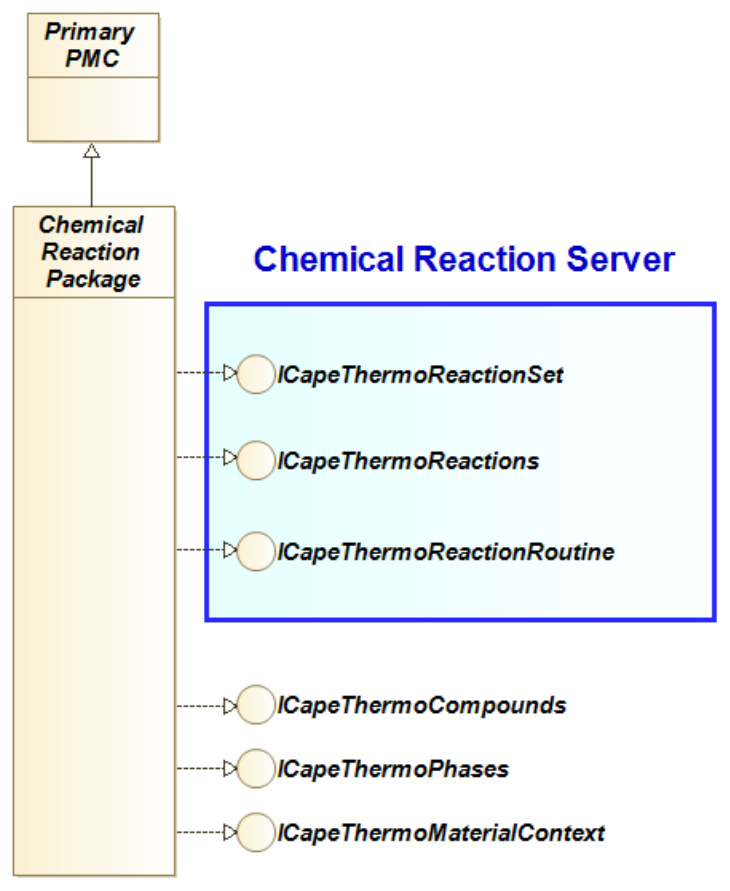
A Property Package that supports reactions, must – in addition to the interfaces exposed by a Property Package that does not support reactions – expose the ICapeThermoReactionSet, ICapeThermoReactionRoutine and ICapeThermoReactions interfaces (see Figure 4-4). Additional interfaces for Property Packages are shown in Figure 5-2 and Figure 6-2.
Figure 4-4 Property Package supporting reactions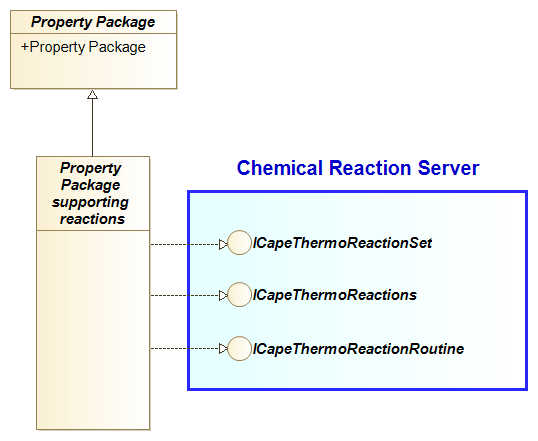
All objects that provide Chemical Reactions, i.e., the Material Object, the Chemical Reaction Package, and the Property Package, are referred to as Chemical Reaction Servers in this document.
Any Chemical Reaction Server returns a context-dependent Reaction Set object (see section 3.5.7). A Reaction Set object is a CAPE-OPEN object supporting ICapeThermoReactionSet as shown in Figure 4-5.
Figure 4-5 Reaction Set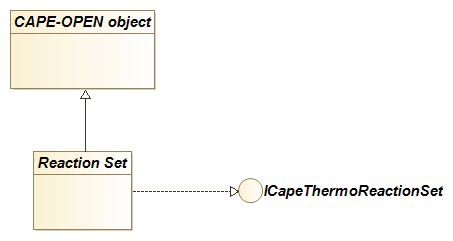
Requirements
Chemical Reaction Server scope
Chemical Reaction Packages must be intrinsically consistent so that they may be used without configuration needed. Process Engineer remains responsible for configuring adequately the Chemical Reaction Package to fit with a specific Reactor. For example, if two or more Chemical Reactions are mutually exclusive by construction, they should not be made part of the same Chemical Reaction Package but instead should be put in different Chemical Reaction Packages.The extent to which a Chemical Reaction takes place can be determined in several ways:
- A Kinetic Reaction is described by a rate at which the reaction takes place (cf. reactionRate property), or by rates at which the individual Compounds are produced or consumed (cf. compoundReactionRate property).
- An Equilibrium Reaction is described by stoichiometry and a deviation function from equilibrium (cf. equilibriumDeviation property in 3.5.6).
The equilibrium deviation function may take any form or shape, may depend directly or indirectly on temperature, pressure, and composition (see 3.5.10 for more details)
- For n reactions for which neither rate expressions nor equilibrium deviations are used, n additional constraints are needed for solving the reaction model equations. For example, these could be reactor product purity specifications, or the reaction extents (conversions). Such types of specifications are expected to be handled by the business application itself (e.g., Reactor) whereas a Chemical Reaction Server must explicitly provide the reaction stoichiometry and, optionally, the enthalpyOfReactionBalanceCorrection property.
The Chemical Reaction Server can expose information for each Chemical Reaction to allow for one or more of the above approaches. Particularly, if reaction rate(s) and stoichiometry, or compound rates, are exposed, the reaction extents can be controlled by kinetic considerations. If equilibrium deviations and stoichiometry are exposed, the reaction extents can be controlled by equilibrium considerations. Controlling reactions by other approaches generally requires stoichiometry to be exposed by the Chemical Reaction Server. In all cases, enthalpyOfReactionBalanceCorrection may be required so that the Reactor may formulate its heat balance (see 3.5.3).
Intellectual property regarding details of reaction schemes e.g., reaction kinetics and stoichiometry, may be sensitive information, and a Chemical Reaction Server may choose to expose merely enough information to allow for calculation of the Reactive System using one of the above approaches.
- For Kinetic Reactions, the Chemical Reaction Server may expose one or more pseudo-overall Chemical Reactions for which the apparent stoichiometry depends on operating conditions. In this case, the apparent stoichiometry is a result of multiple (hidden) reactions contributing to the exposed pseudo-overall reaction in ratios that depend on the operating conditions. In this case, the pseudo-overall stoichiometry is not constant, and is not available to the caller. In this approach, the individual compound reaction rates must be available. The lack of stoichiometry information for this kind of Chemical Reaction may require special treatment with respect to solution of the reaction calculations.
- The Chemical Reaction Server may choose to expose any linearly independent set of reactions equivalent to its internal reaction set, but from which the reaction mechanism is not immediately evident. The exposed equilibrium deviations may or may not correspond to the internal reaction set. The set of reactions can be considered in equilibrium only if all equilibrium deviation functions in the set have a value of zero (within the specified tolerance). Solving for a subset of equilibrium deviations in this scenario is not physically meaningful. The documentation of the Reaction Server may further clarify this to the Process Engineer that configures the reactions to be performed by a Reactor.
PME scope
Once a Chemical Reaction Server component has been installed in a computer, it is available to a PME as any other CAPE-OPEN component as described in (ix).Four scenarios are envisioned for the creation/selection of a Chemical Reaction Package for a Material Template. These are:
- A Chemical Reaction Package belongs to a larger software system that provides reaction data and reaction property calculations, and it has been created as a specialisation of the Reactive System for a process. In this scenario, the Process Engineer will launch the Chemical Reaction Package Manager and will select a Chemical Reaction Package from there. The Process Engineer may also create a new Chemical Reaction Package from scratch within the Chemical Reaction Package Manager or modify one which is already available from the Chemical Reaction Package Manager. A Material Object that supports Chemical Reactions will forward any reaction property calculation request to the Chemical Reaction Package.
- A Chemical Reaction Package has been created for a specific chemical process and is available as a stand-alone Chemical Reaction Package. A Material Object that supports Chemical Reactions will forward any reaction property calculation request to the Chemical Reaction Package.
- If the Chemical Reactions are supplied by a Property Package, then creation of a separate Chemical Reaction Package is not required. A Material Object that supports Chemical Reactions will forward any reaction property calculation request to the Property Package.
- Reaction Property calculations are native to the PME. Creation of a Chemical Reaction Package is not required. A Material Object providing Chemical Reactions will natively perform any reaction property calculation request.
Reactor scope
A Process Modelling Component that consumes reaction data, typically a Unit Operation modelling a reactor, is called a Reactor in this document. A Reactor has no direct access to a Chemical Reaction Package (if there is any) or a Property Package (if there is any). Instead, from the point of view of the Reactor, the Material Object is always the Reaction Server.A Reactor can directly use a Material Object connected to any of its Material Outlet Ports to perform reaction property calculations, or it can use a duplicate of a Material Object connected to either of its Material Inlet or Material Outlet Ports to do so.
When a Reactor is requesting reaction property calculations on a Material Object, the calculation may be performed by a Chemical Reaction Package. The Chemical Reaction Package in turn may require thermodynamic and physical property calculations.
Configuration
Chemical Reactions may be configured at three levels:- First level (Chemical Reaction Server): internal configuration of Chemical Reaction Server.
- Second level (PME): selection of a Chemical Reaction Server for use with a Material Template and configuration of the Material Template.
- Third level (Reactor): selection of reactions to be used by a Reactor.
A Chemical Reaction Package may or may not require internal configuration (for example selection of reactive compounds, reaction rate models and reaction rate constants). A PME provides access to this internal configuration functionality through a call to ICapeUtilities::Edit (vi). The mechanism for internal configuration of Chemical Reaction Server is proprietary to the software component that implements the Chemical Reaction Server. In addition to invocation of ICapeUtilities::Edit, individual aspects of a Chemical Reaction Server configuration (for example reaction rate constants) may be accessed through the Parameter Common Interface.
Once changes on the configuration of a Chemical Reaction Server are made, one should be able to save the changes as part of saving the Flowsheet. For a discussion on the implications of a changed Chemical Reaction Server configuration on requirements for persistence, please refer to chapter 8 of the Thermodynamic and Physical Properties interface specification in its version 1.1 (iii).
The second level of configuration is the selection of a Chemical Reaction Server for use with a Material Template. The PME may show the CapeDescription information in the registry (related to the Chemical Reaction Server) to help the Process Engineer make the selection. For the selected Chemical Reaction Server, the PME may help the Process Engineer making a choice by displaying information contained within the Chemical Reaction Server such as available Chemical Reactions and whether they are Kinetic or Equilibrium Reactions, perhaps even stoichiometry (if available), etc…
If the Chemical Reaction Server is a Chemical Reaction Package, that part of the configuration data may include information on how Compounds of the associated Material Object map to Compounds of the Chemical Reaction Package. It may be required to match the Compounds as exposed by the Chemical Reaction Package to those known by the Material Object. For that purpose, the PME may use CASRegistryNumber and other pieces of information (for example SMILES) provided by ICapeThermoCompounds implemented by the Chemical Reaction Package. The Process Engineer may contribute to the Compound mapping, the GUI provided by the PME also allows inspection of the Compound mapping. Similarly, for Phases, the PME may use stateOfAggregation and other details provided by ICapeThermoPhases implemented by the Chemical Reaction Package, as well as interaction with the Process Engineer, to establish a mapping between Phases known by the Chemical Reaction Package and Phases known by the Material Object. A Chemical Reaction Package deals with foreign Compounds on the Material Object by treating them as inert.
A Material Template should not be configured to support reactions that involve Compounds that are not defined or selected on the Material Template. The reactions returned by the Chemical Reaction Server will reflect this requirement if a Material Object (created from the Material Template) is associated with the Chemical Reaction Server. A further reduction of the set of reactions supported by the Material Template may be accomplished by the Process Engineer.
The third level of configuration takes place during Reactor configuration to optionally allow the Process Engineer to select a subset of reactions. This part of the configuration is the responsibility of the Reactor.
For the sub-selection of reactions on a Reactor level, the Reactor may decide which reactions it offers for selection. For example, Reactor may hide reactions for which no kinetic data is available in case the Reactor can only deal with Kinetic Reactions.
Usage
A PME is not envisioned to use the Chemical Reaction Server to fill in its own data structures, as if the Process Engineer had entered the data directly. Filling in PME data structures would require standardisation of the forms of the reaction models supported by Chemical Reaction Servers. This level of standardisation is deliberately not included here because the Chemical Reaction interfaces need to be flexible enough to cover any formulation, from the well-known reaction models to custom reaction models. In addition, a strategy is adopted where the implementation of a Chemical Reaction Server may choose to expose just enough information to perform calculations on Reactive System without exposing detailed reaction data, to protect sensitive data.Each Compound is identified by a character string known as a Compound identifier. This Compound identifier is used in the calls between a PME and Process Modelling Components. Compounds exposed by Property Packages have Compound identifiers that may be different from Compound identifiers exposed by Reaction Packages. If a Property Package is asking a Material Object which Compounds are currently present, the Property Package receives a list of Compound identifiers that are consistent with its internal Compound identifiers. Similarly, if a Reaction Package asks for the Compounds that are present, it will receive a list consistent with its internal Compound identifiers. This implies that GetCompoundList implemented by the Material Object may have to return a different answer for the Property Package and for the Chemical Reaction Package. The list of Compound identifiers used on the PME side, as seen by the Unit Operations, may again be a different list. For example, the PME may decide to do so to have a consistent list of Compound identifiers between several Material Templates.
The matching of Compounds with different Compound identifiers of different Process Modelling Components is the responsibility of the PME. If Compound identifiers are passed as an argument to a call forwarded by the Material Object from one software component to another (e.g., GetCompoundConstant), the Material Object must properly translate the argument as to match the Compound identifiers on the software component the call is forwarded to.
The same holds for Phases. The Material Object must pass, to the Property Package, Phase labels as known to a Property Package and must pass, to a Chemical Reaction Package, Phase labels as known to the Chemical Reaction Package. The Material Object decides itself which Phase labels to pass to a Reactor. Phase labels passed as an argument to a call forwarded by the Material Object from one software component to another (e.g., CalcSinglePhaseProp) must be translated by the Material Object to match the Phase labels known to the software component the call is forwarded to.
Textual Requirements
REQ-CRS-1
a Chemical Reaction Server must act as a Compound Server, defining all Compounds involved in the description of Chemical Reactions.
Rationale: A Compound Server implements ICapeThermoCompounds.
All Compounds involved in the description of Chemical Reactions must be defined by the Chemical Reaction Server. A Chemical Reaction Server must be able to provide some information on each Compound so that the PME may use this information for Compound mapping.
It is strongly advised for a Chemical Reaction Server to define only Compounds involved in the description of Chemical Reactions, reactants, and reaction products as well as catalysts, inhibitors, and solvents.
REQ-PME-2
Material Object must ensure that the Compound identifiers exposed to the Chemical Reaction Package, for those Compounds that are known to the Chemical Reaction Package, are those defined by the Chemical Reaction Package.
Rationale: See below rationale.
In general, the Compound identifiers of the Compound Server are used by the Material Object in any communication with the Compound Server.
REQ-PME-3
Material Object must ensure that Compounds not known to the Chemical Reaction Package are defined using identifiers that are different from any Compound identifier defined by the Chemical Reaction Package.
Rationale: Like a Property Package, a Chemical Reaction Package exposes its Compounds via ICapeThermoCompounds through which the Chemical Reaction Package makes known what identifiers of the Compounds are used in any communication between the Chemical Reaction Package and the Material Object. The Material Object must adhere to the Compound identifiers known to the Chemical Reaction Package for Compounds that take part in the Chemical Reactions. Mapping of Compounds internal to the Material Object or originating from a Property Package, is part of the configuration of the Material Template and is a responsibility of the PME. The PME may use information like CASRegistryNumber to automate Compound mapping or the PME may rely in end-user interaction to refine the Compound mapping.
In addition to reactive Compounds, a Material Object may be configured to also contain non-reactive Compounds (Compounds which are not known to the Chemical Reaction Package). The Material Object, exposed as active Material Object to the Chemical Reaction Package, must include these non-reactive Compounds to allow the Chemical Reaction Package to properly perform thermodynamic and physical property calculations. In any communication between the Material Object and the Chemical Reaction Package, the Compounds not known to the Chemical Reaction Package must not use Compound identifiers that overlap with those exposed by ICapeThermoCompounds of the Chemical Reaction Package.
REQ-CRS-4
A Chemical Reaction Server must act as a Phase Server, defining all Phases involved in the description of Chemical Reactions.
Rationale: A Phase Server implements ICapeThermoPhases. The PME uses phase definition for Phase mapping.
REQ-PME-5
Material Object must ensure that the Phase labels exposed to the Chemical Reaction Package, for those Phases that are known to the Chemical Reaction Package, are those defined by the Chemical Reaction Package.
Rationale: The Phase label identifies the Phase. Mapping of Phases is the responsibility of the PME. Therefore, the Phase labels used in communication between the PME, and the Chemical Reaction Package are those defined by the Chemical Reaction Package.
In general, the Phase labels of the Phase Server are used by the Material Object in any communication with the Phase Server.
REQ-PME-6
Material Object must ensure that Phases not known to the Chemical Reaction Package are defined using labels that are different from any Phase label defined by the Chemical Reaction Package.
Rationale: In addition to Phases involved in Chemical Reactions, the list of present Phases on the Material Object may also contain Phases in which no Chemical Reaction takes place (Phases which are not known to the Chemical Reaction Package). Since the definition of derivatives of Reaction properties involves all Compounds in all present Phases, the Phases not known to the Chemical Reaction Package must not be identified with labels that overlap with those defined by ICapeThermoPhases of the Chemical Reaction Package.
REQ-CRS-7
If stoichiometry of the Chemical Reaction is not exposed for a Kinetic Reaction, the property compoundReactionRate must be exposed and the attribute PseudoOverall must be TRUE.
Rationale: If compound reaction rates are known, reaction stoichiometry is not necessarily required, if the rates of production or consumption of each Compound involved are available. This approach thus allows that several intrinsic, individual reactions can formally be added together to form a pseudo-overall Kinetic Reaction that describes the rate of consumption or formation of all Compounds involved. If the Reaction stoichiometry is exposed, reactionRate may be exposed making then compoundReactionRate optional.
REQ-PME-8
If the list of Compounds on the Material Object does not contain all the Compounds defined by the Chemical Reaction Server, the Material Object must use a Reduced Reaction Set.
Rationale: The Material Object is configured such that some of the Compounds in the Compound list defined on the Chemical Reaction Server are not present within the Compound list of the Material Object. PME requests a Reduced Reaction Set (see 3.5.7 for more details) from the Chemical Reaction Server. That way the Chemical Reaction Server exposes to the Material Object only Chemical Reactions involving Compounds that are in the Compound list of the Material Object.
The Chemical Reaction Server may refuse to construct a Reduced Reaction Set for a Compound set which is too far out of the intended scope of the Chemical Reaction Server, e.g., a Chemical Reaction Server dedicated to ammonia synthesis could refuse to create a Reduced Reaction Set if ammonia is absent from the Compound list of the Material Object.
Note that the Compound list on a Material Object, as presented to the Chemical Reaction Server, uses Compound identifiers used by the Chemical Reaction Server. This requires Compound matching (see REQ-02-PME). Note also that a Material Object should be active with the Chemical Reaction Server when the PME queries the Chemical Reaction Server for the list of Chemical Reactions consistent for a particular Material Template.
This requirement is fulfilled by the GetReducedReactionSet operation of the ICapeThermoReactions interface.
REQ-PME-9
the PME must keep the reference on the Reduced Reaction Set if the Reduced Reaction Set is in use.
Rationale: Releasing the Reduced Reaction Set signals to the Chemical Reaction Server that the Chemical Reactions in the Reduced Reaction Set are no longer in use. The Chemical Reaction Server may then clean up any information related to the Chemical Reactions present in the Reduced Reaction Set. Therefore, the PME cannot just copy the list of Chemical Reactions identifiers present in the Reduced Reaction Set and count that these identifiers are still meaningful for the Chemical Reaction Server.
REQ-REACTOR-10
No Reaction Property calculation may be performed on a Material Object connected to a feed Port of a Reactor.
Rationale: In accordance with the UNIT specification (iv), whereas a Unit Operation must specify Material Object connected to outlet Ports, Material Objects connected to inlet Ports must be considered as read-only i.e., their content must be preserved. To perform Reaction Property calculations, a Reactor may choose to create a duplicate of a Material Object connected to an inlet Port.
REQ-PME-11
For a list of Phases on the Material Object that does not contain all the Phases defined by the Chemical Reaction Server, the Material Object must be associated with a Reduced Reaction Set.
Rationale: The Material Object discovers that some of the Phases in the Phase list defined on the Chemical Reaction Server are not present within the Phase list of the Material Object. PME requests a Reduced Reaction Set (see 3.5.7 for more details) from the Chemical Reaction Server. That way Chemical Reaction Server exposes to the Material Object only Chemical Reactions involving Phases that are in the Phase list of the Material Object. The Chemical Reaction Server may refuse to construct a Reduced Reaction Set for a Phase set which is too far out of the intended scope of the Chemical Reaction Server, e.g., a Chemical Reaction Server dedicated to ammonia synthesis could refuse to create a Reduced Reaction Set if no vapor phase is present in the Phase list of the Material Object.
The Phase list on Material Object, as presented to the Chemical Reaction Server, uses Phase labels used by the Chemical Reaction Server. This requires Phase matching (see REQ-05-PME).
This requirement is fulfilled by the GetReducedReactionSet operation of the ICapeThermoReactions interface.
REQ-REACTOR-12
Reactor must not evaluate Reaction Properties on Chemical Reactions that involve Phases that are not present.
Rationale: If the Reactor does not consider some Phases, the Reactor must not evaluate Reaction Properties of Chemical Reactions involving these Phases.
To ensure that a given Phase is present, the Reactor can set composition, temperature, and pressure. The Chemical Reaction Server may then obtain composition, pressure, or temperature to calculate any Reaction Property requested by the Reactor. Furthermore, a Chemical Reaction Server may need thermodynamic properties to be calculated on that Phase to calculate the requested Reaction Property.
REQ-CRS-13
Chemical Reaction Server is not allowed to generate under-reduced Reaction Sets.
Rationale: Reactor may not be able to evaluate its model if faced with an under-reduced Reaction. See 3.5.7 for more details.
REQ-REACTOR-14
the lifespan of a Reduced Reaction Set must not exceed the calculation of the Reactor.
Rationale: A Reactor, as any Unit Operation, is not allowed to cache the Material Object past the duration of the ICapeUnit::Calculate call (iv). The Reduced Reaction Set object cannot be cached by the Reactor either because a Reaction Set object, Reduced or not, belongs to the Material. However, the information contained in the Reaction Set object (number of Chemical Reactions, identifiers of the Chemical Reactions), Reduced or not, may be cached (see REQ-20-REACTOR). Neither the PME nor the Reactor may rely on such information in between sessions. Similar constraints hold for ICapeUtilities::Edit.
REQ-PME-15
after re-configuration of an external Chemical Reaction Server, all information pertaining to Chemical Reactions must be re-obtained.
Rationale: Through the reconfiguration of an external Chemical Reaction Server, all Chemical Reactions may have changed and therefore all information pertaining to Chemical Reactions have become obsolete. In particular, the PME must re-obtain all Reduced Reaction Sets in use.
REQ-PME-16
A Material Template must not be used with an invalid subset of the Chemical Reactions supplied by the Chemical Reaction Server.
Rationale: Through its configuration, Material Template may consider, as active, a subset of the Chemical Reactions defined by the Chemical Reaction Server. However, such a subset may not be valid. So, the PME must check the validity of any given subset and must not allow a Material Template to be used with an invalid subset of Chemical Reactions.
This requirement is partially fulfilled by ICapeThermoReactions::IsReactionListValid.
REQ-REACTOR-17
If the Reactor considers a subset of the Chemical Reactions supplied by a Material Object, Reactor must check the validity of the subset prior to using it.
Rationale: In its model, the Reactor can consider only a subset of all the Chemical Reactions obtained from the Material Object acting as Chemical Reaction Server. From the Reactor point of view, the Chemical Reactions in this subset are considered as the only active Chemical Reactions. However, such a subset may not be valid. So, the Reactor must check the validity of any given subset of Chemical Reactions.
This requirement is partially fulfilled by ICapeThermoReactions::IsReactionListValid.
REQ-CRS-18
Any Reaction Set exposed by the Chemical Reaction Server must always be valid.
Rationale: A Reaction Set exposed by a Chemical Reaction Server is valid by design.
If the Reactor offers no provision to select a subset of Chemical Reactions from the Reaction Set provided by the Chemical Reaction Server, the entire Reaction Set provided by the Chemical Reaction Server is guaranteed to be valid (IsReactionListValid would return TRUE). So, there is no need to use ICapeThermoReactions::IsReactionListValid to check the validity of the entire Reaction Set. Not having to rely on IsReactionListValid may improve the overall performance.
REQ-CRS-19
Distinct Chemical Reactions must be given different identifiers.
Rationale: The requirement is evident for the original Chemical Reactions of a Chemical Reaction Server. It applies also to the identifiers of linear combinations of Chemical Reactions which likely are automatically generated: the identifiers should be unique by construction. During the lifespan of a Chemical Reaction Server, Chemical Reactions with the same identifier in distinct Reaction Sets should be identical in all their aspects. As an exception, this requirement does not hold anymore when the Chemical Reaction Server is reconfigured: Chemical Reactions with the same identifier may have different meanings after the reconfiguration of the Chemical Reaction Server.
This requirement does not imply that a Chemical Reaction identifier contains sufficient information for a Chemical Reaction Server to reconstruct the Chemical Reaction.
REQ-CRS-20
Any reduction for given sets of Compounds and Chemical Reactions must always yield the same ordered set of Chemical Reactions (identifiers/stoichiometries/properties/attributes), irrespective of the order of the input.
Rationale: It is a design decision meant to simplify the Reactor’s ability to track equations as Chemical Reactions get removed or added in between calls to ICapeUnit::Calculate (iv) due to the appearance or disappearance of Compounds. Imposed ordered output by the Chemical Reaction Server makes it easier for the Reactor to compare Reaction Sets before and after reduction. This requirement allows for the Reactor to cache information of Chemical Reactions: however, the Reactor cannot assume that the meaning of cached information of Chemical Reactions remains valid after a call to ICapeUnit::Validate.
REQ-PME-21
A PME that implements a socket for Chemical Reaction Servers must support both Chemical Reactions provided through stand-alone Chemical Reaction Packages and Chemical Reactions provided through Property Packages and Chemical Reaction Packages from a Chemical Reaction Package Manager.
Rationale: From the point of view of workflow and consistency, the Chemical Reactions are best integrated in the Property Package. However, due to data ownership and/or intellectual property restrictions, this may not be possible and the PME should consider that the Chemical Reactions are served from a Chemical Reaction Package.
REQ-Design-22
PME exposes Chemical Reactions to a Unit Operation via the Material Object.
Rationale: A Unit Operation connects to Material Objects through the material Ports exposed by the Unit Operation. The Material Object exposes to a Reactor the combined functionality of thermodynamics and reactions.
REQ-CRS-23
Chemical Reaction Package is not allowed to change pressure, temperature, any compositional information or the Phase Equilibrium of the Material Object made active via ICapeThermoMaterialContext.
Rationale: A Chemical Reaction Server may implement both thermodynamic property calculations and Reaction Property calculations. Such a Chemical Reaction Server is a Property Package. The capability to perform Reaction Property calculations is optional for a Property Package. For a definition of a Property Package (excluding the description of the functionality of Reaction Property calculations) see the Thermodynamic and Physical Properties Interface specification (iii).
A Chemical Reaction Server may also be a separate software component containing only information relevant to the reactive phenomena. Such a Chemical Reaction Server is called a Chemical Reaction Package. It follows that a Chemical Reaction Package must be able to interact with a Property Package that will serve it with the required physical properties; this interaction is not direct but takes place via the Material Object. From the Chemical Reaction Package point of view, it is therefore not relevant whether the thermodynamic property calculations are performed by a Property Package or by the PME.
In order to perform physical property calculations necessary for its Reaction Property calculations, a Chemical Reaction Package may use the active Material Object (i.e. the Material Object passed to the Chemical Reaction Package by the last call to SetMaterial) but the Chemical Reaction Package is not allowed to change the state conditions or the Phase Equilibrium of the active Material Object (pressure, temperature, fraction, phaseFraction, flow, totalFlow and phase existence as imposed by the Reactor). See also REQ-24-CRP.
As specified in the Thermodynamic and Physical Properties Interface specification v1.1 (iii), a Property Package must calculate the requested Physical Property without any side effects visible on the Material Object it is passed. If the calculation performed by the Property Package requires other Physical Property calculations, the results of these calculations must not be stored in the Material Object. The reason for insisting on no side effects is that clients may come to rely on them even though they are not part of the standard. However, whereas the Property Package has the internal capability for providing its prerequisite property calculations, a Chemical Reactor Package likely does not. For this reason and in view of performance, side effects are allowed for Reaction Property calculations if the state conditions and Phase Equilibrium of the associated Material Object (pressure, temperature, fraction, phaseFraction, flow and totalFlow) remain unmodified. The Reactor requesting the Reaction Property calculations should not rely on these side effects at any point. Other Chemical Reaction Packages or future versions of the same Chemical Reaction Package might not have the same side effects.
For simplicity of the interface design, no mechanism is provided to combine the thermodynamic and physical properties calculations performed by the Reactor and those performed by the Chemical Reaction Package: for example, if both the Reactor and the Chemical Reaction Package require the density of a phase, both are responsible for issuing a CalcSinglePhaseProp on the Material Object. The Material Object may choose to optimize its implementation by returning from CalcSinglePhaseProp without doing any work if the requested property is already present on the Material Object for the same conditions (pressure, temperature, and fraction).
REQ-CRP-24
Property or Phase Equilibrium calculations required by the Chemical Reaction Package at conditions different from those on the active Material Object, must be performed on a different Material Object.
Rationale: The Chemical Reaction Package is not allowed to change the state of the active Material Object. ICapeThermoMaterial::CreateMaterial can be used to create a new temporary instance of the Material Object. For performance, the Chemical Reaction Package can store a reference to this instance of the Material Object until the next call to SetMaterial or to UnsetMaterial is made on the Chemical Reaction Package.
REQ-CRS-25
Upon request for availability of a Reaction Property, Chemical Reaction Server must check the availability of thermodynamic properties required for evaluation of that Reaction Property.
Rationale: CAPE-OPEN usually favours validation errors over calculation errors. For a Chemical Reaction Package to be able to deliver a given Reaction Property to a Reactor through the Material Object associated with the Chemical Reaction Package, a Chemical Reaction Package may need the Material Object to provide several thermodynamic properties. So, the Reactor needs to check the possibility for the Chemical Reaction Server to evaluate a given Reaction Property using a particular Material Object.
This requirement is fulfilled by ICapeThermoReactionProperties::CheckReactionPropertyAvailability.
REQ-PME-26
PME must validate the Reactor, prior to its calculation, when the Chemical Reaction Server configuration has changed (e.g., number of reactions, reaction attributes, etc…).
Rationale: Allows the Reactor to respond to any changes in the configuration of the Chemical Reaction Server, either by rejecting the new configuration, or by storing information that can be efficiently used during Reactor calculation. Reactor is not required to consider all Chemical Reactions exposed by a Chemical Reaction Server.
REQ-Design-27
Any Object that obtains a Reduced Reaction Object must keep a reference to this Reduced Reaction Set if the list of Reactions in the Set is in use.
Rationale: This allows the Chemical Reaction Server to remove Reactions that are generated for the purpose of a Reduced Reaction Set when the Reduced Reaction Set is no longer in use.
Use Cases
A Chemical Reaction Server must be able to provide its clients with enough information to solve the mass and energy balance equations. This information typically includes:
- Compounds participating in the Chemical Reaction(s),
- Stoichiometry of the participating Chemical Reactions, if available,
- Phases to which the reaction rate expressions will be applied,
- Properties for the various participating reactions at given operating conditions (e.g., temperature, pressure and composition): reaction rates, compound reaction rates, equilibrium deviations and enthalpies of reactions,
- Derivatives of the reaction properties with respect to pressure, temperature, and composition.
Additionally, a Chemical Reaction Server can expose its parameters (e.g., activation energy, pre-exponential factor, etc…) in a way that its clients can edit and modify their values. This functionality may be necessary for data regression. Note that implementation of this functionality by a Chemical Reaction Server is optional.
Actors
PME. A Process Modelling Environment also known as a CAPE-OPEN Simulator Executive (COSE).Reactor. A CAPE-OPEN Unit Operation which represents a Reactor.
Property Package. A CAPE-OPEN thermodynamic Property Package, external to the PME, as defined in (iii), and that supports Chemical Reactions.
Chemical Reaction Package. A software component external to the PME, containing all the information and the calculation capabilities to allow a client to solve the reaction model equations (material and energy balance for a reactive mixture).
Chemical Reaction Server. From the point of view of PME, a Chemical Reaction Package or a Property Package that supports Chemical Reactions. From the point of view of reaction consuming PMCs, such as Reactors, a Material Object that supports Chemical Reactions.
Process Engineer. Human actor.
Use Case Priorities
High. Essential functionality for using a Chemical Reaction Server. Functionality without which the operation usability or performance of a Chemical Reaction Server might be seriously compromised.Medium. Very desirable functionality that will make Chemical Reaction Server more usable, transportable, or versatile. The essence of a Chemical Reaction Server is not compromised by not supporting this Use Case, although the usability and acceptance of the component can be.
Low. Desirable functionality that will improve the performance of Chemical Reaction Server. If this Use Case is not met usability or acceptance can decrease.
List of Use cases
- UC-CR-001 : Create a chemical reaction package manager
- UC-CR-002 : Enumerate available Chemical Reaction Packages
- UC-CR-003 : Initialize a Chemical Reaction Package
- UC-CR-004 : Prepare A New Source of Chemical Reactions
- UC-CR-005 : Inspect a Chemical Reaction Package
- UC-CR-006 : Edit a Chemical Reaction Server
- UC-CR-007 : Mapping Compounds and Phases
- UC-CR-008 : Configure reactions for a Material Template
- UC-CR-009 : Configuring Reactor
- UC-CR-010 : Check Reactions
- UC-CR-011 : Check Reactor
- UC-CR-012 : Reactor requests Reaction Property Calculations from Material Object
- UC-CR-013 : Material Object requests Reaction Property Calculations from Property Package
- UC-CR-014 : Material Object requests Reaction Property Calculations from chemical reaction package
- UC-CR-015 : Solve a Reactor
- UC-CR-016 : Save a Chemical Reaction Package
- UC-CR-017 Restore a Chemical Reaction Package
Use Case map
Figure 4-6 Use case map for Chemical Reaction Packages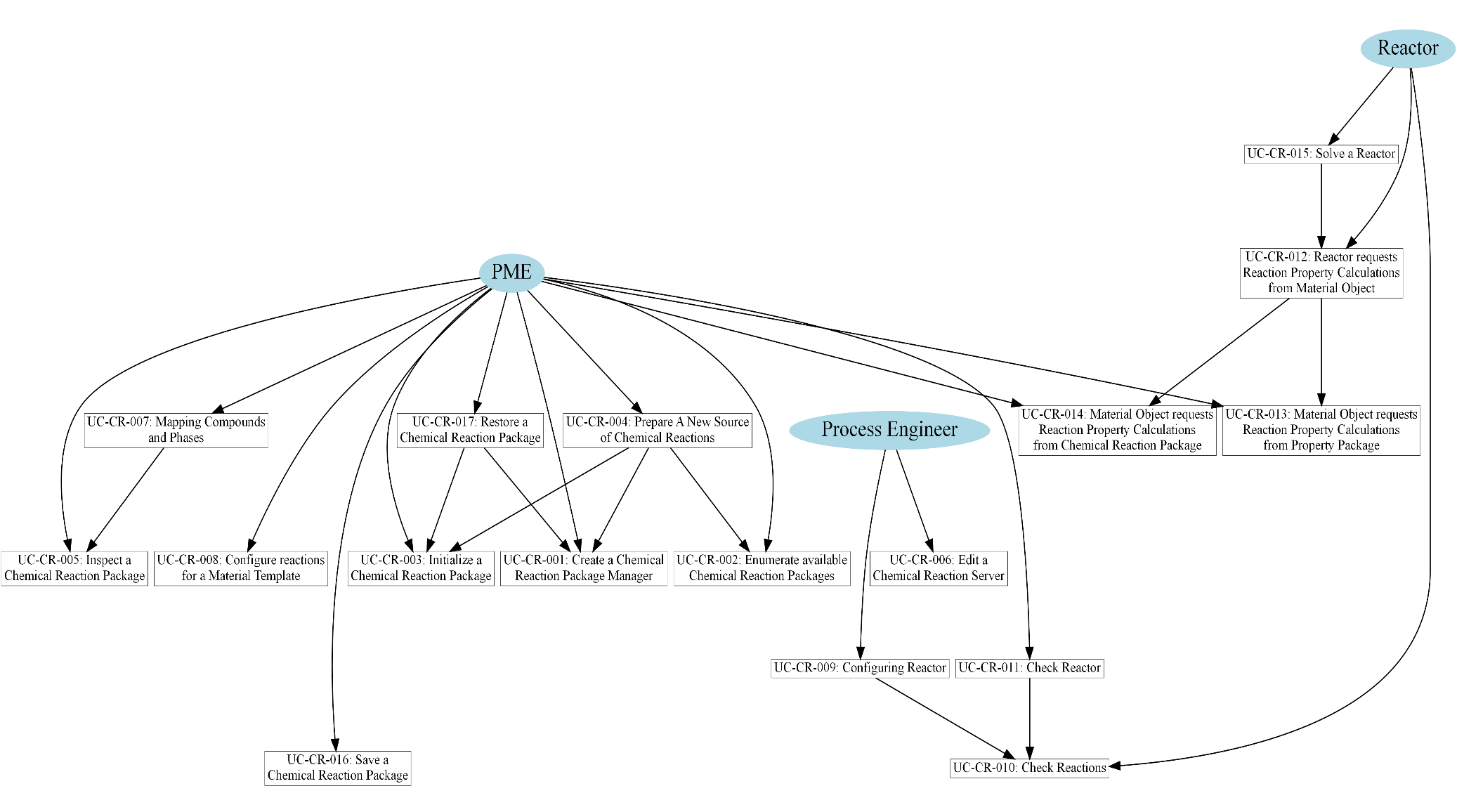
Use Cases
UC-CR-1: Create a chemical reaction package manager
Actor: PME
Priority: High
Status:
<This Use Case is fulfilled by middleware functionalities>
Pre-Conditions:
<PME supports using Chemical Reactions.>
Flow Of Events:
PME instantiates the Chemical Reaction Package Manager using middleware functionalities (e.g., CoCreateInstance for COM-based implementations).
PME initializes the Chemical Reaction Package Manager using ICapeUtilities::Initialize.
Note: at the end of the lifespan of the Chemical Reaction Package Manager (at the latest, at the time of closing the PME), the Chemical Reaction Package Manager must be terminated by the PME (using ICapeUtilities::Terminate).
Errors:
<The Chemical Reaction Package Manager cannot be created>
Post-Conditions:
<The Chemical Reaction Package Manager is ready for use>
UC-CR-2: Enumerate available Chemical Reaction Packages
The Flowsheet Builder wants to know which external sources of Chemical Reactions are available through the PME. This procedure is similar to enumerating Property Packages.
Actor: PME
Priority: High
Status:
<This Use Case is fulfilled by access to the component registry and by ICapeManager::GetTemplateList method.>
Pre-Conditions:
<PME supports using Chemical Reactions.>
Flow Of Events:
PME enumerates all available stand-alone Chemical Reaction Packages and Chemical Reaction Package Managers from the component registry (Chemical Reaction Package Managers and Chemical Reaction Packages are respectively registered using CAPEOPENChemicalReactionPackageManager and CAPEOPENChemicalReactionPackage as Category IDs).
The list of standalone Chemical Reaction Package Managers and of standalone Chemical Reaction Packages is presented to the Process Engineer.
Upon request from the Process Engineer, Using ICapeManager::GetTemplateList, the list of Chemical Reaction Packages within a given Chemical Reaction Package Manager is obtained, and then presented to the Process Engineer by the PME. To call this method, the Chemical Reaction Package Manager must be created using UC-CR-001.
Chemical Reaction Package Managers may also allow a user to create a new Chemical Reaction Package from scratch. This ability may be checked through the managers property ICapeManager::SupportsCreateNew. If supported, this option can be presented to the user to select from as well. To call this method, the Chemical Reaction Package Manager must be created using UC-CR-001.
Chemical Reaction Package Managers should not be created unless their list of Chemical Reaction Packages is requested by the Process Engineer or in case ICapeManager::SupportsCreateNew must be called.
Errors:
<The Chemical Reaction Package Manager fails to provide a list of names for Chemical Reaction Packages>
Post-Conditions:
<The available Chemical Reaction Packages have been enumerated and presented to the Process Engineer>
UC-CR-3: Initialize a Chemical Reaction Package
This Use Case is part of UC-CR-004 as well as of UC-CR-017: it cannot be used in other contexts.
Actor: PME
Priority: High
Status:
<This Use Case is fulfilled by the Initialize method of the ICapeUtilities interface>; <This Use Case applies only to Chemical Reaction Packages and this procedure is like initializing Property Packages>
Pre-Conditions:
<The Chemical Reaction Package has been correctly created but not yet initialized>
Flow Of Events:
The PME asks the Chemical Reaction Package to initialise itself. In conformity with the Persistence Common interface specification, persistence takes place before ICapeUtilities::Initialize; so if the Chemical Reaction Package is to be loaded from configuration data that was saved earlier, the Load call precedes the ICapeUtilities::Initialize call. If InitNew is implemented and the Chemical Reaction Package was not persisted, a call to InitNew precedes the ICapeUtilities::Initialize call.
The PME initializes the Chemical Reaction Package using ICapeUtilities::Initialize.
During the ICapeUtilities::Initialize call, the Chemical Reaction Package checks if its contents had been loaded. If the contents had not been loaded using Load, and if the Chemical Reaction Package was not resolved from pre-existing configurations, the ICapeUtilities::Initialize call may fail.
Typically, the Chemical Reaction Package will create and initialise its internal structure, that may imply creating additional entities such as Parameter entities to be exposed outside, or any other action the Chemical Reaction Package may consider.
This Use Case is triggered by the PME only once during the lifespan of the Chemical Reaction Package, right after its creation.
Errors:
<Failure during initialisation>; <The Chemical Reaction Package was not persisted, and its configuration could not be resolved>
Post-Conditions:
<Chemical Reaction Package is ready for use>
UC-CR-4: Prepare A New Source of Chemical Reactions
Actor: PME
Priority: High
Pre-Conditions:
<PME supports using Chemical Reactions: Material Object is a reactive Material Object.>
Flow Of Events:
PME asks the Flowsheet Builder to select from the enumerated Chemical Reaction Packages (UC-CR-002), reactions provided by the PME, and reactions provided by the current Property Package associated with the Material Object.
Depending on the type of selection:
- The Flowsheet Builder selected the PME as the source of Chemical Reactions (this option is offered only if the PME implements Chemical Reactions internally). In this case configuration of the source of Chemical Reactions is the responsibility of the PME. The Use Case stops here.
- The Flowsheet Builder selected the selected Property Package as the source of Chemical Reactions. No further creation action necessary. The Use case stops here.
- The Flowsheet Builder selected that the source of Chemical Reactions is an existing stand-alone Chemical Reaction Package. The PME instantiates the selected Chemical Reaction Package using middleware functionalities (e.g., CoCreateInstance for COM-based implementations). The PME initializes the Chemical Reaction Package using UC-CR-003.
- The Flowsheet Builder chooses that the source of Chemical Reactions will be a Chemical Reaction Package managed by a Chemical Reaction Package Manager. If not already done, the PME creates the Chemical Reaction Package Manager using UC-CR-001. The PME then creates the Chemical Reaction Package using ICapeManager::CreateFromTemplate. As argument to this method, the Chemical Reaction Package Manager receives the name of the selected Chemical Reaction Package. The Chemical Reaction Package Manager checks that the selected Chemical Reaction Package is recognised. If the name is recognized, the Chemical Reaction Package Manager creates an instance of the Chemical Reaction Package and delivers it to the PME. The PME initializes the Chemical Reaction Package using UC-CR-003.
- The Flowsheet Builder chooses that the source of Chemical Reactions is a new package created by a Chemical Reaction Package Manager. If not already done, the PME creates the Chemical Reaction Package Manager using UC-CR-001. ICapeManager::CreateNew. If creation fails, the PME can check whether the failure was due to a user cancel using ICapeManager::LastCreateNewWasCanceledByUser as to not bother the user with an error description in that case. If creation succeeded, the PME initializes the Chemical Reaction Package using UC-CR-003.
Note that at the end of the lifespan of the Chemical Reaction Package (at the latest, at the time of closing the PME), it must be terminated (using ICapeUtilities::Terminate).
Errors:
None
Post-Conditions:
<A source of Chemical Reactions is available, either an external one or internal to the PME>; <The internal or external source of Chemical Reactions is known and ready for use>
UC-CR-5: Inspect a Chemical Reaction Package
Both a Property Package and a Chemical Reaction Package are Compound Servers. To enable Compound and Phase mapping, the PME must be able to request the Chemical Reaction Package for its list of Reactions with their involved Compounds and Phases, without any Material Template context. This Use Case describes how this inspection is done.
Actor: PME
Priority: Low
Status:
<This Use Case is fulfilled by the property ReactionIds of ICapeThermoReactionSet>
Pre-Conditions:
<PME has initialized a Chemical Reaction Package using UC-CR-003>
Flow Of Events:
The PME inspects the Chemical Reaction Package for aspects that are independent of the active Material Object.
By accessing the property ReactionIds of ICapeThermoReactionSet, the PME requests the list of Chemical Reactions defined within the Chemical Reaction Package. The Chemical Reaction Package returns the identifiers of all Chemical Reactions defined within the Chemical Reaction Package. The PME exercises methods of ICapeThermoReactions to extract details on each Chemical Reaction.
The PME can also obtain the entire list of Compound identifiers as defined in the Chemical Reaction Package, and further details on these Compounds, using the methods of ICapeThermoCompounds. The PME can also obtain the entire list of Phase labels as defined in the Chemical Reaction Package, and further details on these Phases, using the methods of ICapeThermoPhases.
Errors:
None
Post-Conditions:
None
UC-CR-6: Edit a Chemical Reaction Server
For those Chemical Reaction Servers not requiring any configuration, this Use Case does not apply. Also, this Use Case does not apply to Material Objects supporting Chemical Reactions. The Chemical Reaction Server may or may not have a Graphical User Interface. In addition, the Chemical Reaction Server may or may not expose a collection of Public Parameters as described in the Parameter Common interface specification. Since the default interface provided by the PME might well be less intuitive and user friendly, it is recommended that each Chemical Reaction Server requiring configuration by the Process Engineer is provided with its own Graphical User Interface.
Actor: Process Engineer
Priority: Medium
Status:
<This Use Case is fulfilled by ICapeUtilities::Edit, or by the ICapeUtilities::get_Parameters method, which may return an ICapeCollection of ICapeParameter objects>
Pre-Conditions:
<A Chemical Reaction Server is available to the PME and has been initialised properly>
Flow Of Events:
Through the PME, the Process Engineer requests from the Chemical Reaction Server to display its Graphical User Interface (GUI) by calling the ICapeUtilities::Edit method. If ICapeUtilities::Edit returns S_FALSE or CapeEditResult.CapeNotModified, the Use Case terminates. The Post-conditions do not apply.
If the GUI functionality is not supported by the Chemical Reaction Server (ICapeUtilities::Edit returns ECapeNotImplHR or E_NOTIMPL), the PME attempts to construct a default graphical interface for the Chemical Reaction Server. For doing so the PME queries the Chemical Reaction Server for its Public Parameters as described in the Parameter Common Interface specification document (vii).
If the Chemical Reaction Server does not expose any Public Parameters, the PME informs the Flowsheet Builder that the Chemical Reaction Server can neither be edited nor its configuration changed, and this Use Case terminates. The Post-conditions do not apply.
After editing the Chemical Reaction Server, the configuration of the Chemical Reaction Server may have changed so the PME must update its knowledge of reactions, compounds and phases supported by the Chemical Reaction Server, and updates accordingly the configuration of the Material Templates associated with the Chemical Reaction Server.
Errors:
None
Post-Conditions:
<The configuration of the Chemical Reaction Server is assumed to have changed.>; <The PME has updated its knowledge of the Chemical Reaction Server>; <The configuration of the Material Templates associated with the Chemical Reaction Server may have changed>
UC-CR-7: Mapping Compounds and Phases
In any communication between the PME and the Chemical Reaction Package, any Compounds and Phases on the Material Object that map to Compounds and Phases on the Chemical Reaction Package, are identified using the Compound identifiers and Phase labels as exposed by the Chemical Reaction Package, except for what concerns inert Compounds. This Use Case describes how the mapping of Compounds and Phases is established between the PME and a Chemical Reaction Package. This Use Case is called whenever lists of Compounds and/or Phases are modified.
Actor: PME
Priority: High
Status:
<This Use Case is fulfilled by methods of ICapeThermoCompounds and ICapeThermoPhases>
Pre-Conditions:
<A Material Template has been created by PME and a thermodynamic subsystem (which may be internal to the PME or may be an external Property Package) is associated with the Material Template>; <The Material Template is populated with a given list of Compounds>; < The PME has initialized the Chemical Reaction Package.>
Flow Of Events:
The Process Engineer selects a subset of Compounds and Phases from those made available by the thermodynamic subsystem. The Process Engineer may exercise <UC-CR-005> to guide the selection process.
The PME obtains the list of Compounds from the Chemical Reaction Package using ICapeThermoCompounds::GetCompoundList and matches the subset of Compounds with those on the Material Template. For that purpose, the PME may use the CASRegistryNumber compound constant value and other pieces of information provided by ICapeThermoCompounds implemented by the Chemical Reaction Package. The Process Engineer may contribute to the Compound mapping, the Graphical User Interface provided by the PME also allows inspection of the Compound mapping.
Not all Compounds that will appear on a Material Object (based on the Material Template being configured) may have their counterpart on the Chemical Reaction Package. Such Compounds are treated as inert Compounds by the Chemical Reaction Package.
In the communication between the PME and the Chemical Reaction Package, the PME must ensure that identifiers for these inert Compounds are different from any Compound (mapped or not) identifier used by the Chemical Reaction Package. To that end, the PME may generate its internal Compound identifiers. The PME maintains a mapping to the original identifiers for the purpose of answering to requests made by the Chemical Reaction Package.
For Phases, the PME may use stateOfAggregation and other details provided by ICapeThermoPhases::GetPhaseList and ICapeThermoPhases::GetPhaseInfo implemented by the Chemical Reaction Package, as well as user interaction, to establish a mapping between Phases known by the Chemical Reaction Package and Phases known by the Material Object.
Errors:
None
Post-Conditions:
<PME can translate in both directions between Compound identifiers on the Material Object and on the Chemical Reaction Package>; <PME can translate in both directions between Phase labels on the Material Object and on the Chemical Reaction Package>
Uses:
UC-CR-005
UC-CR-8: Configure reactions for a Material Template
Purpose: adapt the Material Template and the Reaction Set one to the other. Any change in Phase or Compound lists in the Material Template should lead to exercise this Use Case. This Use Case applies only to an external source of Chemical Reactions. When the source of Chemical Reactions is internal to the PME, the configuration of reactions for a Material template relies on means proprietary to the PME and outside the scope of the Chemical Reactions interface specification.
Actor: PME
Priority: High
Status:
<This Use Case is fulfilled by methods of ICapeThermoReactionSet, ICapeThermoReactions, ICapeThermoCompounds, ICapeThermoPhases and ICapeThermoMaterialContext>
Pre-Conditions:
<A Material Template has been created by PME and a thermodynamic software component (which may be internal to the PME or may be an external Property Package) is associated with the Material Template>; <Mapping of Compounds and Phases has been performed (UC-CR-007)>; <The source of Chemical Reactions is known>; <A Chemical Reaction Server has been created or a Property Package is used to support Chemical Reactions>
Flow Of Events:
The PME asks the Chemical Reaction Server for its list of Chemical Reactions using the property ReactionIds of ICapeThermoReactionSet. This list contains all Chemical Reactions supported by the Chemical Reaction Server irrespective of the Compounds and Phases defined in the Material Template.
To be able to get information on the Chemical Reactions supported by the Chemical Reaction Server, the PME creates a temporary Material Object based on the Material Template being configured. The PME sets this Material Object as active Material Object on the Chemical Reaction Server using ICapeThermoMaterialContext::SetMaterial..
Using ICapeThermoReactions::GetReducedReactionSet, the PME obtains the Reduced Reaction Set, specifying the list of Chemical Reactions obtained above, and an empty list of absent Compounds. The Reduced Reaction Set contains the Chemical Reactions that are feasible for use with this Material Template, excluding the Chemical Reactions in the Phases which are not defined on the active Material Object. The PME must store the Reduced Reaction Set for the lifespan of the Material Template configuration i.e., until the Material Template ceases to exist or is re-configured, so that the Chemical Reaction Server knows that the Chemical Reactions in the Reduced Reaction Set are still in use.
The Flowsheet Builder may select the Chemical Reactions to be used by the Material Template. For that purpose, the PME presents the Flowsheet Builder with the available Chemical Reactions and whether they are Kinetic or Equilibrium Reactions, perhaps even stoichiometry (if available), etc.… The PME validates any selected subset of Chemical Reactions by calling ICapeThermoReactions::IsReactionListValid on the Chemical Reaction Server.
Errors:
None
Post-Conditions:
<The selected Compounds, the Compound mapping, the selected Phases, the Phase mapping, and the selected Chemical Reactions are stored on the Material Template>
UC-CR-9: Configuring Reactor
Actor: Process Engineer
Priority: High
Status:
<This Use Case is typically fulfilled by ICapeUtilities::Edit and the implementation of ICapeThermoReactions by the Material Object.>
Extends:
<UC-008 Configure Unit> of Unit Operation interface specification (iv).
Pre-Conditions:
<At least one Material Template has been configured>; <At least one Material Object is available through a Port connection or through a Material Template System>
Flow Of Events:
The flow of events is typically executed through ICapeUtilities::Edit implemented by the Reactor. Alternatively, it is possible, in theory, to configure the Reactor through the Public Parameter Collection of the Reactor (see Parameter Common Interface specification (vii)).
For the source of Chemical Reactions, the Reactor selects a Material Object from the ones connected to Ports or creates a new Material Object from a Material Template System (see Simulation Context COSE interface (x)).
The Reactor retrieves the list of Chemical Reactions on the selected Material Object.
If the Reactor chooses to use the entire set of Chemical Reactions, then all the Chemical Reactions are deemed active (through <UC-CR-010>). The Use Case ends here.
If the Reactor allows the Process Engineer to select which Chemical Reactions are active within the Chemical Reactions exposed by the Material Object, the Reactor presents the Process Engineer with the available Chemical Reactions and whether they are Kinetic and/or Equilibrium Reactions, perhaps even stoichiometry (if available), etc… Note that for a Kinetic Reaction, stoichiometry data may not be available (and the apparent reaction stoichiometry is in fact not necessarily constant).
Upon a selection of Chemical Reactions is made, the Reactor invokes ICapeThermoReactions::IsReactionListValid to make sure that the selection is valid (returned value is TRUE). A message is returned if the selection is invalid to guide the Process Engineer in making a valid selection.
Errors:
<No Material Object is available that supports Chemical Reactions>; <The selected Material Object does not contain any Chemical Reaction>; <None of the Chemical Reactions implements a reaction mechanism supported by the Reactor>
Post-Conditions:
<The active Chemical Reactions have been configured for the Reactor>
Uses:
UC-CR-010
UC-CR-10: Check Reactions
This Use Case is meant to make sure that the list of active Chemical Reactions on the Reactor is a valid list for the Chemical Reaction Server so that calculation of the Reactor may take place and to enable the Reactor to obtain static data on Chemical Reactions considered active. The Reactor may update its list of active Chemical Reactions to reflect external configuration changes. This Use Case is called by Use Case UC-CR-011 and is implemented by ICapeUnit::Validate. The result of the check is a validation status and a message if the validation status is invalid.
Actor: Reactor
Priority: High
Status:
<This Use Case is fulfilled by the methods of the ICapeThermoReactions interface>
Pre-Conditions:
<The Reactor knows, or can construct, the list of active Chemical Reactions>
Flow Of Events:
For the source of Chemical Reactions, the Reactor selects a Material Object, typically from the ones connected to Ports. If no Material Object may be selected, e.g., no Port is connected to a Material Object, validation fails, and the Use Case ends here.
The Reactor checks that Chemical Reactions are supported by the selected Material Object. If Chemical Reactions are not supported, the Reactor gets into an invalid state and the Use Case ends here.
The Reactor retrieves the list of supported Chemical Reactions from the selected Material Object.
The Reactor ensures that the list of active Chemical Reactions equals the list of supported Chemical Reactions or is a subset thereof. To this end:
- if an active Chemical Reaction is not present in the list of supported Chemical Reactions, the Reactor either must remove the Chemical Reaction from the list of active Chemical Reactions, or the Reactor gets into an invalid state and the Use Case stops here.
- if a supported Chemical Reaction is not present in the list of active Chemical Reactions, the Reactor either must choose to silently include or exclude that Chemical Reaction in the list of active Chemical Reactions, or the Reactor gets into an invalid state and the Use Case stops here.
Note that the Reactor must not pop up any modal window during this Use Case. The Reactor is encouraged to use ICapeDiagnostic::LogMessage to pass information on which steps the Reactor has taken in modifying its list of active Chemical Reactions.
For each of the active Chemical Reactions (see <UC-CR-009>), the Reactor may perform some, or all, of the following actions, in no particular order:
- The Reactor determines if the type of the Chemical Reaction can be dealt with by the Reactor solver by inspecting the relevant attributes returned by ICapeThermoReactions::GetReactionAttribute.
- The Reactor retrieves identifiers of the subset of Compounds involved in the Chemical Reaction by calling ICapeThermoReactions::GetReactionCompoundIds, e.g., to check the mass balance of a Reaction.
- If the Reactor requires stoichiometry to work, the Reactor checks whether stoichiometry is available by calling ICapeThermoReactions::GetReactionStoichiometricCoefficients.
- If stoichiometry is available, the Reactor performs any check related to it, e.g., mass balance check.
- If the Chemical Reaction is a Kinetic Reaction, the Reactor retrieves the reaction rate basis through ICapeThermoReactionRoutine::GetReactionRateBasis. The Reactor checks that the retrieved reaction rate basis is supported by the Reactor.
- Using ICapeThermoReactionRoutine::GetReactionCompoundPhases, the Reactor retrieves the Phase(s) in which the Chemical Reaction takes place. The Reactor checks that the Phase(s) in which the Chemical Reaction takes place is compatible with the Phase(s) supported by the Reactor.
- The Reactor performs any additional checks as it sees fit (e.g., charge balance).
- Using ICapeThermoReactionProperties::CheckReactionPropertyAvailability, the Reactor also checks that Reaction Properties required for the Reactor calculation can be provided by the Chemical Reaction Server. This check can be performed for each Reaction separately of for all Reactions in one go.
If any aspect of the active Chemical Reaction is not supported by the Reactor, the Reactor has two possibilities. Either the Reactor enters in an invalid state, in which case an appropriate message is produced, and the Use Case stops here. Or the Reactor excludes the Chemical Reaction from the list of active Chemical Reactions and continues validation.
Any information retrieved by the Reactor as part of any check may be stored for use during calculation.
If the Reactor considers a subset of the Chemical Reactions offered by the Material Object, the Reactor checks the validity of this subset by calling ICapeThermoReactions::IsReactionListValid. If the list of Chemical Reactions is not valid, the Reactor gets into an invalid state and forwards the message returned by ICapeThermoReactions::IsReactionListValid. If the list of active Chemical Reactions is the full set of Chemical Reactions supported by the Material Object, calling ICapeThermoReactions::IsReactionListValid is not necessary.
Errors:
None.
Post-Conditions:
<Reactions have been checked as invalid and an appropriate message stating the reason has been issued. The validation status of the Reactor becomes CAPE_INVALID>
OR
<Reactions have been checked as valid for Reactor calculation>
UC-CR-11: Check Reactor
To prevent runtime exceptions or loss of performance during Reactor calculation, the Reactor should perform all checks that do not depend on runtime conditions (temperature, pressure, composition, flowrate) within ICapeUnit::Validate. In addition to the cases listed in <UC-015> of the Unit Operation interface specification (iv) for calling Validate on a Unit Operation, the PME must ensure that <UC-015> is called again whenever any changes are made on the Chemical Reaction Server (e.g. number of reactions, reaction attributes, etc…).
Actor: PME
Priority: High
Extends:
<Use Case UC-015 Check Unit> of Unit Operation interface specification (iv)>
Pre-Conditions:
Flow Of Events:
In addition to the flow of events described in Use Case <UC-015 Check Unit>, if the Unit is a Reactor, Reactor performs Use Case <UC-CR-010>.
Errors:
Same as in Use Case <UC-015 Check Unit>
Post-Conditions:
As in Use Case <UC-015 Check Unit>
Uses:
UC-CR-010
UC-CR-12: Reactor requests Reaction Property Calculations from Material Object
Actor: Reactor
Priority: High
Status:
<This Use Case is fulfilled by the methods of ICapeThermoReactionProperties and of ICapeThermoReactionRoutine>
Pre-Conditions:
<Reactor has prepared a Material Object which supports reactions>; <The Material Object knows how to perform or how to forward physical property calculations and reaction property calculations>; <Reactor is configured with active reactions (UC-CR-009)>
Flow Of Events:
Reactor sets the necessary information (e.g., temperature, pressure, and compositions) to perform the requested calculation on the Material Object.
Reactor requests the Material Object to calculate one or more reaction properties by invoking ICapeThermoReactionRoutine::CalcReactionProp.
Depending on the Material Object configuration, the reaction properties are calculated using internal PME mechanisms, or the Material Object forwards the calculations to an external Chemical Reaction Server (see UC-CR-013 and UC-CR-014). The calculated reaction properties are stored on the Material Object.
Reactor retrieves the values of calculated reaction properties from the Material Object using ICapeThermoReactionProperties::GetReactionProp.
As a side effect of UC-CR-014, additional calculations of thermophysical properties may have been performed, at conditions equal to the ones imposed by the Reactor and stored on the Material Object. The Reactor must not depend on such additional calculations and should not assume that they are or are not performed.
Errors:
<The requested reaction properties are not supported by the Material Object>; <The Material Object fails to provide the requested reaction properties>; <The calculation conditions are out of range>; <The thermophysical properties necessary are not available from the thermodynamic server>
Post-Conditions:
<Reactor has obtained the requested reaction properties>
UC-CR-13: Material Object requests Reaction Property Calculations from Property Package
Actor: PME
Priority: High
Status:
<This Use Case is fulfilled by the methods of ICapeThermoReactionProperties and of ICapeThermoReactionRoutine>
Pre-Conditions:
<Material Object is configured to perform reaction calculations through an external Chemical Reaction Server>; <The Chemical Reaction Server is a Property Package>; <The calculation conditions such as temperature, pressure and compositions have been set on the Material Object>
Flow Of Events:
Using ICapeThermoMaterialContext::SetMaterial, the PME sets the Material Object as the active Material Object on the Property Package (if it is not already the active Material Object).
The Material Object requests the Property Package to calculate one or more reaction properties by invoking ICapeThermoReactionRoutine::CalcReactionProp.
The Property Package obtains the calculation conditions from the Material Object using ICapeThermoMaterial.
The Property Package calculates the requested calculations. If any thermophysical properties are required for the calculation of the reaction properties, the Property Package performs these calculations internally. The Property Package sets the property calculation results on the Material Object by using ICapeThermoReactionProperties::SetReactionProp, thus allowing the Material Object to store the property calculation results.
Errors:
<The requested reaction properties are not supported by the Property Package>; <The Property Package fails to provide the requested reaction properties>; <The calculation conditions are out of range>
Post-Conditions:
<The values of the requested Reaction Property(ies) are stored on the Material Object>
UC-CR-14: Material Object requests Reaction Property Calculations from chemical reaction package
Actor: PME
Priority: High
Status:
<This Use Case is fulfilled by the methods of ICapeThermoReactionProperties and of ICapeThermoReactionRoutine>
Pre-Conditions:
<Material Object is configured to perform reaction calculations through an external Chemical Reaction Server>; <The Chemical Reaction Server is a Chemical Reaction Package>; <Temperature, pressure, and compositions have been set on the Material Object for all relevant phases>
Flow Of Events:
The PME checks if the Material Object is the active Material Object on the Chemical Reaction Package. If not, the PME invokes ICapeThermoMaterialContext::SetMaterial on the Chemical Reaction Package.
The Material Object requests the Chemical Reaction Package to calculate one or more reaction properties by invoking ICapeThermoReactionRoutine::CalcReactionProp.
The Chemical Reaction Package obtains the calculation conditions from the Material Object using ICapeThermoMaterial.
The Chemical Reaction Package calculates the requested calculations.
- If any thermophysical properties are required at the same conditions (temperature, pressure, fraction and phaseFraction) as for the calculation of the reaction properties, the Chemical Reaction Package directly invokes property calculations on the Material Object (for example this implies that phase equilibrium calculations are not allowed).
- If any thermophysical property calculations are required at conditions different from those used for the calculation of the reaction properties, the Chemical Reaction Package must use a temporary Material Object created by invoking ICapeThermoMaterial::CreateMaterial on the active Material Object.
The Chemical Reaction Package sets the reaction property calculation results on the Material Object by using ICapeThermoReactionProperties::SetReactionProp, thus allowing the Material Object to store the property calculation results.
Errors:
<The requested reaction properties are not supported by the Chemical Reaction Package>; <The Chemical Reaction Package fails to provide the requested reaction properties>; <The calculation conditions are out of range>
Post-Conditions:
<The values of the requested reaction properties are stored on the Material Object>
UC-CR-15: Solve a Reactor
Actor: Reactor
Priority: High
Status:
<This Use Case is fulfilled by the methods of ICapeThermoReactionProperties, of ICapeThermoReactions and of ICapeThermoReactionRoutine>
Extends:
<Use Case Calculate of Unit Operation interface specification (iv)>.
Pre-Conditions:
<Reactor is requested to calculate itself>; <At least one Material Object is connected to a Reactor Port>; <The Material Object knows how to perform or how to forward physical property calculations and reaction property calculations>; <Reactor is configured with active reactions UC-CR-009>; <Reactor has been successfully checked using UC-CR-011>.
Flow Of Events:
Static reaction data that are needed during the Reactor calculation have been obtained during validation during UC-CR-011 and stored in the Reactor or are retrieved now. Identifiers of active chemical reactions are known to the Reactor.
Reactor must not consider as active Chemical Reactions that rely on Phases which are not present. Reactor may eliminate Chemical Reactions, that rely on Phases which are not present, from the list of active Chemical Reactions. Alternatively, Reactor may extend the list of present Phases by setting temperature, pressure and composition for these Phases.
If the Reactor deals with Equilibrium Reactions, to improve numerical stability, using ICapeThermoReactions::GetReducedReactionSet, the Reactor may reduce the active Reaction Set by considering that some compounds are “not present” according to a Reactor defined threshold See section 3.5.7. If the obtained reduced reaction set contains Chemical Reactions not in the original active reaction set, the Reactor retrieves the corresponding static reaction data. These pieces of data may be cached by the Reactor for use in the next call to ICapeUnit::Calculate. The Chemical Reactions in the reduced Reaction Set replace the Chemical Reactions in the original active reaction set for the remainder of this Use Case.
The Reactor performs its calculations, considering the active Chemical Reactions including e.g. mass and energy balances. As required to complete its calculations, the Reactor performs reaction property calculations using UC-CR-012 repeatedly.
Reactor calculations (like any Unit Operation calculations) may not have side effects on Material Objects that are connected to feed Ports (iv). Hence, to calculate reaction properties, the Reactor may use a Material Object connected to a product Port, or, alternatively, create a temporary Material Object using ICapeThermoMaterial.CreateMaterial.
Errors:
As in Use Case Calculate.
Post-Conditions:
As in Use Case Calculate.
Uses:
UC-CR-012
UC-CR-16: Save a Chemical Reaction Package
Actor: PME
Priority: High> (PME must always support persistence even if some Chemical Reaction Packages may not support or not require persistence)
Status:
<This Use Case applies only to Chemical Reaction Packages and this procedure is like saving Property Packages>; <This Use Case is fulfilled by the method Save of Persistence Common Interface specification>
Pre-Conditions:
<A Chemical Reaction Package is initialized using UC-CR-003>
Flow Of Events:
The PME stores enough information to create a new instance of the Chemical Reaction Package. For a standalone Chemical Reaction Package, this may be the CLSID or the ProgID. For a Chemical Reaction Package created from a Chemical Reaction Package Manager, this may be the CLSID or the ProgID of the Chemical Reaction Package Manager as well as the Chemical Reaction Package name.
The PME uses the Save method of the Persistence Common Interfaces (if implemented) to store the data specific to the Chemical Reaction Package.
Storing compound and phase mappings (and other PME configuration data related to the use of the Chemical Reaction Package) is the responsibility of the PME and is accomplished using PME specific mechanisms.
Errors:
None
Post-Conditions:
<The Chemical Reaction Package specific data have been saved or no persistence is implemented by the Chemical Reaction Package>
UC-CR-17: Restore a Chemical Reaction Package
Actor: PME
Priority: High> (PME must always support persistence even if some Chemical Reaction Packages may not support or not require persistence)
Status:
<This Use Case is fulfilled by the method Load of Persistence Common Interface specification>
Pre-Conditions:
<Chemical Reaction Package supports persistence>
Flow Of Events:
If Chemical Reaction Package specific data were stored using the Save method of the Persistence Common Interface implemented on the Chemical Reaction Package (see UC-CR-016), and the Chemical Reaction Package is provided by a Chemical Reaction Package Manager, the Chemical Reaction Package is created from the Manager’s depersistence feature. If not already done, the PME creates the Chemical Reaction Package Manager using UC-CR-001. Then, the PME creates the instance of the Chemical Reaction Package by invoking ICapeManager::CreateForLoad on the Chemical Reaction Package Manager.
For all other cases, the PME creates a new instance of the Chemical Reaction Package using the information (CLSID or ProgID, Chemical Reaction Package name) stored in UC-CR-016 by invoking UC-CR-001. If Chemical Reaction Package specific data were stored using the Save method of the Persistence Common Interface implemented on the Chemical Reaction Package (see UC-CR-016), the PME invokes Load on the Chemical Reaction Package to restore the specific data of the Chemical Reaction Package.
For both scenarios above, the PME initializes the Chemical Reaction Package by invoking UC-CR-003.
The PME internally takes care of any configuration data related to the Chemical Reaction Package such as compound and phase mappings. For any Material Object configuration with a Reduced Reaction Set, the PME re-obtains the Reduced Reaction Set using ICapeThermoReactions::GetReducedReactionSet.
Errors:
None.
Post-Conditions:
<The Chemical Reaction Package is available and initialized>
<The Chemical Reaction Package specific data have been restored>
Sequence diagrams
This section contains sequence diagrams explaining how the different objects are interacting.
For the description of the calculation phase of reaction properties, two situations are exposed: either the Chemical Reaction Package is integrated within the Property Package, or the Chemical Reaction Package is a separate object.
Figure 4-7 Reaction properties calculation when Property Package supporting reactions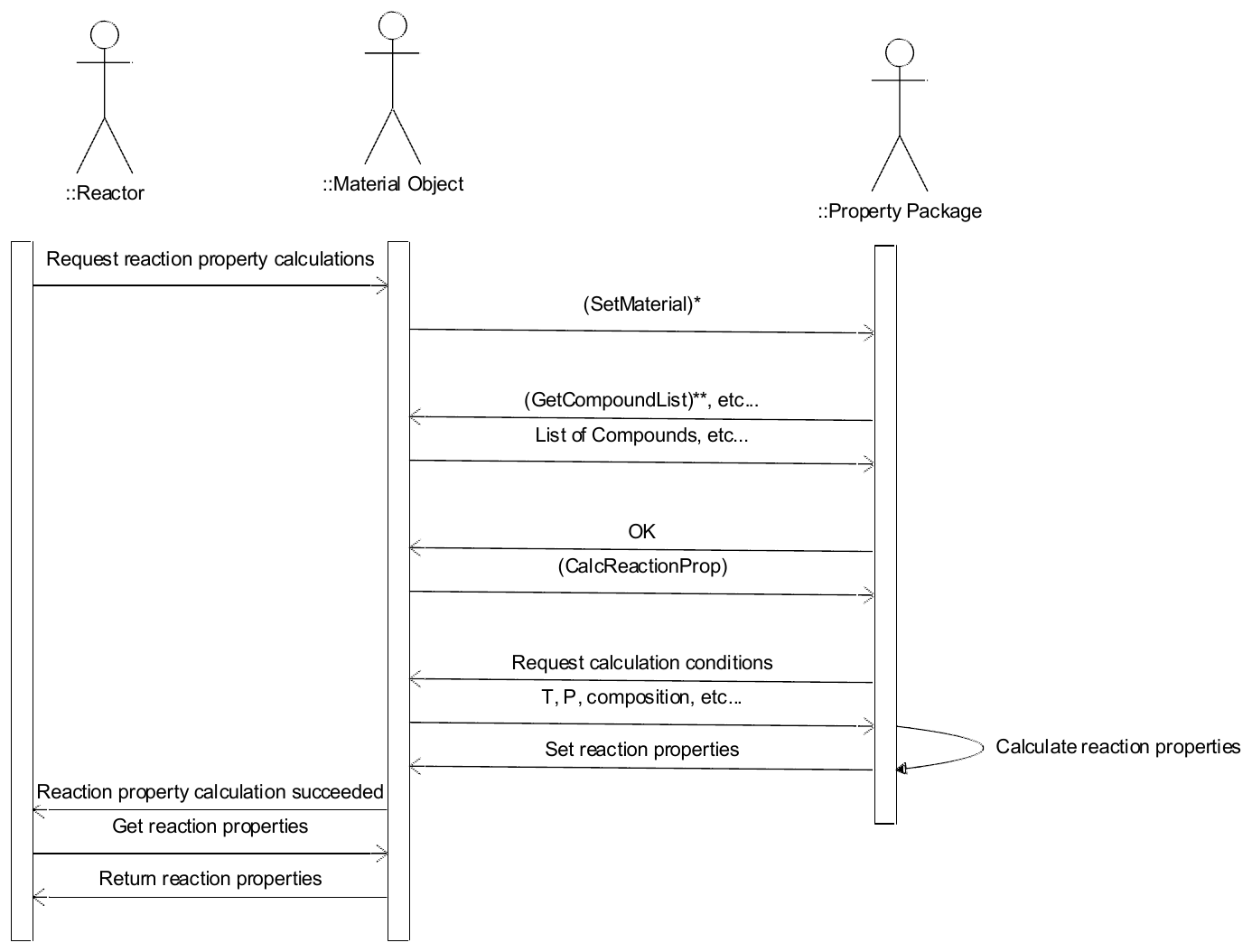
Notes
* The SetMaterial should only be performed if the Material Object is not already the active Material Object of the Property Package.
** The Property Package only needs to obtain the Compound list if it has not done so since the last call to SetMaterial.
Figure 4-8 Reaction property calculation when Chemical Reaction Package is used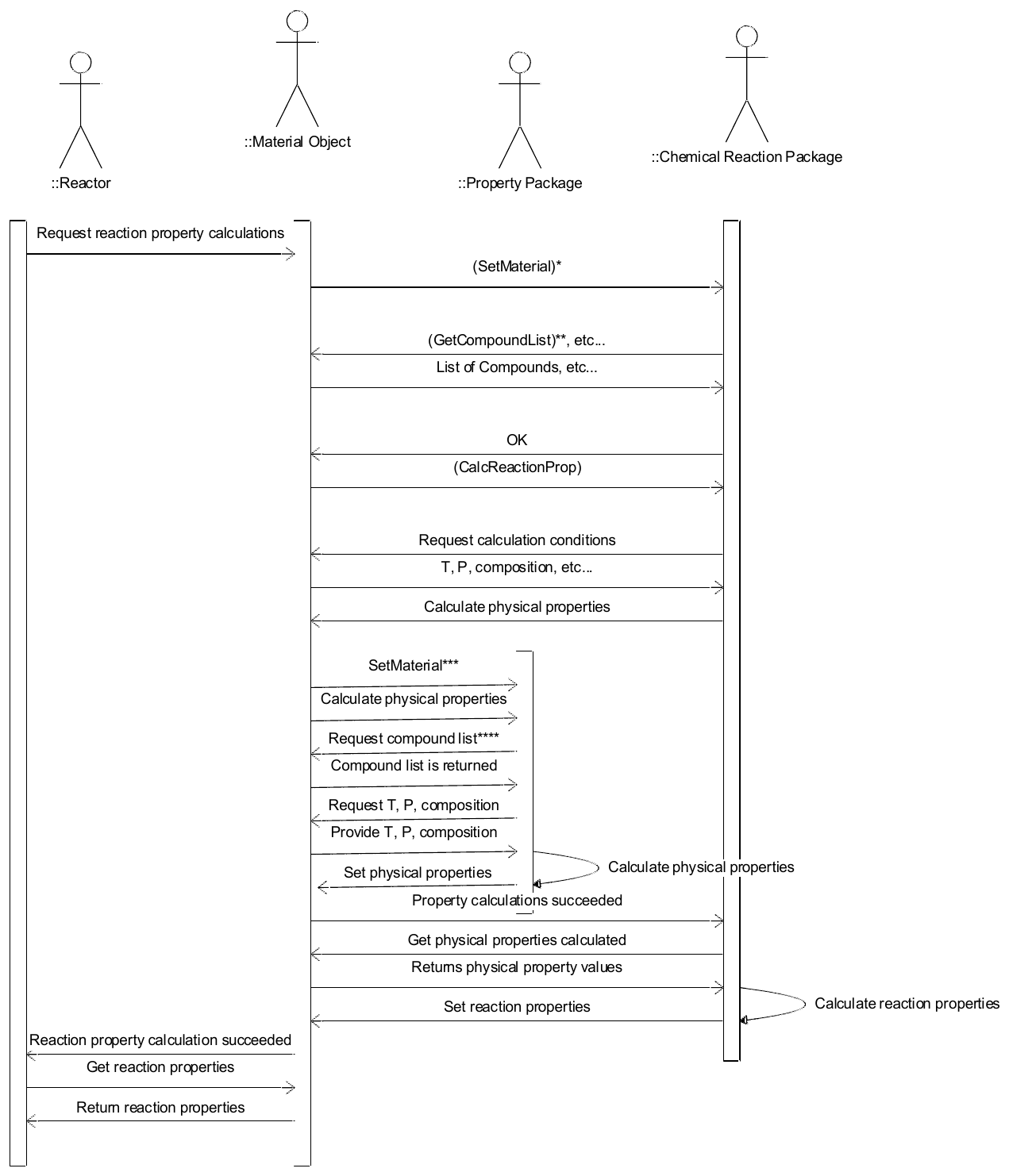
Notes
* The SetMaterial should only be performed if the Material Object is not already the active Material Object of the Chemical Reaction Package.
** The Chemical Reaction Package must obtain the Compound list from the Material Object after each SetMaterial call for use in subsequent calculations. Redundant SetMaterial calls should be avoided for efficiency. The PME should keep track of which Material Object is active with which Chemical Reaction Package.
*** The SetMaterial should only be performed if the Material Object is not already the active Material Object of the Property Package.
**** The Property Package only needs to obtain the Compound list if it has not done so since the last call to SetMaterial.
Analysis and Design
Chemical Reaction Package Manager component
A Chemical Reaction Package Manager Component is a primary CAPE-OPEN component. See its interface diagram as Figure 4-1 Class diagram: Chemical Reaction Package Manager .A Chemical Reaction Package Manager must support the ICapeManager interface so that client can discover what Chemical Reaction Packages are managed by the Chemical Reaction Package Manager and so that a client can request the instantiation of a particular Chemical Reaction Package.
A new Category ID is introduced to identify Chemical Reaction Package Managers.
| Description | Name | Category ID |
|---|---|---|
| CAPE-OPEN 1.1 Chemical Reaction Package Manager | CAPEOPENChemicalReactionPackageManager | 25777A4A-8209-4CCC-97AF-459D820BF190 |
A Property Package Manager which is managing Property Packages that can also be used as Chemical Reaction Packages (without using the Property Package functionality of these Property Packages) must also advertise itself as a Chemical Reaction Package Manager and implement ICapeManager (xiii).
More details on how to make use of Category IDs may be found in the Methods and Tools Integrated Guidelines document (ix).
Chemical Reaction Package component
A Chemical Reaction Package component is a CAPE-OPEN PMC primary object. This means that it should implement the ICapeUtilities interface. A Chemical Reaction Package may optionally implement persistence. See Methods & Tools Integrated Guidelines (ix) for more information on CAPE-OPEN PMC primary objects.A Chemical Reaction Package component must also support the following interfaces:
- ICapeThermoReactionRoutine so that a client can request reaction property calculations
- ICapeThermoReactions so that a client can query for the description of the system of reactions the Chemical Reaction Package contains
- ICapeThermoReactionSet so that a client can obtain the list of supported reactions
- ICapeThermoMaterialContext so that the PME can set the current material on the Chemical Reaction Package
- ICapeThermoCompounds so that the PME can obtain the details of the Compounds supported by the Chemical Reaction Package
- ICapeThermoPhases so that the PME can obtain the details of the Phases supported by the Chemical Reaction Package.
A new Category ID is introduced to identify stand-alone Chemical Reaction Packages.
| Description | Name | Category ID |
|---|---|---|
| CAPE-OPEN 1.1 Chemical Reaction Package | CAPEOPENChemicalReactionPackage | 5A901D1C-A807-49FF-A9E9-3DD8B01D9D92 |
A stand-alone Property Package that can also be used as a Chemical Reaction Package (without using the Property Package functionality of this Property Package) must also advertise itself as a Chemical Reaction Package.
More details on how to make use of CATIDs may be found in the Methods and Tools Integrated Guidelines document (ix).
Property Package supporting chemical reactions
A detailed description of a Property Package is given in the Thermodynamic and Physical Properties interface specification Version 1.1 (iii). In addition to the standard functionality of a Property Package, a Property Package that supports reactions implements the following interfaces:- ICapeThermoReactionRoutine so that a client can request reaction property calculations,
- ICapeThermoReactions so that a client can query for the description of the system of reactions the Property Package contains,
- ICapeThermoReactionSet so that a client may obtain the list of supported Chemical Reactions.
A Property Package supporting Chemical Reactions is typically designed to be used simultaneously as a Property Package and a Chemical Reaction Package. However, such a component could also be designed to be used separately as a Property Package and as a Chemical Reaction Package.
Interface descriptions
This section describes the following interfaces:| Interface Name | ICapeThermoReactionSet 🔗 |
|---|
Referenced in (15)
Architecture, Architecture, Architecture, Architecture, Architecture, Architecture, Inspect a Chemical Reaction Package, Inspect a Chemical Reaction Package, Configure reactions for a Material Template, Configure reactions for a Material Template, Analysis and Design, Analysis and Design, Analysis and Design, ICapeThermoReactionSet, ICapeThermoReactionSet
The interface ICapeThermoReactionSet gives a Client of a Chemical Reaction Server access to the list of Chemical Reactions that can be exercised in each context defined by the Client. ICapeThermoReactionSet is implemented by a Reaction Set object and any Chemical Reaction Server. The life span of a Reaction Set object is controlled by the PME; the reactions in the Reaction Set exists as long as the PME holds a reference to the Reaction Set object. The Reaction Set object is implemented by the Chemical Reaction Server.
Unless the Chemical Reaction Server is the Material Object itself, a Material Object on which reaction calculation by the Reactor will take place, is assigned to the Chemical Reaction Server using ICapeThermoMaterialContext::SetMaterial. A list of Compounds is defined on the Material Object. If not already done since the last call to ICapeThermoMaterialContext::SetMaterial, the Chemical Reaction Server obtains the list of Compounds defined on the Material Object (ICapeThermoCompounds::GetCompoundList) in reference to the Compounds defined on the Chemical Reactor Server and creates a Reaction Set object which can work with the list of Compounds defined on the Material Object.
There might be several Reaction Set Objects alive at any point in time.
Figure 4-9 Interface diagram for ICapeThermoReactionSet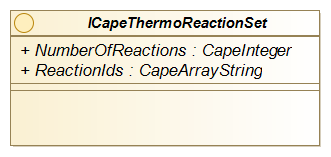
Methods
| Method Name | NumberOfReactions |
Description
Number of Chemical Reactions (zero or more) contained in the Reaction Set.
Notes
For a Reduced Reaction Set object, the information returned depends on the arguments passed to ICapeThermoReactions::GetReducedReactionSet as well as on the active Material Object associated with the Chemical Reaction Package at the time ICapeThermoReactions::GetReducedReactionSet was called.
For a Chemical Reaction Server, the size of the entire list of reactions is returned.
Referenced in (3)
| Method Name | ReactionIds |
Description
Identifiers of all Chemical Reactions exposed by the Reaction Set.
Notes
Textual identifiers are arbitrary (e.g., “Reaction 1”, “Esterification of methanol with acetic acid”, “1”, or “overall”).
All identifiers need to be unique within the returned list. Identifiers could be automatically generated by the Chemical Reaction Package.
For a Chemical Reaction Server, the information returned is independent of the context i.e., independent of any active Material Object on the Chemical Reaction Package. It returns the identifiers of the full set of reactions as originally defined in the Chemical Reaction Server without accounting for automatically generated reactions.
For a Reduced Reaction Set object, the information returned depends on the arguments passed to ICapeThermoReactions::GetReducedReactionSet as well as on the active Material Object on the Chemical Reaction Package at the time ICapeThermoReactions::GetReducedReactionSet was called.
| Interface Name | ICapeThermoReactions 🔗 |
|---|
Referenced in (34)
Introduction, Architecture, Architecture, Architecture, Architecture, Architecture, Inspect a Chemical Reaction Package, Configure reactions for a Material Template, Configure reactions for a Material Template, Configure reactions for a Material Template, Configuring Reactor, Configuring Reactor, Check Reactions, Check Reactions, Check Reactions, Solve a Reactor, Solve a Reactor, Restore a Chemical Reaction Package, Analysis and Design, Analysis and Design, Analysis and Design, ICapeThermoReactionSet::NumberOfReactions, ICapeThermoReactionSet::ReactionIds, ICapeThermoReactions, ICapeThermoReactions, ICapeThermoReactions::GetReactionCompoundCount, ICapeThermoReactions::GetReactionCompoundIds, ICapeThermoReactions::GetReactionCompoundIds, ICapeThermoReactions::GetReactionCompoundIds, ICapeThermoReactions::GetReactionStoichiometricCoefficients, ICapeThermoReactions::GetReactionStoichiometricCoefficients, ICapeThermoReactions::GetReactionCompoundPhases, ICapeThermoReactions::GetReactionCompoundPhases, ICapeThermoReactionRoutine::GetReactionRateBasis
Interface ICapeThermoReactions gives access to the static description of a Chemical Reaction.
Figure 4-10 Interface diagram for ICapeThermoReactions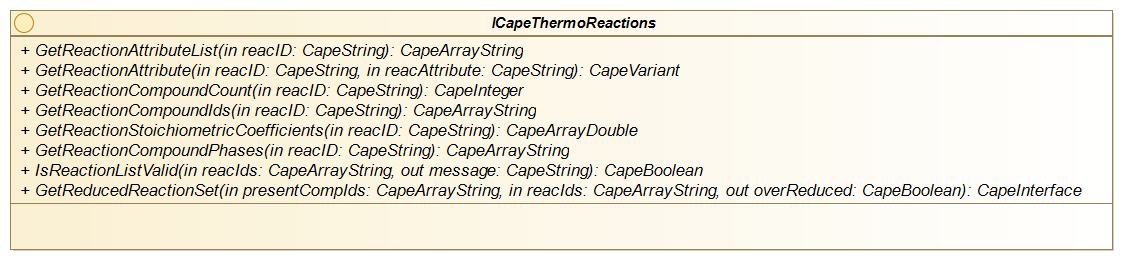
Methods
| Method Name | GetReactionAttributeList |
| Returns | CapeArrayString |
Arguments
| Name | Type | Direction | Description |
|---|---|---|---|
reacId |
CapeString | in |
The identifier of the Chemical Reaction
|
return |
CapeArrayString | out, retval | Returns CapeArrayString. |
Description
Returns the list of attribute identifiers for the specified Chemical Reaction.
Errors
| Error | Description |
|---|---|
ECapeInvalidArgument |
Raised if the reacID argument passed in does not identify any Chemical Reaction known to the Chemical Reaction Server.
|
Notes
A software component that implements this method may return attributes which do not belong to the list defined in 4.4.5. However, these proprietary attributes may not be understood by most of the clients of this software component.
Referenced in (1)
| Method Name | GetReactionAttribute |
| Returns | CapeVariant |
Arguments
| Name | Type | Direction | Description |
|---|---|---|---|
reacId |
CapeString | in |
The identifier of the Chemical Reaction
|
reacAttribute |
CapeString | in |
The identifier of the attribute
|
return |
CapeVariant | out, retval | Returns CapeVariant. |
Description
Returns the value of the specified attribute of the specified Chemical Reaction.
Errors
| Error | Description |
|---|---|
ECapeInvalidArgument |
Raised if the reacId argument passed in does not identify any Chemical Reaction known to the Chemical Reaction Server.
|
ECapeLimitedImpl |
Raised if the attribute identified through reacAttribute is not supported.
|
Notes
The list of standardized attributes is available in section 4.4.5.
Referenced in (2)
| Method Name | GetReactionCompoundCount |
| Returns | CapeInteger |
Arguments
| Name | Type | Direction | Description |
|---|---|---|---|
reacId |
CapeString | in |
The identifier of the Chemical Reaction
|
return |
CapeInteger | out, retval | Returns CapeInteger. |
Description
Returns the number of Compounds participating in the specified Chemical Reaction.
Errors
| Error | Description |
|---|---|
ECapeInvalidArgument |
Raised if the reacId argument passed in does not identify any Chemical Reaction known to the Chemical Reaction Server.
|
Notes
The number returned by GetReactionCompoundCount must be equal to the number of Compound identifiers returned by GetReactionCompoundIds, for the same Chemical Reaction.
A Reactor can assume that the number of Compounds occurring in a specified Chemical Reaction remains constant between two calls to ICapeUnit::Validate.
Referenced in (6)
| Method Name | GetReactionCompoundIds |
| Returns | CapeArrayString |
Arguments
| Name | Type | Direction | Description |
|---|---|---|---|
reacId |
CapeString | in |
The Chemical Reaction identifier
|
return |
CapeArrayString | out, retval | Returns CapeArrayString. |
Description
Returns identifiers of the Compounds participating in the specified Chemical Reaction.
Errors
| Error | Description |
|---|---|
ECapeInvalidArgument |
Raised if the reacId passed in does not identify any Chemical Reaction known to the Chemical Reaction Server that implements ICapeThermoReactions.
|
Notes
Valid Compound identifiers are obtained from ICapeThermoCompounds::GetCompoundList implemented on the same software component as ICapeThermoReactions. Any additional Compound constant properties, such as CAS numbers or charge, can also be obtained through operations of ICapeThermoCompounds.
The number of Compound identifiers returned by GetReactionCompoundIds must be equal to the number returned by GetReactionCompoundCount for the same Chemical Reaction. Compounds of which the amount affects the Chemical Reaction but are neither a reactant nor a product (e.g., catalysts, inhibitors) may be exposed by GetReactionCompoundIds.
Reactors can assume that identifiers of Compounds participating in a specified Chemical Reaction remain constant between two calls to ICapeUnit::Validate.
Referenced in (1)
| Method Name | GetReactionStoichiometricCoefficients |
| Returns | CapeArrayDouble |
Arguments
| Name | Type | Direction | Description |
|---|---|---|---|
reacId |
CapeString | in |
The Chemical Reaction identifier
|
return |
CapeArrayDouble | out, retval | Returns CapeArrayDouble. |
Description
Returns the stoichiometric coefficients for the compounds participating in the specified Chemical Reaction.
Errors
| Error | Description |
|---|---|
ECapeInvalidArgument |
Raised if the reacId argument passed in does not identify any Chemical Reaction known to the Chemical Reaction Server.
|
ECapeThrmPropertyNotAvailable |
The specified Chemical Reaction is a pseudo-overall Chemical Reaction and therefore its stoichiometry is not available (see General notes below).
|
Notes
The order and number of stoichiometric coefficients correspond to the Compounds returned by GetReactionCompoundIds.
Stoichiometric coefficients are real numbers and do not need to be integer values.
Compounds that take part in the Chemical Reaction but are neither a reactant nor a product (e.g., catalysts, inhibitors, solvents) may or may not be exposed by GetReactionCompoundIds. If exposed, their stoichiometric coefficients must be zero.
For the special case of a pseudo-overall Chemical Reaction, according to the definition of such a Chemical Reaction, the stoichiometry is not available. Such a Chemical Reaction must expose the compoundReactionRate property. For these Chemical Reactions the PseudoOverall attribute is TRUE. For obvious performance reasons, check for this attribute before asking for stoichiometric coefficients.
Reactors can assume that stoichiometric coefficients remain constant between two calls to ICapeUnit::Validate.
Referenced in (1)
| Method Name | GetReactionCompoundPhases |
| Returns | CapeArrayString |
Arguments
| Name | Type | Direction | Description |
|---|---|---|---|
reacId |
CapeString | in |
The Chemical Reaction identifier
|
return |
CapeArrayString | out, retval | Returns CapeArrayString. |
Description
Returns the Phase labels (one Phase for each Compound in the same order as in GetReactionCompoundIds) for the Compounds involved in the specified Chemical Reaction.
Errors
| Error | Description |
|---|---|
ECapeInvalidArgument |
Raised if the reacId argument passed in does not identify any Chemical Reaction known to the Chemical Reaction Server.
|
Notes
Valid Phase labels are obtained from ICapeThermoPhases::GetPhaseList implemented on the same software component as ICapeThermoReactions is.
Reactors can assume that Phases for Compounds in Chemical Reactions remain constant between two calls to ICapeUnit::Validate.
In case the Chemical Reaction takes place in one single Phase, all returned Phase labels are equal to the attribute reactionPhase for the Chemical Reaction.
Referenced in (3)
| Method Name | IsReactionListValid |
| Returns | CapeBoolean |
Arguments
| Name | Type | Direction | Description |
|---|---|---|---|
reacIds |
CapeArrayString | in |
List of Chemical Reaction identifiers
|
message |
CapeString | out |
If the list of Chemical Reaction identifiers is not valid, a message conveying the reason for that.
|
return |
CapeBoolean | out, retval | Returns CapeBoolean. |
Description
Checks if the list of Chemical Reaction identifiers is valid as a set of Chemical Reactions.
Errors
| Error | Description |
|---|---|
ECapeInvalidArgument |
Raised if any element of the reacIds argument passed in does not identify any Chemical Reaction known to the Chemical Reaction Server.
|
Notes
A given combination of user selected Chemical Reactions may not be valid in the sense that the Chemical Reaction Server was not designed to deal with that subset of Chemical Reactions.
Referenced in (6)
| Method Name | GetReducedReactionSet |
| Returns | ICapeThermoReactionSet |
Arguments
| Name | Type | Direction | Description |
|---|---|---|---|
presentCompIds |
CapeArrayString | in |
List of Compound identifiers of the Compounds that have non-zero concentration (are available) prior to reacting. UNDEFINED means all Compounds defined on the active Material Object.
|
reacIDs |
CapeArrayString | in |
List of active Chemical Reactions identifiers that must be considered. These identifiers are taken out from the list obtained from the active Material Object.
|
isEquilibrium |
CapeArrayBoolean | in |
For each of the active Chemical Reactions, a Boolean value stating whether the Chemical Reaction is considered as an Equilibrium Reaction (or Full Conversion Reaction) or not.
|
considerAllReactions |
CapeBoolean | in |
TRUE means that Compounds formed by non-equilibrium Reactions should be considered during reduction
|
overReduced |
CapeBoolean | out |
TRUE means that too many Chemical Reactions may have been eliminated (see 3.5.8 for more details)
|
return |
ICapeThermoReactionSet | out, retval | Returns ICapeThermoReactionSet. |
Description
Returns a Reduced Reaction Set.
Errors
| Error | Description |
|---|---|
ECapeInvalidArgument |
The error to be raised when, for example, Compound identifiers are not valid, or the list of active Chemical Reactions identifiers represents an invalid combination of Chemical Reactions (a given Chemical Reaction implies that other Chemical Reaction(s) must be present in the subset).
|
ECapeSolvingError |
The error to be raised if Chemical Reactions cannot be linearly combined and the Chemical Reaction Server chooses not to over-reduce the Reaction Set.
|
ECapeInvalidOperation |
The error to be raised if the request for the Reduced Reaction Set is not useful in the context of the Chemical Reaction Server (for example one of the essential Compounds or Phases is not defined).
|
Notes
See 3.5.7 to 3.5.9 for details on Reduced Reaction Set.
Chemical Reactions that are not treated as Equilibrium Reactions may produce Compounds which otherwise would not be present. Therefore, these reactions may or may not affect the reduction process depending on if time or space is sufficient for these reactions to take place. The Reactor decides this and specifies the argument considerAllReactions.
Chemical Reactions that are not treated as Equilibrium Reactions cannot be combined. If such Reactions can take place (considerAllReactions is TRUE), they must appear in the Reduced Reaction Set.
Any warnings that results from a particular reduction may be sent to ICapeDiagnostic::LogMessage, if implemented by the Simulation Context.
Under-reduction is not allowed.
| Interface Name | ICapeThermoReactionRoutine 🔗 |
|---|
Referenced in (23)
Architecture, Architecture, Architecture, Architecture, Architecture, Check Reactions, Reactor requests Reaction Property Calculations from Material Object, Reactor requests Reaction Property Calculations from Material Object, Material Object requests Reaction Property Calculations from Property Package, Material Object requests Reaction Property Calculations from Property Package, Material Object requests Reaction Property Calculations from chemical reaction package, Material Object requests Reaction Property Calculations from chemical reaction package, Solve a Reactor, Analysis and Design, Analysis and Design, Analysis and Design, Reaction properties, ICapeThermoReactionRoutine, ICapeThermoReactionRoutine, ICapeThermoReactionRoutine::GetReactionPropList, ICapeThermoReactionRoutine::CalcReactionProp, ICapeThermoReactionProperties::GetReactionProp, ICapeThermoReactionProperties::SetReactionProp
The ICapeThermoReactionRoutine provides the Client with the capability to request calculation of Reaction Properties.
Figure 4-11 Interface diagram for ICapeThermoReactionRoutine
Methods
Referenced in (1)
| Method Name | GetReactionPropList |
| Returns | CapeArrayString |
Arguments
| Name | Type | Direction | Description |
|---|---|---|---|
reacId |
CapeString | in |
The Chemical Reaction identifier
|
return |
CapeArrayString | out, retval | Returns CapeArrayString. |
Description
Returns the identifiers of the Reaction Properties that are available for the specified Chemical Reaction.
Errors
| Error | Description |
|---|---|
ECapeInvalidArgument |
Raised if the reacId argument passed in does not identify any Chemical Reaction known to the Chemical Reaction Package, Property Package or Material Object.
|
Notes
Properties are among the list of standardized Reaction Properties (see 4.4.6) or are proprietary Reaction Properties (not listed in 4.4.6). Available derivatives of Reaction Properties should be included in the returned list in accordance with the naming defined in 4.4.6.
A Chemical Reaction can be used as an Equilibrium Reaction only if it exposes the equilibriumDeviation property. Equilibrium Reactions must be linearly independent.
A Chemical Reaction can be used as a Kinetic Reaction only if it exposes reactionRate and/or compoundReactionRate property. Pseudo-overall Chemical Reactions will return compoundReactionRate but will not return reactionRate among the available Reaction Properties.
If both equilibrium deviation and reaction rate (or compound reaction rates) are exposed, their values may or may not be consistent (in the sense that the kinetic model will not necessarily result in the same equilibrium for infinite residence time as the equilibrium model).
If neither equilibrium deviation nor reaction rate (or compound reaction rates) are exposed, the extent of reaction must be determined by some other means (e.g., by specified conversion).
The returned list of Reaction Properties must include all supported Reaction Properties irrespective of whether they depend on the thermodynamic context. To check the actual availability of a Reaction Property in the given thermodynamic context, use CheckReactionPropertyAvailability method.
Referenced in (2)
| Method Name | CheckReactionPropertyAvailability |
| Returns | CapeBoolean |
Arguments
| Name | Type | Direction | Description |
|---|---|---|---|
reacId |
CapeString | in |
The Chemical Reaction for which a check needs to be made.
|
property |
CapeString | in |
The identifier of the Reaction Property, including Reaction Property derivatives, for which availability must be checked for the specified Chemical Reaction.
|
message |
CapeString | out |
In case of FALSE returned by the operation, message stating the reason. In case of TRUE returned by the operation, message value is undefined.
|
return |
CapeBoolean | out, retval | Returns CapeBoolean. |
Description
For the specified Chemical Reaction, the Chemical Reaction Server checks that the specified Reaction Property can be calculated.
Errors
| Error | Description |
|---|---|
ECapeInvalidArgument |
Raised if the Chemical Reaction identifier is invalid.
|
Notes
If the Chemical Reaction Server is not a Material Object, the check may depend on the properties provided by the associated Material Object. The Chemical Reaction Server needs to ask the associated Material Object which thermodynamic properties are supported. If a Reaction Property cannot be supplied because of missing physical or thermodynamic properties, the Chemical Reaction Server should return FALSE and issue a message detailing the reason.
The method is intended to be called during the validation of a Reactor.
Referenced in (4)
| Method Name | CalcReactionProp |
Arguments
| Name | Type | Direction | Description |
|---|---|---|---|
props |
CapeArrayString | in |
The Reaction Properties to be calculated.
|
reacIds |
CapeArrayString | in |
The identifiers of the Chemical Reactions for which to calculate the specified Reaction Properties.
|
Description
Calculates specified Reaction Properties for the specified Chemical Reactions.
Errors
| Error | Description |
|---|---|
ECapeInvalidArgument |
Raised if any of the Reaction Property identifiers or Chemical Reaction identifiers is invalid.
|
Notes
A Material Object may delegate such calculations of Reaction Properties to an associated Property Package or Chemical Reaction Package.
Chemical Reaction Packages and Property Packages store the calculation results of Reaction Properties on the Material Object. Any calculation of Reaction Properties should have no side effects on other properties stored on the Material Object (e.g., if the Chemical Reaction Package requires thermodynamic property calculations, it should do so on a duplicated Material Object).
When multiple Chemical Reactions are specified in the operation call, all Chemical Reactions must support the requested Reaction Properties. The caller can verify this by inspecting the results of GetReactionPropList. If any Reaction Property is not supported for any of the Chemical Reactions, an invalid argument error is raised.
Furthermore, although multiple Chemical Reactions might be specified, all Chemical Reactions are treated independently by the Chemical Reaction Package.
Referenced in (3)
| Method Name | GetReactionRateBasis |
Arguments
| Name | Type | Direction | Description |
|---|---|---|---|
reacID |
CapeString | in |
The identifier of the Chemical Reaction
|
basis |
CapeString | out |
The basis descriptor (see table)
|
qualifier |
CapeString | out |
The basis qualifier (see table)
|
Description
Returns the Reaction Rate Basis along with a qualifier of the Reaction Rate Basis. The reaction rate unit of measure is equal to mole of reaction per second per unit of measure of the Reaction Rate Basis.
The following table lists valid basis, along with their qualifier, resulting (compound-) reaction rate unit of measure and description:
| Basis | Qualifier | Rate unit of measure | Description |
|---|---|---|---|
| PhaseVolume | phaseName | mol/s/m³-phase | Single phase Chemical Reaction. The Chemical Reaction takes place in the specified phase. |
| PhaseMass | phaseName | mol/s/kg-phase | Single phase Chemical Reaction. The Chemical Reaction takes place in the specified phase. |
| PhaseAmount | phaseName | mol/s/mol-phase | Single phase Chemical Reaction. The Chemical Reaction takes place in the specified phase. |
| PhaseInterface | phasePair; a string value containing two phase names separated by a new line character (e.g., “Vapor\nLiquid” or “Liquid\nLiquid1”, … where \n is a placeholder for a newline character) | mol/s/m²-interfacial area | The Chemical Reaction takes place at the interfacial area between two phases. The qualifier specifies the names of the two phases. |
| CatalystMass | Catalyst name (optional, can be UNDEFINED, in which case the value will be assumed equal to the value of the “Catalyst” Reaction Attribute) | mol/s/kg-cat | This is a heterogeneous Chemical Reaction that takes place on the catalyst; the rate is specified per mass of catalyst and an optional qualifier can specify the name of the catalyst. |
| CatalystSites | Catalyst name (optional, can be UNDEFINED, in which case the value will be assumed equal to the value of the “Catalyst” Reaction Attribute) | mol/s/mol-active sites | This is a heterogeneous Chemical Reaction that takes place using a catalyst; the rate is specified per mole of catalyst sites and an optional qualifier can specify the name of the catalyst. |
| Surface | Surface description (optional, can be UNDEFINED), e.g. “catalyst surface”) | mol/s/m² | The Chemical Reaction takes place on a surface (e.g., catalyst surface, reactor wall, …). The rate is specified per surface area a qualifier is optional. |
Errors
| Error | Description |
|---|---|
ECapeInvalidArgument |
Raised if the reacID passed in does not identify any Chemical Reaction known to the Chemical Reaction Package, Property Package or Material Object that implements ICapeThermoReactions.
|
| Interface Name | ICapeThermoReactionProperties 🔗 |
|---|
Referenced in (13)
Architecture, Architecture, Reactor requests Reaction Property Calculations from Material Object, Reactor requests Reaction Property Calculations from Material Object, Material Object requests Reaction Property Calculations from Property Package, Material Object requests Reaction Property Calculations from Property Package, Material Object requests Reaction Property Calculations from chemical reaction package, Material Object requests Reaction Property Calculations from chemical reaction package, Solve a Reactor, Analysis and Design, Reaction properties, ICapeThermoReactionProperties, ICapeThermoReactionProperties
ICapeThermoReactionProperties allows for storing and retrieving Reaction Properties.
Figure 4-12 Interface diagram for ICapeThermoReactionProperties
Methods
Referenced in (2)
| Method Name | GetReactionProp |
| Returns | CapeArrayDouble |
Arguments
| Name | Type | Direction | Description |
|---|---|---|---|
property |
CapeString | in |
The Reaction Property to be retrieved.
|
reacId |
CapeString | in |
The identifier of the Chemical Reaction.
|
return |
CapeArrayDouble | out, retval | Returns CapeArrayDouble. |
Description
Gets the value(s) of the specified Reaction Property for a specified Chemical Reaction.
Errors
| Error | Description |
|---|---|
ECapeInvalidArgument |
Raised if either the Reaction Property or Chemical Reaction identifier is invalid.
|
ECapeData |
The requested data item is not available (no value is currently stored on the Material Object).
|
Notes
There is no basis argument as in the GetSinglePhaseProperty equivalent of the Material Object; see GetReactionRateBasis for Kinetic Reactions, and the definition of equilibriumDeviation. Reaction enthalpies are on a molar basis.
Referenced in (3)
| Method Name | SetReactionProp |
Arguments
| Name | Type | Direction | Description |
|---|---|---|---|
property |
CapeString | in |
The identifier of Reaction Property to be set.
|
reacId |
CapeString | in |
The identifier of the Chemical Reaction.
|
values |
CapeArrayDouble | in |
The values of the Reaction Property.
|
Description
Sets the value(s) of the specified Reaction Property for the specified Chemical Reaction.
Errors
| Error | Description |
|---|---|
ECapeInvalidArgument |
Raised if the Reaction Property or Chemical Reaction identifier is invalid.
|
Notes
There is no basis argument as in the SetSinglePhaseProperty equivalent of the Material Object; see GetReactionRateBasis for Kinetic Reactions, and the definition of equilibriumDeviation. Reaction enthalpies are on a molar basis.
Reaction Attributes
This section describes attributes, including their data types and their default values, associated with a Chemical Reaction. Proprietary Reaction Attributes, which are not listed in the table below, are allowed. However, most clients of the Chemical Reaction Server may not be able to interpret such proprietary Reaction Attributes.
Each Chemical Reaction is qualified by constant Reaction Attributes that can only be changed through configuration of the Chemical Reaction Server. For an external Chemical Server, Reaction Attributes can only change during ICapeUtilities::Initialize, ICapeUtilities::Load or ICapeUtilities::Edit. For Unit Operations, Reaction Attributes remain constant between two calls to ICapeUnit::Validate.
Some Reaction Attributes help in selecting Chemical Reactions, others allow for simplifications in the numerical system to be solved, others inform on the reaction mechanism.
| Attribute | Description | Type | Default value |
|---|---|---|---|
| Catalyst | Textual description of the catalyst | CapeString | UNDEFINED |
| Comment | Any textual information helping in documenting a Chemical Reaction: may for example include a literature reference or information on a valid temperature range. | CapeString | UNDEFINED |
| Equilibrium | The Chemical Reaction is an Equilibrium Reaction. It exposes equilibriumDeviation. | CapeBoolean | FALSE |
| EquilibriumDeviationTolerance | Value that can be used as a measure for convergence of the Equilibrium Reaction. This value can be used by the consumer of the reaction properties (generally the PME or a Reactor) to determine whether an Equilibrium Reaction is converged. The Equilibrium Reaction can be considered converged if the absolute value of equilibriumDeviation is smaller than or equal to the EquilibriumDeviationTolerance value. EquilibriumDeviationTolerance must be positive. | CapeDouble | UNDEFINED |
| FullConversion | A full conversion reaction takes place to the maximum extent so that one or more of the Compound(s) with negative value of stoichiometric coefficient is fully consumed. This attribute should only be TRUE for reactions which are not Kinetic Reactions and for which stoichiometry is available. When FullConversion is TRUE, the equilibriumDeviation property is exposed and the value of equilibriumDeviation is zero at full conversion, e.g. one of the reactants has disappeared. This is useful for Reactors that deal only with equilibrium reactions. | CapeBoolean | FALSE |
| Kinetic | The Chemical Reaction is a Kinetic Reaction. Properties Reaction Rate and/or Compound Reaction Rate are exposed. Property reactionRate is not supported by PseudoOverall Chemical Reactions. | CapeBoolean | FALSE |
| StoichiometryUnavailable | The Chemical Reaction is the summation of multiple Kinetic Chemical Reactions. Therefore, the stoichiometric coefficients are not available. reactionRate is not available. compoundReactionRate property must be used instead. For such a Chemical Reaction, Kinetic attribute is also TRUE and Equilibrium attribute is FALSE. | CapeBoolean | FALSE |
| ReactionPhase | Reaction exists only in the returned Phase label. Returns UNDEFINED if the Chemical Reaction involves species from multiple Phases. In the case of a Chemical Reaction in one single phase, operation GetReactionCompoundPhases will return the same Phase label for all Compounds involved in the Chemical Reaction. | CapeString | UNDEFINED |
Kinetic, Equilibrium and FullConversion are representative of different reaction mechanisms and are not mutually exclusive.
If a Reaction Attribute is not supplied for a Chemical Reaction by the Chemical Reaction Server, the component that consumes the Chemical Reaction should assume that the default value applies.
Reaction properties
This section describes the list of standardized Reaction Properties whose calculation can be requested through the CalcReactionProp method and whose values can be accessed through calls to the GetReactionProp and SetReactionProp methods.
Proprietary Reaction Properties may be allowed. However, clients of a Chemical Reaction Server may not be able to interpret such proprietary Reaction Properties. Even if two PMCs support the same proprietary Reaction Property, they may still be unable to communicate about this Reaction Property through a Material Object since that Material Object is not required to support proprietary Reaction Properties. It is only if the Material Object supports proprietary Reaction Properties that using such Reaction Properties can be envisioned.
List of properties
| Property Names | Description | Units |
|---|---|---|
| reactionRate | Reaction rate for Kinetic Reactions | See GetReactionRateBasis |
| compoundReactionRate | Rate of consumption or production of each compound appearing in a Kinetic Reaction. The order and number of values match the Compounds exposed by GetReactionCompoundIds. A positive value indicated a Compound is produced, whereas a negative value indicates a Compound is consumed by the Chemical Reaction. | See GetReactionRateBasis |
| equilibriumDeviation | Any smooth, differentiable function that equals to zero at chemical equilibrium. See the formulations below this table. | Not directly specified as depends on the expression form, concentration basis and stoichiometry. |
| enthalpyOfReactionBalanceCorrection | Enthalpy change per mole of reaction at reference conditions of the Property Package. Exothermic reactions have a negative EnthalpyOfReaction, endothermic reactions have a positive EnthalpyOfReaction. | J/mol |
equilibriumDeviation: the most general formulation comes directly from thermodynamics as
Another common definition could beor its analogue in the logarithmic form.
In this definition, the stoichiometry for Compound i is given by υᵢ. If applicable, the meaning of aᵢ may vary, and could for example be partial pressures, activities or concentrations. Note that absolute values of Kᵢ might be very small (e.g. often for electrolytes) and this may lead to problems with convergence criterion. With this concern, usage of a logarithmic scale seems more preferable. Other ways of ‘normalization’ could also be used to improve the convergence issue. CapeDoubleUNDEFINED is an acceptable value at the boundary of the feasible region, especially for EquilibriumDeviation. As the unit of measure nor scale for this property is known, a measure for the convergence criteria of this property is given by the EquilibriumDeviationTolerance attribute.
Derivatives of Reaction Properties can also be exposed. Temperature derivatives and pressure derivatives are consistent with those of the Thermodynamic and Physical Properties specification (iii): it is assumed that the increase in temperature or pressure is equal in all Phases; temperature and pressure derivatives are arrays with the same number of elements as their corresponding property. Their property name follows from the above property names, to which .Dtemperature or .Dpressure is appended.
For composition derivatives, the derivatives with respect to all Compounds (not just the ones taking part in the reactions) in all phases are returned; the derivatives are returned in the order of Phases that is returned by the Material Object’s GetPresentPhases method. The derivatives with respect to all Compounds in the first Phase are followed by the derivatives with respect to all Compounds in the second Phase, and so on. The composition derivatives names follow the definition found in the Thermodynamic and Physical Properties interface specification (iii) and are composed of the property names followed by .Dmoles or .DmolFraction. The order of values of composition derivatives for vector values (compoundReactionRate) follow the definition of the Thermodynamic and Physical Properties interface specification (iii): the composition derivatives of the first vector element are followed by the composition derivatives of the second vector element, and so on.
The derivatives are such that changes in phase equilibrium are not considered; like in the Thermodynamic and Physical Properties specification (iii) they should be considered derivatives with respect to independently changing pressure, temperature, or compositions. Similarly, the amount derivatives are such that the phase fractions are considered constant.
Reactive Phase Equilibria
Architecture
In systems in which all chemical reactions can be considered fast and in instant equilibrium, the reactive Equilibrium is solved hand in hand with the Phase Equilibrium. In this scenario, reactions can take place in any stream and in any Unit Operation, even those that are not Reactors. Reaction chemistry information and Reaction Property calculations are not required by Unit Operations and streams, but the PME and the Unit Operations must deal with changes in overall composition.
Instead of Phase Equilibrium Calculations, Reactive Phase Equilibrium calculations are used throughout the part of Flowsheet associated with the same, reactive, thermodynamic sub-system. A software component that provides Reactive Phase Equilibrium calculations should be backwards compatible with a non-reactive phase equilibrium server when it is configured to have no reactions, or if it is configured to work with an apparent composition that keeps the overall composition constant (see chapter 6). However, if a phase equilibrium calculation is requested through the standard phase equilibrium interface that would change the overall composition, an error must be given. This document introduces an interface for calculation of Reactive Phase Equilibrium. The reaction data itself may be internal to the Equilibrium Server and is not necessarily exposed via a Reaction Server.
To allow for a Unit Operation to distinguish between Reactive Phase Equilibrium and non-reactive Phase Equilibrium, an optional interface is introduced, ICapeThermoEquilibriumRoutineEx. If Reaction Phase Equilibrium is to be used, the Material Object must expose this interface in addition to the ICapeThermoEquilibriumRoutine (See Figure 5-1).
Therefore, from a CAPE-OPEN point of view, a Phase Equilibrium is reactive if, for some overall composition and equilibrium specifications, the overall composition changes as part of the Phase Equilibrium calculation. This implies that the Reactive Equilibrium Server considers Chemical Reactions as part of its configuration, and that the effect of the Chemical Reactions is not hidden by the application of an apparent Compound Slate.
Whether the Phase Equilibrium is reactive or non-reactive depends only on the configuration of the Equilibrium Server and therefore remains constant between its configurations. The Equilibrium Server advertises that it supports Reactive Phase Equilibrium or non-reactive Phase Equilibrium and therefore enables the PME to determine which software components are compatible with the configuration of the Equilibrium Server.
Although in version 1.1 a separate, extended, interface is required to support consistent thermodynamic calculations including both Reactive Phase Equilibrium and Phase Equilibrium, the intent is to combine the functionality of the two interfaces in a single interface in a subsequent version of the interface specification. It is foreseen that the extended interface ICapeThermoEquilibriumRoutineEx is tied into only version 1.1 of the CAPE-OPEN standard.
For PMEs that support Reactive Phase Equilibria, support for ICapeThermoMaterialCustomData interface is required. This allows the Property Package to store reaction equilibrium data on the Material Object, reducing the need for recalculation when calculating phase properties (xi).
The Named Value “SupportsReactivePhaseEquilibrium110” is exposed by a PME to allow a Property Package to verify that PME supports Reactive Phase Equilibrium. Its value is TRUE if PME supports Reactive Phase Equilibrium and FALSE otherwise. It is anticipated that this check will not be required in future versions of CAPE-OPEN.
Additional interfaces for Material Objects are shown in Figure 4-2 and Figure 6-1.
Figure 5-1 Material Object supporting reactive phase equilibria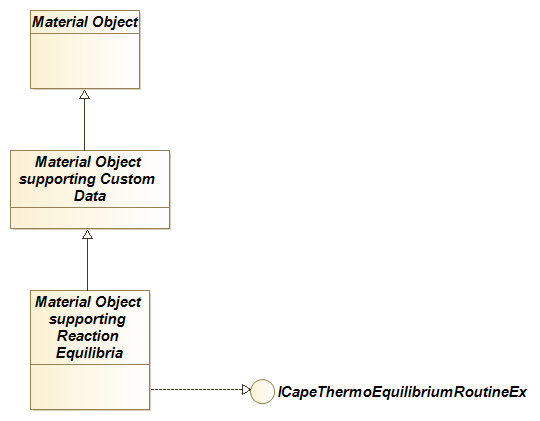
If the Phase Equilibrium is calculated by a PMC, such as a Property Package, the PMC must also expose the ICapeThermoEquilibriumRoutineEx interface along with the ICapeThermoEquilibriumRoutine interface. If the Property Package wishes to use the Custom Data facilities of the *-Material Object, it should also implement ICapeThermoCustomDataCreate. See Figure 5-2 when the PMC is a Property Package. Additional interfaces for Property Packages are shown in Figure 4-4 and Figure 6-2.
Figure 5-2 Property Package supporting reactive phase equilibria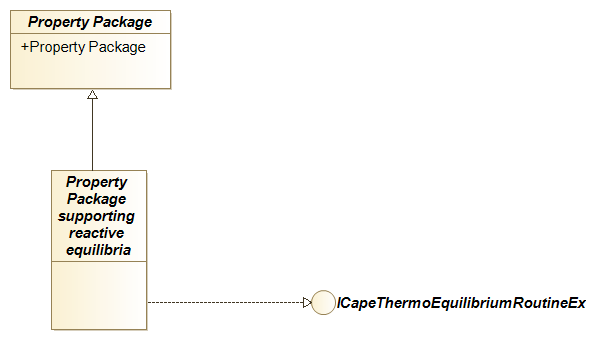
Requirements
A Reactive Phase Equilibrium calculation (or reactive flash) is a phase equilibrium calculation that changes the overall composition. This change of overall composition takes place due to the Chemical Reactions between the Compounds present. Phase Equilibrium calculations that are internally reactive, but for which the results may be represented in such a way that the overall composition does not change (e.g., apparent species are used), are not considered hereafter as Reactive Phase Equilibrium.
Changing the overall composition has implications for applications that are dealing with Reactive Phase Equilibrium compared to applications dealing with non-reactive Phase Equilibrium.
Objects that expose the functionality of Phase Equilibrium calculations implement the non-reactive phase equilibrium interface ICapeThermoEquilibriumRoutine. Such objects are called Equilibrium Servers; these include Material Objects, Property Packages and Equilibrium Calculators. All software components throughout the Flowsheet that refer to the same thermodynamic configuration, use the Phase Equilibrium calculations provided by the Equilibrium Server associated with the thermodynamic configuration. These Phase Equilibrium calculations refer exclusively either to reactive algorithms or to non-reactive algorithms. Equilibrium Servers are subsequently called Reactive Equilibrium Servers or non-reactive Equilibrium Servers.
Phase Equilibrium calculations (reactive or not) are performed by Equilibrium Servers. This implies that if the thermodynamics are native to the PME, the Phase Equilibrium calculation is implemented directly by the Material Object. If the Phase Equilibrium calculation is implemented by a PMC such as a Property Package or an Equilibrium Calculator, requests for Phase Equilibrium calculations made on a Material Object by any PMCs such as Unit Operations, are forwarded by the Material Object. In all cases, the Material Object is seen by PMCs such as Unit Operations (all PMCs except Equilibrium Servers), as the software component providing the Phase Equilibrium calculations.
It is important to understand that Materials Objects that are configured with a Reactive Equilibrium Server will only provide Reactive Phase Equilibrium, irrespective of the context in which these Material Objects are used. If the activation of reactions is to be context dependent, different Material Objects should be applied to each context. For example, in a distillation column in which some stages are reactive and others are not, the end-user may be guided into selecting a Material Template to be used for each stage or column section. The Material Template System (x) or Material Manager (pending publication) may provide access to the various Material Templates configured for the simulation. It is up to the Unit Operation to check and validate the consistency between the Material Templates selected for internal calculation and those representing the streams connected to the Material Ports, for example by comparison of the Compound and Phase lists.
The following requirements must be fulfilled for the use of Reactive Phase Equilibrium.
Textual Requirements
REQ-GENERAL-1
PMEs and all PMCs (referred for this requirement as Unit Operations for sake of clarity), that invoke Phase Equilibrium calculations need to be aware of Reactive Equilibrium Servers.
Rationale: Change in overall composition goes hand in hand with a change in mixture molecular weight. Results obtained with Unit Operations not aware of Reactive Phase Equilibrium presence would be misleading, or calculations could lead to errors. If a Unit Operation calculation scheme relies on thermodynamic properties and Phase Equilibrium calculations not modifying the overall composition, such a Unit Operation will not be able to deal with a Reactive Phase Equilibrium calculation or will give incorrect results.
Therefore, a Unit Operation must be able to distinguish between a Reactive Equilibrium Server and a non-reactive Phase Equilibrium Server. So, access to Reactive Phase Equilibrium should be through a different mechanism than access to non-reactive Phase Equilibrium.
This requirement is fulfilled by designing a new generic interface for Equilibrium Server: ICapeThermoEquilibriumRoutineEx.
REQ-GENERAL-2
PME and PMC must work with Equilibrium Server that does not expose ICapeThermoEquilibriumRoutineEx.
Rationale: Backward compatibility must be kept with existing Equilibrium Servers. Implementation of ICapeThermoEquilibriumRoutineEx is not mandatory for an Equilibrium Server that does not calculate Reactive Phase Equilibrium.
REQ-ES-3
If ICapeThermoEquilibriumRoutineEx is implemented on an Equilibrium Server that does not calculate Reactive Phase Equilibrium, the ICapeThermoEquilibriumRoutineEx operations must give results equal to the ICapeThermoEquilibriumRoutine operations.
Rationale: This allows client applications to transparently use the ICapeThermoEquilibriumRoutineEx interface (if implemented).
REQ-PME-4
A Material Object implementing ICapeThermoEquilibriumRoutineEx and using an external Equilibrium Server that does not implement ICapeThermoEquilibriumRoutineEx, must forward ICapeThermoEquilibriumRoutineEx calls to ICapeThermoEquilibriumRoutine.
Rationale: See REQ-30-ES. If the external Equilibrium Server (e.g., a Property Package) does not implement ICapeThermoEquilibriumRoutineEx, the Phase Equilibrium Server is non-reactive. The Material Object may still implement the ICapeThermoEquilibriumRoutineEx interface. Then calls to ICapeThermoEquilibriumRoutineEx::CalcEquilibriumEx are forwarded to ICapeThermoEquilibriumRoutine::CalcEquilibrium. Calls to ICapeThermoEquilibriumRoutineEx::CheckEquilibriumSpecEx are forwarded to ICapeThermoEquilibriulRoutine::CheckEquilibriumSpec.
Care must be exercised when forwarding CalcEquilibrium and CheckEquilibriumSpec calls: a suitable conversion of arguments may be needed for the basis of Phase Equilibrium conditions for the overall phase cf. REQ-43-PMC.
REQ-PME-5
If the PME supports reactive Phase Equilibrium, the PME must set the Simulation Context on the Property Package prior to the call to ICapeUtilities::Initialize on the Property Package.
Rationale: See REQ-34-PME. A NamedValue “SupportsReactivePhaseEquilibrium110” is used by the PME to inform the Property Package that the PME supports Chemical Reactions. The Property Package should be capable to access this NamedValue during ICapeUtilities::Initialize.
REQ-PME-6
PME must advertise to the Property Package that the PME can support Chemical Reactions.
Rationale: Because any reactive Property Package will fail if the PME is not supporting Chemical Reactions, the additional Named Value “SupportsReactivePhaseEquilibrium110” is defined that lets the Property Package know if the PME is supporting or not Chemical Reactions.
REQ-PP-7
A reactive Property Package must check PME support for Chemical Reactions.
Rationale: This is necessary to recognize as early as possible that PME and reactive Property Package are compatible in their operation and act upon it.
In general, this requirement is fulfilled by a check performed within an ICapeUtilities::Initialize call. If PME and reactive Property Package are not compatible, ICapeUtilities::Initialize fails with an appropriate error description.
If the Simulation Context was not set prior to ICapeUtilities::Initialize, the Property Package can assume that the PME does not support reactive Phase Equilibrium (according to REQ-32-PME).
REQ-PP-8
If the PME does not support Chemical Reactions, a Property Package must prevent configuration changes that make the Property Package reactive.
Rationale: The PME has no way to check after initialization of the Property Package that the Property Package is changed to a reactive one.
REQ-PME-9
If the PME supports Chemical Reactions, the PME must know if the Phase Equilibrium is reactive in the selected Property Package.
Rationale: The PME needs to deal with Unit Operations which do not support reactive Phase Equilibrium in their calculations. Also, the PME needs to know how to deal with calls to ICapeThermoEquilibriumRoutine on the Material Object.
The PME determines if the selected Property Package is reactive by querying ICapeThermoEquilibriumRoutineEx on the Property Package and, if exposed, by checking the property IsReactive on ICapeThermoEquilibriumRoutineEx.
REQ-GENERAL-10
Client of the Equilibrium Server must not replace reactive Phase Equilibrium calculations by its own.
Rationale: If the Equilibrium Server is reactive, consistency of Phase Equilibrium calculations is achieved only by using the Equilibrium Server. Not all the details on Chemical Reactions are exposed by a reactive Property Package, making it impossible to correctly perform a reactive Phase Equilibrium calculation externally.
If the Phase Equilibrium is not reactive, this requirement does not apply.
REQ-PME-11
If the PMC is to interact with a Material Object configured with a Phase Equilibrium routine which is reactive, the PME must explicitly inform the end-user when a PMC consuming thermodynamics is not compatible with Reactive Phase Equilibrium.
Rationale: The end-user must be made aware of the reason that renders the PMC unusable in that context.
In the case of Flowsheet calculation, the advised timing of the notification is within any validation step of the Flowsheet. Or more generally the PME should make this notification when the PME is about to start a simulation.
REQ-PMC-12
Any PMC consuming thermodynamics must advertise that it supports Reactive Phase Equilibrium in its calculations.
Rationale: To comply with REQ-38-PME, the PME must be capable to check that if a PMC consuming thermodynamics is compatible or not with the selected Property Package. It is a configuration independent property of the PMC. Therefore, the PMC consuming thermodynamics will register with a specific Category ID, CAPEOPENICapeThermoEquilibrium110Compatible, when registering itself to advertise that it supports Reactive Phase Equilibrium and the PME will have the information available. This Category ID is defined only for version 1.1 of the CAPE-OPEN standard.
For PMCs consuming thermodynamics other than Unit Operations (e.g., Flowsheet Monitoring Components, Chemical Reaction Packages), this may imply that even though thermodynamic functions may never be called by the PMC, the PME may still reject those PMCs if the Category ID is not present in the PMC registration.
The requirement does not apply to PMCs providing thermodynamics such as Property Package Managers, Property Packages, Property Routines, Equilibrium Servers.
REQ-PMC-13
Non-reactive Phase Equilibrium must not be invoked on an Equilibrium Server which is reactive.
Rationale: The operations of ICapeThermoEquilibriumRoutine, considering the mixture as non-reactive, presumes that the feed remains unchanged in overall composition while the Reactive Phase Equilibrium will violate this presumption.
REQ-PMC-14
If any operation of ICapeThermoEquilibrium is called when the Phase Equilibrium is reactive, the call must fail.
Rationale: A CAPE-OPEN error code must be returned by the Equilibrium Server. To inform the end-user properly, an error message describing the error must be provided, stating that the Phase Equilibrium of the selected thermodynamic model is reactive, and attempting to use a non-reactive Phase Equilibrium is invalid.
REQ-PME-15
A Material Object that supports Property Packages exposing ICapeThermoEquilibriumRoutineEx must implement ICapeThermoMaterialCustomData
Rationale: A Property Package must be able to store true or internal composition on the Material Object even if this composition does not correspond to the exposed Compounds. This provides a mechanism for the Property Package to avoid recalculations of Chemical Equilibrium at each property request.
REQ-GENERAL-16
In contrast to non-reactive Phase Equilibrium, a basis specification is required for mass- or mole-based overall Phase Equilibrium conditions.
Rationale: For non-reactive Phase Equilibrium, it does not matter whether an enthalpy specification is specific or molar. Such a specification goes with basis UNDEFINED. The software component that requests the Phase Equilibrium calculation (e.g., Unit Operation, PME) may set such a specification in either basis. The overall molecular weight is known prior to the Phase Equilibrium calculation and basis conversion may be performed by the Material Object so that the Equilibrium Server may obtain the specification in either basis.
For Reactive Phase Equilibrium, the overall molecular weight is a result of the calculation. The basis of an overall equilibrium condition does matter and must be specified. Mass basis is usually desired for Reactive Phase Equilibrium since mass is preserved. If molar properties are specified, they correspond to the composition of the overall phase at equilibrium.
This requirement is fulfilled by specifying a value different from UNDEFINED for the basis element of specifications for mass- or mole-based overall Phase Equilibrium conditions (in input arguments to the methods CalcEquilibriumEx and CheckEquilibriumSpecEx). For example, a pressure condition has basis as UNDEFINED but an enthalpy condition must have basis of “mole” or “mass”. An overall enthalpy condition with basis UNDEFINED is a valid condition for non-reactive Phase Equilibrium but is not a valid condition for Reactive Phase Equilibrium.
REQ-PME-17
In compliance with the UNIT Interface specification (iv), inlet Material Objects must be in Phase Equilibrium before the Calculate method of a Unit Operation is invoked.
Rationale: Each connected inlet Port has its own Material Object implementing or using a particular Equilibrium Server. The Equilibrium Server may be reactive or not. When the Equilibrium Server is reactive, this requirement means the inlet Material Object must be in chemical and physical equilibrium.
REQ-UO-18
In compliance with the UNIT Interface specification (iv), a Unit Operation must invoke a Phase Equilibrium calculation for all its product Material Objects as part of its Calculate method. This requires calling ICapeThermoEquilibriumRoutineEx::CalcEquilibriumEx in case of Reactive Phase Equilibrium.
Rationale: When a Material Object connected to an outlet Port implements or uses an Equilibrium Server that is reactive, this implies that the Unit Operation must invoke the CalcEquilibriumEx method on ICapeThermoEquilibriumRoutineEx interface during ICapeUnit::Calculate.
REQ-ES-19
In contrast to ICapeThermoEquilibriumRoutine::CalcEquilibrium, the ICapeThermoEquilibriumRoutineEx::CalcEquilibriumEx method requires an additional output argument, 'reactionMoleRatio'.
Rationale: For Reactive Phase Equilibrium, neither the total mole number nor the compound mole numbers are conserved. The information about the change in number of moles resulting from the chemical equilibrium calculation must be provided as an output from the Equilibrium Server.
The state of a Material Object should not depend on the history of operations. So, at any time an operation, such as a Reactive Phase Equilibrium calculation, has been completed, the state of the Material Object should be self-consistent. Naturally the reaction result is directly represented in mole numbers. However, the CAPE-OPEN interface design relies on fractions rather than mole numbers and the change in mole numbers due to chemical reactions cannot be represented by non-normalized mole fractions.
If molecular weights are known to the PME for all compounds, one could also derive the change in mole numbers from the overall mixture molecular weights prior to and after the reactive equilibrium calculation. It may happen that molecular weights are not all provided by the Compound Server.
Therefore, the change in mole number must be returned by the equilibrium calculation method itself. It is given by the reactionMoleRatio argument. reactionMoleRatio is the ratio of the total number of moles at equilibrium to the total number of moles prior to the equilibrium calculation.
REQ-PME-20
The Material Object must correct molar flowrates (if stored) for the change in mole numbers resulting from the Reactive Phase Equilibrium calculation.
Rationale: Even though the total molar amount is not stored on the Material Object (see REQ-46-ES), the Material Object can store molar flowrates particularly when one represents streams in the Flowsheet. The Material Object that performs a Reactive Phase Equilibrium calculation or forwards a Reactive Phase Equilibrium calculation to an Equilibrium Server must ensure that molar total flow rate (if stored) or molar compound flow rates (if stored) are corrected for the change in moles resulting from the reactive equilibrium calculation. To accomplish this, in case the Reactive Phase Equilibrium is calculated by an external software component, the Material Object may make use of 'reactionMoleRatio' returned by the CalcEquilibriumEx method. Alternatively, a Material Object may choose to replace the total molar flowrate by a total mass flowrate by a conversion based on the overall composition as part of its CalcEquilibriumEx method (if all molecular weights are known).
If, for example, a Unit Operation sets molar flowrates on a Material Object, the Material Object does not yet have sufficient information to convert these flowrates to mass basis because the Unit Operation may choose to set composition after setting flowrates. Therefore, a Material Object must always postpone basis conversion of flowrates (and of any other property) until conversion is requested in a basis different from the one used to store the property. Therefore, the Material Object must be able to store flowrates in either mole or mass basis. Hence, flowrates may not actually be present on the Material Object at all, or present on a mole basis or on a mass basis. REQ-47-PME only applies if overall flowrate is stored in mole basis, or if compound flow rates are stored.
To illustrate, the Unit Operation may store total molar flowrate on an outlet Material Object, and then requests a Reactive Phase Equilibrium calculation. As part of the Reactive Phase Equilibrium calculation, the Material Object adjusts the total molar flowrate to reflect the change of mole numbers due to the reaction(s).
REQ-UO-21
The Unit Operation must consider change in mole numbers due to reactions if the Unit Operation sets molar total flow rate on an outlet Material Object after calculating the Reactive Phase Equilibrium.
Rationale: To specify the state of an outlet stream, a Unit Operation sets overall composition (or compound flows) and equilibrium conditions before requesting the outlet equilibrium calculation. However, the overall total flow may be specified before or after the Reactive Phase Equilibrium calculation. If the Unit Operation specifies total molar flow before the Reactive Phase Equilibrium calculation, this molar flow rate corresponds to the Reactive Phase Equilibrium calculation input composition (cf. REQ-47-PME) and the PME will ensure mass balance (see REQ-47-PME). However, in case the total molar flow is specified after the Reactive Phase Equilibrium calculation, the Unit Operation must ensure that the total molar flow corresponds to the composition on the Material Object after the Reactive Phase Equilibrium calculation such that mass balance is maintained. The Unit Operation may use the reactionMoleRatio argument returned by the ICapeThermoEquilibriumRoutineEx::CalcEquilibriumEx method.
REQ-ES-22
Equilibrium Reactions that are considered for the Reactive Phase Equilibrium, and any linear combination thereof, must not be exposed via ICapeThermoReactions.
Rationale: Exposing the same Chemical Reactions via two mechanisms (Reactive Phase Equilibrium and Chemical Reactions) lead to confusion and may result in double accounting for the same Chemical Reaction. Chemical Reactions that take part in the Reactive Phase Equilibrium are already always considered because a Unit Operation must perform a Phase Equilibrium calculation on each of its outlet Ports.
REQ-ES-23
Equilibrium Reactions considered for the Reactive Phase Equilibrium may be exposed through an additional interface.
Rationale: It is foreseen that possibly exposing the Chemical Reactions considered in the Phase Equilibrium will be useful for back-calculating reaction extents from the composition set for the phases. This requirement is considered of low priority and is not fulfilled by the current interface design.
Use Cases
Actors
PME. A Process Modelling Environment also known as a CAPE-OPEN Simulator Executive (COSE).Flowsheet UNIT. A CAPE-OPEN Unit Operation.
Property Package. A CAPE-OPEN thermodynamic Property Package, external to the PME, as defined in (iii), and capable of providing a Reactive Phase Equilibrium (necessary interfaces are implemented).
Equilibrium Server. See glossary. Any object that implements ICapeThermoEquilibriumRoutine and / or ICapeThermoEquilibriumRoutineEx and is the source of Phase Equilibrium calculations, e.g., a Property Package, a Material Object.
Use Case Priorities
High. Essential functionality. Functionality without which the operation usability or performance of a Reaction Equilibrium Server might be seriously compromised.Medium. Very desirable functionality that will make Reaction Equilibrium Servers more usable, transportable, or versatile. The essence of a Reactive Equilibrium Server is not compromised by not supporting this Use Case, although the usability and acceptance of the component can be.
Low. Desirable functionality that will improve the performance of Reaction Equilibrium Servers. If this Use Case is not met usability or acceptance can decrease.
Use Case map
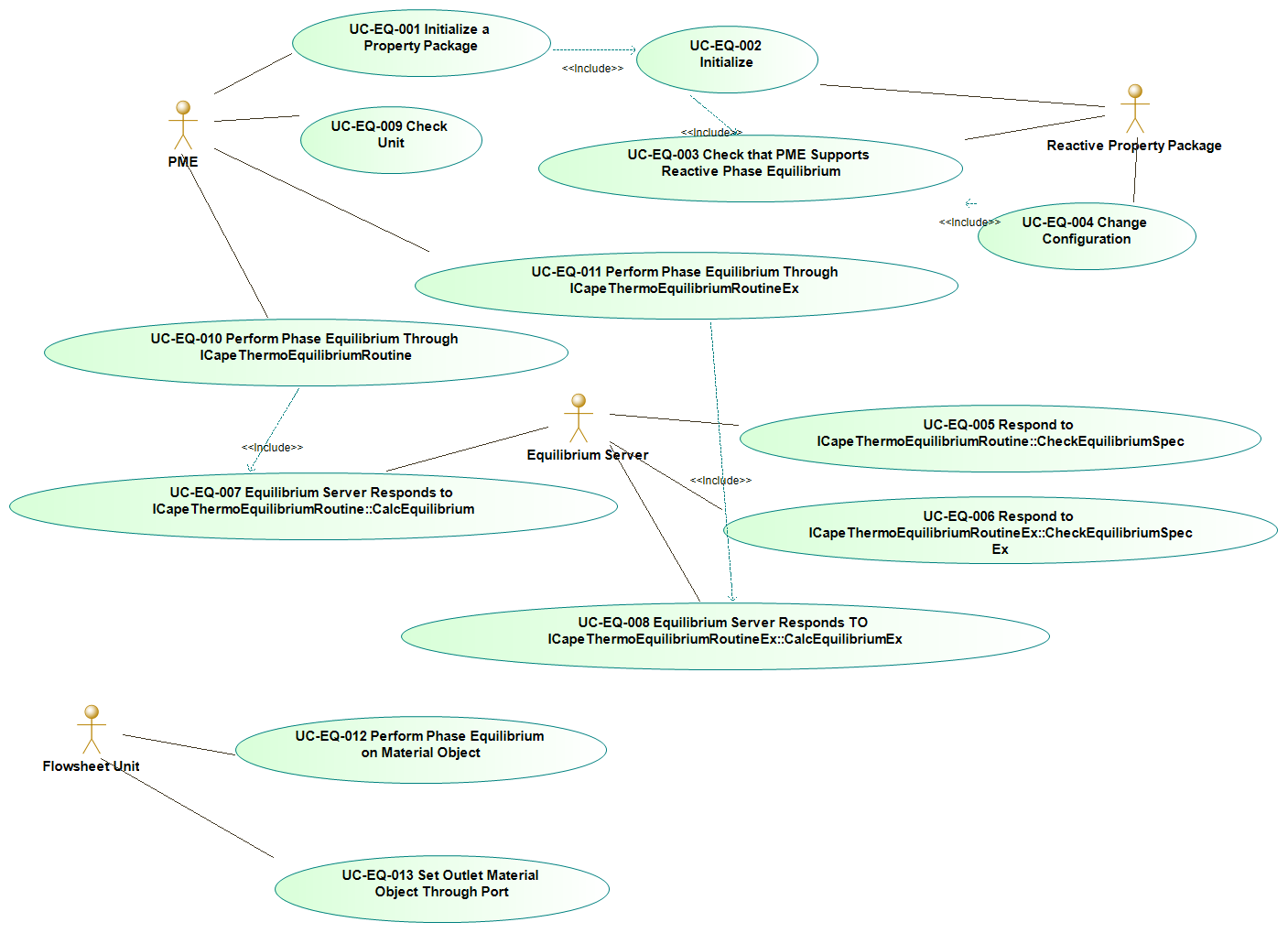
Use Case list
- UC-EQ-001 : Initialize a Property Package
- UC-EQ-002 : Initialize
- UC-EQ-003 : Check that PME Supports Reactive Phase Equilibrium
- UC-EQ-004 : Change Configuration
- UC-EQ-005 : Respond to ICapeThermoEquilibriumRoutine::CheckEquilibriumSpec
- UC-EQ-006 : respond to ICapeThermoEquilibriumRoutineEx::CheckEquilibriumSpec
- UC-EQ-007 : Equilibrium Server Responds to ICapeThermoEquilibriumRoutine::CalcEquilibrium
- UC-EQ-008 : Equilibrium server responds to ICapeThermoEquilibriumRoutineEx::CalcEquilibriumEx
- UC-EQ-009 : Check Unit
- UC-EQ-010 : perform phase equilibrium Through ICapeThermoEquilibriumRoutine
- UC-EQ-011 : perform phase equilibrium through ICapeThermoEquilibriumRoutineEx
- UC-EQ-012 : Perform Phase Equilibrium on Material Object
- UC-EQ-013 : Set Outlet Material Object Through Port
UC-EQ-1: Initialize a Property Package
This Use Case reflects REQ-32-PME (Simulation Context to be set on Property Package by PME supporting Chemical Reactions).
Actor: PME
Priority: High
Status:
<This Use Case is fulfilled by the simulationContext property and by ICapeUtilities::Initialize.>
Pre-Conditions:
<Property Package is created>; <Any Persistence operations have been performed on the Property Package>; <The PME supports Reactive Phase Equilibrium>; <NamedValue “SupportsReactivePhaseEquilibrium110” is TRUE>
Flow Of Events:
The PME sets Simulation Context property on the Property Package then calls ICapeUtilities::Initialize on the Property Package. The Property Package executes UC-EQ-002.
Errors:
<The Property Package fails initialization>
Post-Conditions:
<The Property Package is compatible with the reactive equilibrium support of the PME>
Uses:
UC-EQ-002
UC-EQ-2: Initialize
Actor: Property Package
Priority: High
Status:
<This Use Case is fulfilled by ICapeUtilities::Initialize.>
Pre-Conditions:
<Phase Equilibrium is Reactive within the Property Package>
Flow Of Events:
The Property Package exercises the Use Case UC-EQ-003.
If the PME does not support Reactive Phase Equilibrium, the Property Package fails initialization with a message encouraging the end-user to review the configuration of the Property Package in an external manner. The Use Case stops here.
The Property Package performs any action necessary prior to receiving any call through any CAPE-OPEN interface.
Errors:
<The Property Package fails initialization.>
Post-Conditions:
<The Property Package is ready for use and is compatible with the reactive equilibrium support of the PME>
Uses:
UC-EQ-003
UC-EQ-3: Check that PME Supports Reactive Phase Equilibrium
This Use Case relates to Requirement REQ-34-PP. This Use Case is exercised when the PME asks for the Property Package to initialize. It may also be exercised during configuration of the Property Package.
According to REQ-32-PME, if the PME supports Reactive Phase Equilibrium, the Simulation Context has been set prior to calling Initialize on the Property Package.
Actor: Property Package
Priority: High
Status:
<This Use Case is fulfilled by the Simulation Context.>
Pre-Conditions:
<None>
Flow Of Events:
The Property Package checks that the Simulation Context has been set by the PME. If not, the Property Package knows that the PME does not support Reactive Phase Equilibrium and the Use Case stops here.
If the Simulation Context has been set on the Property Package, the Property Package checks that the NamedValue “SupportsReactivePhaseEquilibrium110” is present, and its value is TRUE. If not, the Property Package knows that the PME does not support Reactive Phase Equilibrium and the Use Case stops here.
The Property Package knows that the PME supports Reactive Phase Equilibrium.
Errors:
None
Post-Conditions:
<The Property Package knows the support provided by the PME on Reactive Phase Equilibrium>
UC-EQ-4: Change Configuration
Actor: Property Package
Priority: Medium
Status:
<This Use Case is fulfilled by ICapeUtilities::Edit>
Extends:
Configuration of a Property Package
Pre-Conditions:
<Property Package is initialized>
Flow Of Events:
The Property Package allows the Process Engineer to change the configuration of the Property Package.
The Property Package exercises UC-EQ-003. If the PME does not support Reactive Phase Equilibrium, the Property Package prevents any change of its configuration that leads to a Reactive Phase Equilibrium.
Errors:
None
Post-Conditions:
<The Property Package is compatible with the Reactive Phase Equilibrium support of the PME>
UC-EQ-5: Respond to ICapeThermoEquilibriumRoutine::CheckEquilibriumSpec
Actor: Equilibrium Server
Priority: Medium
Status:
<This Use Case is fulfilled by methods of ICapeThermoEquilibriumRoutine and interfaces from the Thermodynamic and Physical Properties interface specification 1.1 (iii)>
Pre-Conditions:
<Phases allowed to exist at equilibrium have been set as being present on the Material Object>; <Equilibrium Server is configured either with a Reactive or non-Reactive Phase Equilibrium>
Flow Of Events:
If the Phase Equilibrium is Reactive, Equilibrium Server raises an error and returns control to the PME. Error description must indicate that Phase Equilibrium is reactive and that checking support for a non-reactive Phase Equilibrium is invalid. The Use Case stops here.
If the Phase Equilibrium is non-Reactive, the Phase Equilibrium Server checks whether the specified combination of specifications, solution type and allowed Phases is supported.
Errors:
<Reactive Phase Equilibrium not supported via ICapeThermoEquilibriumRoutine>
Post-Conditions:
<Specified Phase Equilibrium is supported or not>
UC-EQ-6: Respond to ICapeThermoEquilibriumRoutineEx::CheckEquilibriumSpec
Actor: Equilibrium Server
Priority: Medium
Status:
<This Use Case is fulfilled by methods of ICapeThermoEquilibriumRoutineEx and interfaces from the Thermodynamic and Physical Properties interface specification 1.1 (iii)>
Pre-Conditions:
<Phases allowed to exist at equilibrium have been set as being present on this Material Object>; <Equilibrium Server is configured either with a Reactive or non-Reactive Phase Equilibrium>
Flow Of Events:
The Phase Equilibrium Server checks whether the specified combination of specifications, solution type and allowed Phases is supported. If the Phase Equilibrium is Reactive, the Equilibrium Server checks that the calculation is supported for the basis of overall mass- or mole-based Phase Equilibrium specifications (see REQ-43-GENERAL).
Errors:
None
Post-Conditions:
<The Equilibrium Server states if the combination of specifications is supported>
UC-EQ-7: Equilibrium Server Responds to ICapeThermoEquilibriumRoutine::CalcEquilibrium
Actor: Equilibrium Server
Priority: High
Status:
<This Use Case is fulfilled by methods of ICapeThermoEquilibriumRoutine and interfaces from the Thermodynamic and Physical Properties interface specification 1.1 (iii)>
Pre-Conditions:
<The Material Object on which the Phase Equilibrium is calculated contains the necessary information to perform the requested calculation (e.g. temperature, pressure and composition)>; <Phases allowed to exist at equilibrium have been set as being present on the Material Object>; <Phases that contain an initial guess are marked accordingly>; <Equilibrium Server is configured either with a Reactive or non-Reactive Phase Equilibrium>
Flow Of Events:
If the Phase Equilibrium is Reactive, Equilibrium Server raises an error and returns control to the PME. Error description must indicate that Phase Equilibrium is reactive and that requesting a non-reactive Phase Equilibrium is invalid. The Use Case stops here.
If the Phase Equilibrium is non-Reactive, the flow of events is described in the Thermodynamic and Physical Properties interface specification, see (iii).
The Equilibrium Server may use ICapeThermoMaterialCustomData (xi) to store on the Material Object any additional data calculated at Phase Equilibrium, so that calculation performance may be improved for subsequent calls of property calculations.
Errors:
<Calculation failure>
Post-Conditions:
<The Material Object is populated with the Phase Equilibrium results and the overall composition is unchanged>
UC-EQ-8: Equilibrium server responds to ICapeThermoEquilibriumRoutineEx::CalcEquilibriumEx
Actor: Equilibrium Server
Priority: High
Status:
<This Use Case is fulfilled by methods of ICapeThermoEquilibriumRoutineEx and interfaces from the Thermodynamic and Physical Properties interface specification 1.1 (iii)>
Pre-Conditions:
<The Material Object on which the Phase Equilibrium is calculated contains the necessary information to perform the requested calculation (e.g., temperature, pressure, and composition)>; <Phases allowed to exist at equilibrium have been set as being present on this Material Object>; <Phases that contain an initial guess are marked accordingly>; <Equilibrium Server is configured either with a Reactive or non-Reactive Phase Equilibrium>
Flow Of Events:
The Equilibrium Server calculates the Phase Equilibrium using the overall composition and the set of specifications.
Upon successful completion of the Phase Equilibrium calculation, the following properties are set on the Material Object: the list of present Phases, and for each present Phase, the composition, phase fraction, temperature, and pressure. Temperature and pressure are also set for the overall phase in case they are not the specifications of the Phase Equilibrium.
If the Equilibrium Server is not a Material Object, the Equilibrium Server may use the Custom Data interface (xi) to store on the Material Object additional or more detailed data calculated at Phase Equilibrium (e.g., true compositions), so that calculation performance may be improved for subsequent calls of property calculations.
If the Phase Equilibrium is Reactive, the overall composition and the total number of moles are subject to change. This leads to three additional points of attention:
∙ the Equilibrium Server sets the overall composition on the Material Object as a result of the calculation,
∙ the Equilibrium Server returns reactionMoleRatio as output argument: it is the ratio of the total number of moles at Phase Equilibrium to the total number of moles prior to the Phase Equilibrium calculation,
∙ overall flash specifications (e.g., enthalpy, entropy), are considered in the basis in which they are specified (e.g., molar, specific enthalpy) and a molar specification pertains to the composition at Phase Equilibrium.
If the Equilibrium Server is a Material Object, and totalFlow was known on a molar basis prior to the Phase Equilibrium calculation, Equilibrium Server corrects totalFlow in agreement with reactionMoleRatio. A similar correction is applied if compound flowrates were known prior to the Phase Equilibrium calculation.
If the Phase Equilibrium is non-Reactive, the Equilibrium Server returns a value of unity for the reactionMoleRatio argument.
Errors:
<Calculation failure>
Post-Conditions:
<The Material Object is populated with the Phase Equilibrium results and the overall composition is valid>
UC-EQ-9: Check Unit
Actor: PME
Priority: High
Status:
<This Use Case is fulfilled through the Unit Operation registration information>
Extends:
<UC-015 Check Unit in (iv) >
Pre-Conditions:
Flow Of Events:
If the Phase Equilibrium on any Stream connected to a Port of the Unit Operation is Reactive, PME checks if the Unit Operation is registered as supporting Reactive Phase Equilibrium.
Errors:
As in UC-015
Post-Conditions:
As in UC-015
UC-EQ-10: Perform phase equilibrium Through ICapeThermoEquilibriumRoutine
If the Material Object is itself the Equilibrium Server, see UC-EQ-007.
Actor: PME
Priority: High
Status:
<This Use Case is fulfilled by the methods of ICapeThermoEquilibriumRoutine>
Pre-Conditions:
<A Material Object exists>; <This Material Object uses an external Equilibrium Server>; <This Material Object contains the necessary information to perform the requested calculation (e.g., temperature, pressure and composition)>; <Phases allowed to exist at equilibrium have been set as being present on this Material Object>; <Phases that contain an initial guess are marked accordingly on this Material Object>
Flow Of Events:
The Material Object receives the call for Phase Equilibrium calculation through ICapeThermoEquilibriumRoutine::CalcEquilibrium. PME checks whether Phase Equilibrium is reactive.
If Phase Equilibrium is reactive, the Material Object raises an exception with a description that says that the Phase Equilibrium is reactive.
The Material Object forwards the calculation request to the external Equilibrium Server. The Equilibrium Server then exercises UC-EQ-007.
Errors:
<Phase Equilibrium is reactive>
Post-Conditions:
<The Material Object is populated with the Phase Equilibrium results>
Uses:
UC-EQ-007
UC-EQ-11: Perform phase equilibrium through ICapeThermoEquilibriumRoutineEx
Context: if the Material Object is itself the Equilibrium Server, see UC-EQ-008.
Actor: PME
Priority: High
Status:
<This Use Case is fulfilled by the methods of ICapeThermoEquilibriumRoutineEx and of ICapeThermoEquilibriumRoutine>
Pre-Conditions:
<A Material Object exists>; <This Material Object uses an external Equilibrium Server>; <This Material Object contains the necessary information to perform the requested calculation (e.g., temperature, pressure and composition)>; <This Material Object supports Reactive Phase Equilibrium>; <Phases allowed to exist at equilibrium have been set as being present on this Material Object>; <Phases that contain an initial guess are marked accordingly>
Flow Of Events:
The Material Object receives the call for Phase Equilibrium calculation through ICapeThermoEquilibriumRoutineEx::CalcEquilibriumEx. PME checks whether Phase Equilibrium is reactive.
1. If Phase Equilibrium is reactive,
the Material Object is requested to perform a Reactive Phase Equilibrium. The PME obtains the ICapeThermoEquilibriumRoutineEx interface from the external Equilibrium Server (if the PME has not already done so). Material Object forwards the calculation request to the external Equilibrium Server. The Equilibrium Server executes UC-EQ-008.
If totalFlow was known in molar basis prior to the Phase Equilibrium calculation, the PME corrects totalFlow for reactionMoleRatio.
If component flowrates were known prior to the Phase Equilibrium Routine, the PME performs correction according to reactionMoleRatio.
This Use Case ends here.
2. If Phase Equilibrium is non-reactive, two flows of events are possible:
If the Equilibrium Server exposes ICapeThermoEquilibriumRoutineEx, the Material Object forwards the calculation request to the external Equilibrium Server which performs UC-EQ-008. The Use Case ends here.
If the Equilibrium Server does not expose ICapeThermoEquilibriumRoutineEx, the Material Object removes the basis from equilibrium specifications for which basis applies. Then the Material Object requests a non-reactive Phase Equilibrium calculation from the Equilibrium Server using ICapeThermoEquilibriumRoutine::CalcEquilibrium. External Equilibrium Server performs UC-EQ-007. The Material Object returns a value of unity for the reactionMoleRatio argument of ICapeThermoEquilibriumRoutineEx::CalcEquilibriumEx.
Errors:
None
Post-Conditions:
<The Material Object is populated with the Phase Equilibrium results>
<Flowrates are adjusted according to reactionMoleRatio>
UC-EQ-12: Perform Phase Equilibrium on Material Object
This Use Case extends UC-025 (iv) and can be used in conjunction with UC-EQ-013 of this document which also extends UC-025 (iv).
Actor: Flowsheet UNIT
Priority: High
Status:
<This Use Case is fulfilled by the methods of ICapeThermoEquilibriumRoutineEx>
Extends:
<UC-021 Evaluate UNIT (iv)>
Pre-Conditions:
<Same as in UC-021 (iv)>; <UNIT is aware of Reactive Phase Equilibrium>
Flow Of Events:
When during UC-021 UNIT requires Phase Equilibrium calculation to be performed, the following applies:
UNIT prepares a Material Object. Reminder: as any calculation performed by UNIT should not have any effect on a Material Object connected to an Inlet Port, UNIT uses either a Material Object connected to an Outlet Port or a Material Object created using ICapeThermoMaterial::CreateMaterial.
UNIT queries for ICapeThermoEquilibriumRoutineEx on the Material Object. If available, this interface can be used even if the Phase Equilibrium is not reactive (see UC-EQ-008). If not available, the Material Object does not support Reactive Phase Equilibrium and the Phase Equilibrium is not reactive. UNIT obtains and uses ICapeThermoEquilibriumRoutine.
If the Phase Equilibrium is reactive, UNIT must consider that the composition may have changed as well as any molar-based quantity.
Errors:
None
Post-Conditions:
<The Material Object is populated with the Phase Equilibrium results>; <Flowrates are adjusted according to reactionMoleRatio>
UC-EQ-13: Set Outlet Material Object Through Port
Actor: Flowsheet UNIT
Priority: High
Status:
<Same as in UC-025 Set Outlet Material Objects Through Ports (iv)>
Extends:
<UC-025 Set Outlet Material Objects Through Ports (iv)>
Pre-Conditions:
<Same as in UC-025 Set Outlet Material Objects Through Ports (iv)>; <UNIT is aware of Reactive Phase Equilibrium>; <Phase Equilibrium on Material Object connected to Outlet Port is reactive>
Flow Of Events:
Same as for any UNIT.
If UNIT sets totalFlow on the Material Object in molar basis after the Phase Equilibrium calculation (see UC-EQ-012), UNIT internally corrects totalFlow for reactionMoleRatio if the Phase Equilibrium is reactive. See ICapeThermoEquilibriumRoutineEx::CalcEquilibriumEx for a definition of reactionMoleRatio argument.
In all other cases PME corrects totalFlow for reactionMoleRatio. These cases include totalFlow or compound flow rates being set before Phase Equilibrium calculation.
If UNIT sets totalFlow in mass basis prior to the Phase Equilibrium calculation, correction of totalFlow is not needed, presuming Chemical Reactions do not violate mass conservation.
Errors:
None
Post-Conditions:
<Material Object connected to outlet Port is populated with the Phase Equilibrium results and flow rates>
Analysis and Design
Due to the inherent complexity of Reactive Phase Equilibrium, it is not foreseen that reactive stand-alone Equilibrium Calculators will be made available. Rather the Reactive Phase Equilibrium functionality will be exposed by self-contained thermodynamic servers that may be either Property Packages or the PME itself.
PMCs supporting Reactive Phase Equilibrium
PMCs consuming thermodynamic calculations (e.g., Unit Operations, Flowsheet Monitoring Components, Chemical Reaction Packages and Chemical Reaction Package Managers) need to be registered with the following Category ID to fulfil the requirements imposed on such PMCs:| Description | PMC supports Reactive Phase Equilibrium |
|---|---|
| Name | CAPEOPENICapeThermoEquilibriumRoutineExCompatible |
| Value | {5D92734E-82F7-4F51-B943-A241E8C6D837} |
PMEs supporting Reactive Phase Equilibrium
If the PME supports the use of external Property Packages that supply Reactive Phase Equilibrium, a NamedValue “SupportsReactivePhaseEquilibrium110” is defined by the PME to inform the Property Package that the PME supports Chemical Reactions. In this scenario the PME must set Simulation Context before ICapeUtilities::Initialize is called on such an external Property Package so that the Property Package can obtain the Named Value.PMEs supporting Reactive Phase Equilibrium must also support ICapeThermoCustomData (xi) interface.
Property Packages supporting Reactive Phase Equilibrium
A Property Package supporting Reactive Phase Equilibrium is categorized as a CAPE-OPEN Property Package. A Property Package must not provide Reactive Phase Equilibrium in a PME that does not support Reactive Phase Equilibrium.Interface Descriptions
| Interface Name | ICapeThermoEquilibriumRoutineEx 🔗 |
|---|
Referenced in (26)
Glossary, Glossary, Architecture, Architecture, Architecture, Use Cases, Use Cases, Respond to ICapeThermoEquilibriumRoutineEx::CheckEquilibriumSpec, Equilibrium server responds to ICapeThermoEquilibriumRoutineEx::CalcEquilibriumEx, Perform phase equilibrium through ICapeThermoEquilibriumRoutineEx, Perform phase equilibrium through ICapeThermoEquilibriumRoutineEx, Perform phase equilibrium through ICapeThermoEquilibriumRoutineEx, Perform phase equilibrium through ICapeThermoEquilibriumRoutineEx, Perform phase equilibrium through ICapeThermoEquilibriumRoutineEx, Perform Phase Equilibrium on Material Object, Perform Phase Equilibrium on Material Object, Set Outlet Material Object Through Port, ICapeThermoEquilibriumRoutineEx, ICapeThermoEquilibriumRoutineEx, ICapeThermoEquilibriumRoutineEx::CalcEquilibriumEx, ICapeThermoEquilibriumRoutineEx::CalcEquilibriumEx, ICapeThermoEquilibriumRoutineEx::CalcEquilibriumEx, ICapeThermoEquilibriumRoutineEx::IsReactive, ICapeThermoEquilibriumRoutineEx::CheckEquilibriumSpecEx, Architecture, Obtain Conversion Of Overall composition between compound slates
Figure 5-3 Interface diagram for ICapeThermoEquilibriumRoutineEx
ICapeThermoEquilibriumRoutineEx extends ICapeThermoEquilibriumRoutine with Reactive Phase Equilibrium. For ICapeThermoEquilibriumRoutine, see CAPE-OPEN Interface Specifications: Thermodynamic and Physical Properties Version 1.1 (iii).
Methods
Referenced in (9)
Use Cases, Perform phase equilibrium through ICapeThermoEquilibriumRoutineEx, Perform phase equilibrium through ICapeThermoEquilibriumRoutineEx, Set Outlet Material Object Through Port, ICapeThermoEquilibriumRoutineEx::CalcEquilibriumEx, ICapeThermoEquilibriumRoutineEx::CalcEquilibriumEx, ICapeThermoEquilibriumRoutineEx::IsReactive, ICapeThermoEquilibriumRoutineEx::CheckEquilibriumSpecEx, Obtain Conversion Of Overall composition between compound slates
| Method Name | CalcEquilibriumEx |
Arguments
| Name | Type | Direction | Description |
|---|---|---|---|
specification1 |
CapeArrayString | in |
First specification for the Equilibrium calculation. The specification information is used to retrieve the value of the specification from the Material Object. See notes.
|
specification2 |
CapeArrayString | in |
Second specification for the Equilibrium calculation in the same format as specification1.
|
solutionType |
CapeSolutionType | in |
The identifier for the required solution type. The standard identifiers are given in the following list: Unspecified Normal Retrograde The meaning of these terms is defined in (iii).
|
reactionMoleRatio |
CapeDouble | out |
The ratio of the total number of moles at equilibrium to the total number of moles prior to the equilibrium calculation.
|
Description
CalcEquilibriumEx is used to calculate the amounts and compositions of Phases at the combined Reactive and Phase Equilibrium. CalcEquilibriumEx calculates temperature and/or pressure if these are not among the two specifications that are mandatory for each equilibrium calculation considered. CalcEquilibriumEx calculates the change in mole numbers due to any defined reactions.
CalcEquilibriumEx is the equivalent of ICapeThermoEquilibriumRoutine::CalcEquilibrium (iii).
Errors
| Error | Description |
|---|---|
ECapeLimitedImplementation |
The error to be raised when the Equilibrium calculation is not supported. See CheckEquilibriumSpecEx for details.
|
ECapeUnknown |
The error to be raised when other error(s), specified for this operation, are not suitable.
|
Notes
If any reaction takes place, in addition to the requirements imposed by ICapeThermoEquilibriumRoutine::CalcEquilibrium, the Equilibrium Server must set the overall composition on the Material Object.
If no reaction takes place, reactionMoleRatio must be set to one.
For overall specifications using properties to which a basis applies, the basis must be part of the specification argument. Omitting such a basis raises an ECapeBadArgument exception. For example, overall enthalpy must be specified as molar (Basis = “mole”) or specific (Basis = “mass”). The basis is required since the Material Object cannot provide basis conversion since the overall composition is a result of the equilibrium calculation. This is in contrast with ICapeThermoEquilibriumRoutine::CalcEquilibrium, where the basis for overall specifications is omitted.
If the Equilibrium Server is unable to calculate reactionMoleRatio (allowed only if the Equilibrium Server works on mass basis only and if information on some molecular weights is unavailable to the Equilibrium Server), CapeDoubleUNDEFINED must be returned. In this scenario, the Material Object will not be able to provide any basis conversion and all involved simulation software components must operate on mass basis only.
If it is assumed that the equilibrium calculation is in mass balance, , one may calculate the relationship between the reactionMoleRatio and the molecular weights using . Then
Where, m is the overall mass, M is the overall mixture molecular weight, subscript in pertains to the feed conditions, subscript eq pertains to the equilibrium results, n is the overall number of moles at the conditions specified by subscript.
| Method Name | IsReactive |
Description
Checks on whether the Equilibrium Server is a Reactive Equilibrium Server or not. If true is returned, the overall composition may be changed by ICapeThermoEquilibriumRoutineEx::CalcEquilibriumEx.
Errors
| Error | Description |
|---|---|
ECapeUnknown |
The error to be raised when other error(s), specified for this operation, are not suitable.
|
Notes
If implemented on an external Equilibrium Server such as a Property Package, the returned value may change after configuration of the Equilibrium Server using ICapeUtilities::Edit. Any other mechanism should not lead to a change of this value.
If implemented by the Material Object, when the returned value changes, Unit Operations that interact with the Material Object must receive an ICapeUnit::Validate call prior to any ICapeUnit::Calculate call.
Referenced in (1)
| Method Name | CheckEquilibriumSpecEx |
| Returns | CapeBoolean |
Arguments
| Name | Type | Direction | Description |
|---|---|---|---|
specification1 |
CapeArrayString | in |
First specification for the Equilibrium Calculation.
|
specification2 |
CapeArrayString | in |
Second specification for the Equilibrium Calculation.
|
solutionType |
CapeSolutionType | in |
The required solution type according to (iii).
|
isSupported |
CapeBoolean | out, retval |
TRUE if the combination of specifications and solutionType is supported for phases marked present on the active Material Object, or FALSE if not supported.
|
Description
This method is an extension to ICapeThermoEquilibriumRoutine::CheckEquilibriumSpec (iii).
Checks whether a particular type of Equilibrium Calculation is supported, using the present Phases on the current Material Object.
Errors
| Error | Description |
|---|---|
ECapeUnknown |
The error to be raised when other error(s), specified for this operation, are not suitable.
|
Notes
Note that the phases present on the Material Object prior to this call, indicate which phases can be considered in the calculation.
See ICapeThermoEquilibriumRoutineEx::CalcEquilibriumEx for additional requirements on the basis of the specification arguments.
Compound Slates
As explained in section 3.5.11, it often is advantageous to hide some of the complexity of reactions and only look at an apparent composition. An apparent composition is invariant under reaction progress, so this also allows PMCs or PMEs who do not support reactions to deal with a Reactive System. Other PMCs however need full access to the true composition. True and apparent composition are related through the Chemical Reactions, and under the assumption of reaction equilibrium can be uniquely converted into each other. There may be multiple reasonable choices for apparent compounds, and potentially one may want to only hide some reactions with apparent compounds, and leave other true compounds exposed.
This chapter introduces the Compound Slate interfaces. These allow Property Packages and Material Objects to define multiple compound slates and convert between them.
The main usages for multiple Compound Slates:
- convenient input / output for the user,
- setting up the calculation with the minimum number of variables (by solving in terms of Apparent Compound composition instead of True Compound composition),
- providing compatibility with PMCs or PMEs not supporting Reactive Phase Equilibrium by hiding reactivity through an apparent Compound Slate, while still providing true Compound Slate to Unit Operations that support Reactive Systems.
The preferred Apparent Compound Slate for these usages may differ. Even the preferred Compound Slate for convenient user input/output may depend on the operating conditions.
The set of Apparent Compounds may include a Compound that does not appear in equilibrium and therefore does not appear in the set of True Compounds. For example, a solid salt may be considered as an Apparent Compound in a fluid system where solid phases are not considered, but only as separate ions in the true composition.
Architecture
In order for any PMC to access multiple Compound Slates exposed by the Material Object, the Material Object must implement one new interface: ICapeThermoCompoundSlates (see Figure 6-1). The Material Object must also support Custom Data (xi).
A Material Object always supports at least one Compound Slate through the ICapeThermoCompounds interface that gives access to a fixed Compound list. This list is also available through the ICapeThermoCompoundSlates interface as the Default Compound Slate.
Support for multiple Compound Slates by Material Objects is optional. Unit Operations can always get the Default Compound Slate using ICapeThermoCompounds. However, Compound Slates may be necessary to Unit Operations in the context of reaction modelling. In this case support for multiple Compound Slates on Material Object must be checked by the Unit Operation.
Additional interfaces for Material Objects are shown in Figure 4-2 and Figure 5-1.
Figure 6-1 Component diagram: Material Object supporting multiple Compound Slates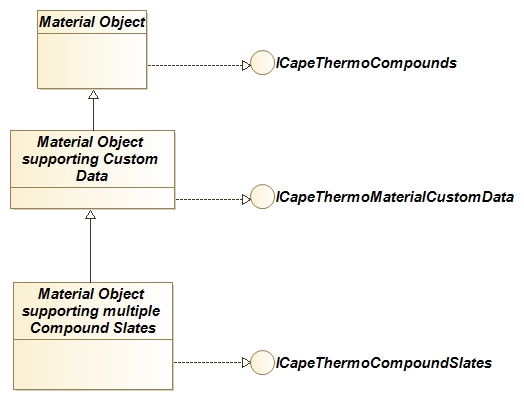
ICapeThermoCompoundSlates exposes the available Compound Slates and their attributes.
If a PMC requires access to a Compound Slate other than the Default Compound Slate, the PMC requests the Material Object to change the Compound Slate on which it is operating, using ICapeThermoCompoundSlates::SetActiveCompoundSlate. After this, all operations on the Material Object apply to the active Compound Slate. ICapeThermoCompounds now exposes the list of Compounds of the active Compound Slate and the corresponding Compound properties. ICapeThermoMaterial allows for setting and getting mixture thermodynamic and physical properties based on the active Compound Slate. ICapeThermoPropertyRoutine, ICapeThermoEquilibriumRoutine and ICapeThermoEquilibriumRoutineEx provide property and phase equilibrium calculations for the active Compound Slate. The state of the Material Object (overall pressure, temperature, composition, phase presence, phase fractions, phase compositions and temperature and pressure for each phase) is shared between all Compound Slates, e.g., setting composition for a phase on the active Compound Slate affects composition of all Compound Slates.
This way, multiple software components that operate on the same Material Object do not need to be concerned in which Compound Slate the state variables (temperature, pressure, fraction) have been set on the Material Object. All other properties (compound constants, temperature and pressure dependent compound properties, single phase and two-phase mixture properties) than the ones defining state are unique to each Compound Slate, e.g., calculating fugacity coefficients for the active Compound Slate does not make fugacity coefficients available for any other Compound Slate. If a Property calculation is required by a software component on the Material Object for a specific Compound Slate, the software component must set the Compound Slate as the active Compound Slate on the Material Object and then request the calculation before getting the value from the Material Object.
If multiple Compound Slates are supported by a Property Package, the Property Package must implement the two interfaces ICapeThermoCompoundSlates and ICapeThermoCompoundSlateUtilities (see Figure 6-2). Additional interfaces for a Property Package acting as a Reaction Server are shown in Figure 4-4 and additional interfaces for a Property Package acting as a Reactive Equilibrium Server are shown on Figure 5-2.
Figure 6-2 Component diagram: Property Package supporting multiple compound slates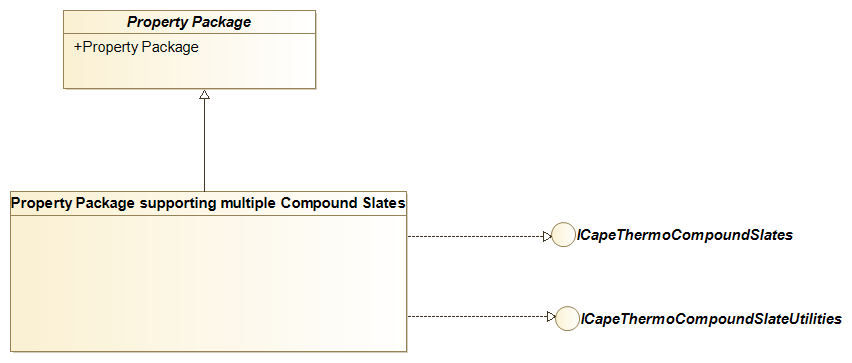
Like for the Material Object, ICapeThermoCompoundSlates exposes the available Compound Slates and their attributes, and allows setting the active Compound Slate. ICapeThermoCompoundSlateUtilities helps the PME to configure subsets of Compounds that are consistent over multiple Compound Slates.
Requirements
Introduction
The software component that defines one or more Compound Slates is a Compound Server.
Any software component that uses the Compound Slates defined by a Compound Server, is referred to as a Compound Client. Typically, the Compound Server and the Equilibrium Server are the same software component, e.g. an external Property Package or the native thermodynamics of the PME.
The Compound Slate exposed by default by the Material Object is referred to as the Default Compound Slate. It is simply exposed by ICapeThermoCompounds on a Material Object prior to setting any active Compound Slate, or after setting the active Compound Slate to the default Compound Slate. Similarly, a Property Package or any other external Compound Server also exposes its Default Compound Slate via ICapeThermoCompounds. When the active Compound Slate is changed, the behaviour of ICapeThermoCompounds on the Property Package adapts to reflect the active Compound Slate. Compound Clients that only support the Default Compound Slate have no added benefits from the functionality of this chapter. The remainder of this chapter applies only to Compound Clients able to use multiple Compound Slates.
The scope of the subsequent requirements is as follows.
A Compound Server that chooses, for example for intellectual property reasons or to hide the actual complexity of the chemistry, to expose only Apparent Compounds, behaves as a “classic” non-reactive Equilibrium Server. In the case where such a Compound Server is a Property Package, this implies that true equilibrium composition is not stored on the Material Object and the Property Package itself is responsible for managing internally the true equilibrium composition between equilibrium and property calculations. In this scenario, the Compound Client is unaware that a True Compound Slate exists. As this scenario has no further implications on the interaction between a Compound Server and a Compound Client, it does not call for the additional interface described here and is fulfilled by the interfaces described in the Thermodynamic and Physical Properties interface specification (iii).
If a Compound Server exposes only true compounds and is reactive in nature, it must comply with the requirements outlined in Chapter 5: Reactive phase equilibria. Beyond that there are no further implication on the interaction between the Compound Client and the Compound Server.
The remainder of this chapter deals only with Compound Servers exposing multiple Compound Slates. In the naming of requirements that follow, PME indicates requirements applicable to Process Modelling Environments, CS means requirements applicable to Compound Servers while PP means requirements applicable to Property Packages.
Requirements
Textual Requirements
REQ-CS-1
a Compound Server that provides multiple Compound Slates must also provide physical and thermodynamic property calculations and phase equilibrium calculations
Rationale: Any scenario in which compound definitions for multiple Compound Slates do not reside in the same software component that provides the thermodynamics is considered out-of-scope for this document because of additional complexity arising from Compound mapping.
REQ-CS-2
physically feasible values for property “fraction” (composition) corresponding to the Default Compound Slate must be strictly within the range from 0 to 1 inclusive.
Rationale: The Default Compound Slate must be compatible with any possible situation and therefore compositions must be physically feasible for compatibility with existing implementations. This requirement always holds for a slate of True Compounds but not necessarily for a slate of Apparent Compounds. Therefore, the Compound Server can only define a Compound Slate of Apparent Compounds as the Default Compound Slate if it ensures that the Compound Slate fulfils the requirement of strictly non-negative composition. Any operation outside of the region where composition is out the range from 0 to 1 inclusive must raise an error.
REQ-PME-3
if a Material Object supports multiple Compound Slates, the Material Object must implement ICapeThermoCompoundSlates.
Rationale: ICapeThermoCompoundSlates exposes the name and attributes of each Compound Slate to PMCs such as Unit Operations. The attributes of Compound Slates convey information about the Compound Slate: e.g. whether if it is an apparent or true Compound Slate, whether the phase equilibria are reactive or non-reactive, whether the composition may become negative or not. For details see GetCompoundSlateInfo. Also, ICapeThermoCompoundSlates allows switching between Compound Slates.
REQ-CS-4
if a Property Package or any other external Compound Server is used and this Compound Server supports multiple Compound Slates, the Compound Server must implement ICapeThermoCompoundSlates.
Rationale: See REQ-53-PME.
REQ-PME-5
a Material Object that supports multiple Compound Slates exposed by a Property Package must implement ICapeThermoMaterialCustomData
Rationale: The Custom Data interface (x) provides the Property Package with a mechanism to store on the Material Object the necessary information to avoid recalculating chemical phase equilibrium in between requests for composition conversions or for properties.
REQ-CS-6
names of Compound Slates must be unique.
Rationale: The name of the Compound Slate is used to identify a Compound Slate.
REQ-CS-7
Default Compound Slate must be the first Compound Slate in the list of Compound Slates exposed by ICapeThermoCompoundSlates.
Rationale: To facilitate easy selection of the Default Compound Slate, the Default Compound Slate is the first Compound Slate in the list of Compound Slates.
REQ-PME-8
if multiple Compound Slates exist, the Material Object must allow selecting the active Compound Slate though ICapeThermoCompoundSlates::SetActiveCompoundSlate.
Rationale: The active compound slate allows operating on Compound Slates other than the Default Compound Slate.
The Compounds exposed through ICapeThermoCompounds correspond to the active Compound Slate and the properties on the Material Object reflect those corresponding to the active Compound Slate.
REQ-PME-9
the PME must ensure that the active Compound Slate on a Material Object is restored after returning from an external call.
Rationale: The active Compound Slate imposed by a PMC must not affect other PMCs. For example, if a Unit Operation requests a Phase Equilibrium calculation from a Material Object, and the Material Object is passed on to a Property Package, the Property Package may change the active Compound Slate on the Material Object. The Unit Operation however should, upon return, not have to validate or restore the active Compound Slate, which should be the slate that was selected by the Unit Operation. The responsibility to restore the active Compound Slate is placed on the PME; the PME must make sure that the Compound Slate is restored after the external call to the Property Package.
REQ-PME-10
the PME must ensure the correct active Compound Slate is set on a Property Package prior to any call to the Property Package.
Rationale: The active Compound Slate on a Property Package determines the behaviour of the Property Package in methods that involve Compounds. For consistency, the Property Package must use the same Compound Slate as the Material Object when performing a calculation on behalf of the Material Object.
The PME is responsible for setting the active Material Object on the Property Package. The PME is also responsible for setting the active Compound Slate on the Property Package.
REQ-PME-11
the PME must ensure that the initial active Compound Slate on a Material Object is the default Compound Slate on a Material Object.
Rationale: A PMC that is not aware of Compound Slates should operate on the default Compound Slate. REQ-59-PME will ensure that the default Compound Slate remains the active Compound Slate over time, prior to any external call on e.g. a Unit Operation. Note that for external calls on a Property Package, this does not hold as such calls may be made from within the context of an external call to another PMC such as a Unit Operation, and therefore the Property Package may be requested to operate on a Compound Slate different from the default one. Also the PME may internally change the active Compound Slate on a Material Object for an external call to a Property Package, in order to make property calculations on a Compound Slate different from the default one.
Note that, in principle, the PME may choose a different default Compound Slate for different PMCs (e.g. different Unit Operations) as long as for each selected default Compound Slate, the compositions are strictly non-negative (cf. REQ-52-CS), the Compound Slate exposed by the Material Object comply to REQ-57-CS, and the PME ensures that the default Compound Slate is selected prior to external calls to a PMC (such as a Unit Operation) to satisfy requirement REQ-61-PME.
REQ-PME-12
a PME, that is aware of Compound Slates, requests a validation to ensure consistency if a subset of Compounds is selected by the Flowsheet User.
Rationale: The Property Package has been configured so that the total set of Compounds and its Chemical Reactions are internally consistent. The Property Package may be used to perform calculations on subsets of Compounds. The set of Chemical Reactions remains fixed as per the Property Package configuration. Therefore, the presence of some Compounds may imply the presence of other Compounds through Equilibrium Reactions. This implies that any sub-selection of Compounds must be consistent with the configured Chemical Reactions. A sub-selection of Compounds must therefore be validated by the Property Package.
The validation is performed by calling ValidateCompoundList on ICapeThermoCompoundSlateUtilities implemented by the Property Package. In case of an invalid selection of Compounds, the PME presents the message returned by ValidateCompoundList to the Flowsheet User so that the Flowsheet User may correct its selection of Compounds.
REQ-PP-13
the Property Package must not presume that a validation of a sub-selection of the Default Compound Slate has been performed before a property or Phase Equilibrium calculation is requested.
Rationale: A PME not aware of Compound Slates, will not perform a Compound Slate validation and may make an inconsistent selection of Compounds on the Default Compound Slate. This will lead to an error later on, when a Material Object with that Compound selection is set as the active Material Object or when a calculation using that Compound Slate is attempted. A Material Object with an invalid set of Compounds may be refused as an active Material Object by the Property Package when ICapeThermoMaterialObject::SetMaterial is called or alternatively an equilibrium or mixture property calculation may fail.
REQ-PME-14
Any sub-selection of Compounds on a Material Object must be applied in all Compound Slates exposed by the Material Object.
Rationale: The Flowsheet User may make a sub-selection of Compounds on the Default Compound Slate or on any Compound Slates. State of the Material Object in one Compound Slate reflects the state of the Material Object in any other Compound Slate so the Compound sets of the two must be kept consistent.
To obtain an equivalent subset of Compounds in another Compound Slate, the PME calls TranslateCompoundList on ICapeThermoCompoundSlateUtilities implemented by the Property Package.
REQ-PME-15
state (composition, temperature, pressure, total and compound flowrates, phase existence and phase fractions) must be uniquely defined on a Material Object. Therefore, the Material Object’s state set by an operation in the active Compound Slate is reflected in all other Compound Slates.
Rationale: Different software components are allowed to operate on different Compound Slates. Consider for example a Unit Operation A with a product stream S that is the feed stream of Unit Operation B. Unit Operation A must calculate the state equilibrium of its product stream S. Unit Operation B may operate on a different Compound Slate than Unit Operation A does. However, the Phase Equilibrium predicted by Unit Operation A on S must be interpreted by Unit Operation B. That requires Phase Equilibrium to be shared between all Compound Slates defined on a Material Object.
Effectively this implies that upon setting a composition in the active Compound Slate, the Material Object should remove the corresponding compositions for other Compound Slates, and store the composition for the active Compound Slate, along with its basis and a reference to the Compound Slate that composition is defined in (the currently active Compound Slate). When composition is required in another Compound Slate, the Material Object provides the conversion. Similarly, phase fractions may require a conversion; molar values for phase fractions may depend on the Compound Slate. Temperature and pressure do not require translation between one Compound Slate and another.
For translation of composition from one compound slate to another, the Material Object may call ICapeThermoCompoundSlateUtilities::ConvertFractionSinglePhase on the Property Package. Note that ConvertFractionSinglePhase may result composition in a basis imposed by the Property Package. Therefore, when required, basis conversion of composition is done in a separate step by the PME using only molecular weights. Basis conversions remains, as usual, a responsibility of the Material Object.
When total flowrate is needed for a Compound Slate or in a basis different from the one it was stored with, the PME performs the required conversion. If instead of total flowrate, compound flowrates are stored and need to be converted to another Compound Slate, the conversion route is via composition and total flowrate.
When phase fractions are needed for a Compound Slate or in a basis different from the one phase fractions were stored with, the PME performs the required conversion. For this action, the phase fractions and compositions of all Phases present on the Material Object must be known. One possible route is via mass phase fractions, which do not depend on Compound Slate.
REQ-PME-16
properties calculated for a Material Object for each Compound Slate must be treated as different properties.
Rationale: All Physical Properties that can be calculated by GetTDependentProperty, GetPDependentProperty, CalcSinglePhaseProp, CalcAndGetLnPhi and CalcTwoPhaseProp on one Compound Slate, are not automatically equal to the same Physical Properties calculated on another Compound Slate. Although specific enthalpy can be expected to have an equal value under different Compound Slates, this is not the case for molar enthalpy or the composition derivatives of specific enthalpy. Physical Properties such as fugacities or activities that apply to each Compound clearly have different values for each Compound Slate. The number of values for such properties is depending on the Compound Slate as well.
Consequently, properties calculated on an active Compound Slate are set and obtained using the SetOverallProp, SetsinglePhaseProp, GetOverallProp or GetSinglePhaseProp method of the same Material Object, with the same active Compound Slate. Calculating enthalpy for a particular Compound Slate does not imply that it is known for any other Compound Slate. Only temperature, pressure, flow, totalFlow, phaseFraction and fraction can be considered as known in for all Compound Slates if they are known in one Compound Slate.
Basis conversion of any property other than composition cannot be performed upon setting the property because the composition required for the basis conversion might not yet have been set. A typical implementation would defer basis conversion until the converted property is needed. Similarly, it is advised to postpone Compound Slate conversions until the moment they are required (“just-in-time” conversions).
REQ-CS-17
prior to a Phase Equilibrium calculation, equilibrium conditions other than temperature and pressure must be specified using the same active Compound Slate as the Compound Slate that is active when the Phase Equilibrium calculation is requested.
Rationale: The flash condition properties may depend on Compound Slate, see REQ-66-PME.
REQ-PP-18
before getting and setting on the active Material Object, properties for a particular Compound Slate, the Property Package must ensure this Compound Slate is active on the Material Object.
Rationale: The Property Package cannot assume that the Compound Slate on the Material Object matches the Compound Slate used by the Property Package. There are several reasons to impose this requirement:
The Property Package can assume that the Compound List on the active Material Object remains unchanged between two calls to SetMaterial. As per REQ-64- PME, this holds for all Compound Slates, so that the Property Package does not need to query for the Material Object’s Compound list for more than one Compound Slate.
Prior to phase equilibrium calculations, the Property Package must be aware which is the Compound Slate in which the equilibrium conditions are defined, see REQ-67- CS.
For property calculations using ICapeThermoPropertyRoutine, the Property Package must be aware of which Compound Slate the properties are requested for. The PME may switch the active Compound Slate to obtain composition (and temperature and pressure) but needs to set the requested property using the active Compound Slate for which the request was made.
Some properties may only be available for certain Compound Slates, affecting property lists using ICapeThermoPropertyRoutine.
The chosen scheme applies to all Compound Slates so that the PME can change the active Compound Slate without changing the active Material Object.
Between two calls to SetMaterial, the Property Package only needs to inquire once what the sub-selection of Compounds is.
For other Compound Slates of the active Material Object, the Property Package may obtain the sub-selection of Compounds by calling GetCompoundList. However, as per REQ-64-PME, the sub-selections for all Compound Slates are consistent with each other. The Property Package may alternatively obtain the sub-selection on for any Compound Slate via its internal implementation of TranslateCompoundList. The Property Package may decide which of these approaches it deems more efficient.
REQ-PME-19
after reloading a Property Package or editing a Property Package, the PME must synchronize the Compound list in all the Compound Slates the PME is interesting in.
Rationale: After editing a Property Package, the PME must assume that the list of Compound Slates may have changed or that the Compounds associated with Compound Slate may have changed. For example, the Property Package may have internally revised its reaction system so that the Compounds associated with each Compound Slate have changed.
Therefore, the PME must re-obtain the Compound list in all Compound Slates that are in use, must check for inconsistencies (a Compound Slate may have been removed, or a Compound may have been removed from a Compound Slate in use) and must provide means for the Flowsheet User to resolve these inconsistencies
A similar requirement applies to the PME when reloading a previously saved PME document (e.g., Flowsheet), Property Packages that are externally configured may have changed since the save was done. Even if the Property Package is persisted, the internal configuration of the Property Package may have changed. For example, constant properties of some Compounds may have changed. Or a newer version of a Property Package may have a different Phase support. Or the Compound list within a Compound Slate may have changed.
REQ-PME-20
in all communications with the Compound Server, the Compound Client must use Compound Slate names defined by the Compound Server.
Rationale: Compound Slate is identified by its name. The PME may choose to assign a different label to a Compound Slate in communication with the Flowsheet User or with a Unit Operation. However, the PME must adhere to the label defined by the Property Package in communication with the Property Package.
Use Cases
Actors
PME. A Process Modelling Environment, also known as a CAPE-OPEN Simulator Executive (COSE), that supports multiple Compound Slates.UNIT. A CAPE-OPEN Unit Operation supporting multiple Compound Slates.
Compound Client. Any software component that uses the Compound Slates defined by a Compound Server is referred to as a Compound Client. A Material Object is always a Compound Server from a Unit Operation point of view and may also be a Compound Client from a Property Package point of view.
Property Package. A CAPE-OPEN thermodynamic Property Package, external to the PME, as defined in (iii), which supports multiple Compound Slates.
Use Case Priorities
All Use Cases carry a high priority which means that they represent an essential functionality, a functionality without which the operation usability or performance might be seriously compromised.Use Case map
Figure 6-3 Use Case map for Compound Slates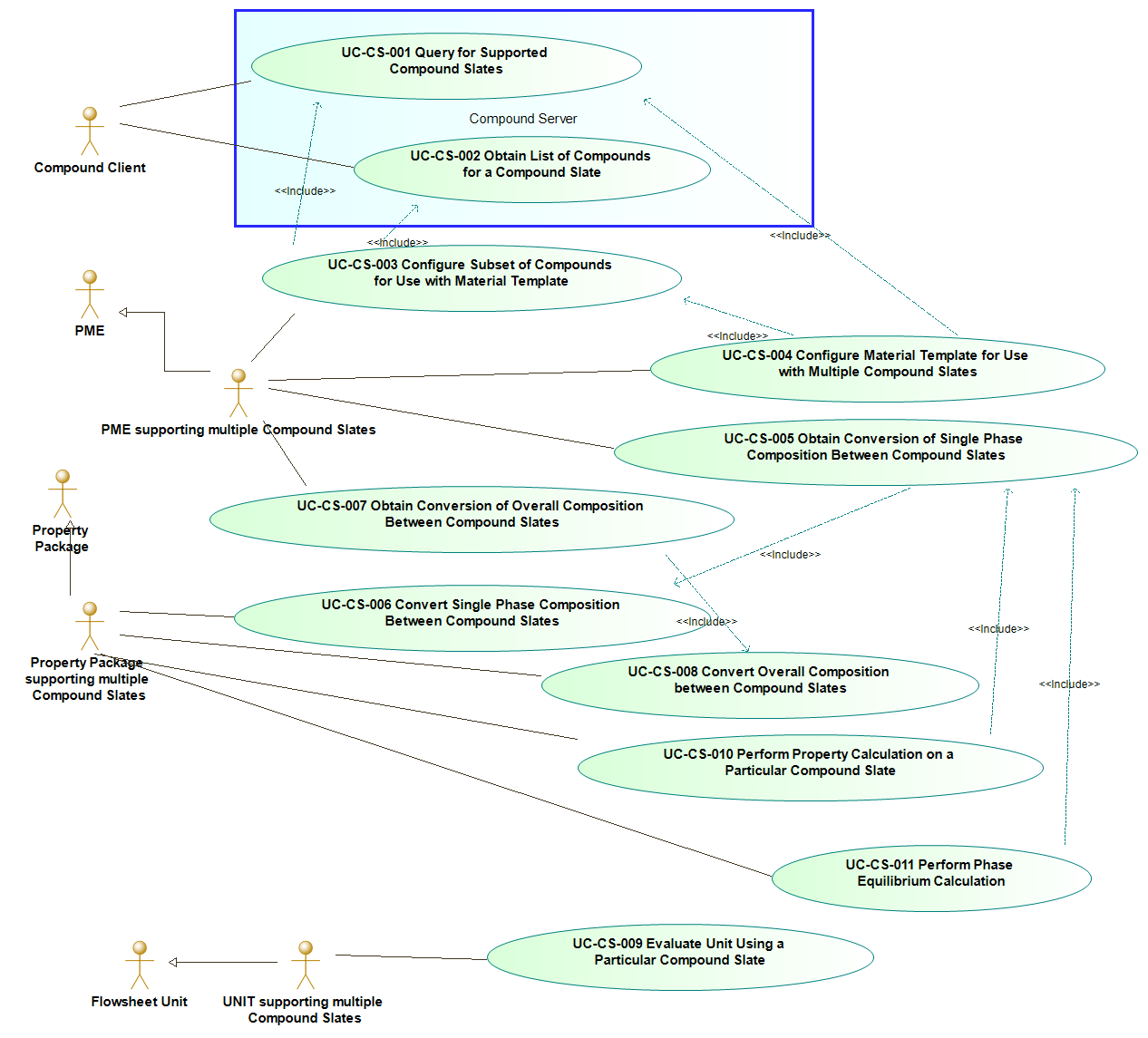
List of Use Cases
- UC-CS-001 : Query for supported Compound Slates
- UC-CS-002 : Obtain list of Compounds for A Compound Slate
- UC-CS-003 : Configure subset of compounds for use with Material Template
- UC-CS-004 : Configure Material Template for use with multiple Compound Slates
- UC-CS-005 : Obtain Conversion Of Single Phase composition between compound slates
- UC-CS-006 : Convert Single Phase composition between compound slates
- UC-CS-007 : Obtain Conversion Of Overall composition between compound slates
- UC-CS-008 : Convert Overall composition between compound slates
- UC-CS-009 : Evaluate Unit using a particular Compound Slate
- UC-CS-010 : perform property calculation on a particular Compound Slate
- UC-CS-011 : perform Phase Equilibrium calculation
UC-CS-1: Query for supported Compound Slates
Actor: Compound Client
Priority: All Use Cases carry a high priority
Status:
<This Use Case is fulfilled by the methods of ICapeThermoCompoundSlates and ICapeThermoCompounds>
Pre-Conditions:
<A Compound Server exists>
Flow Of Events:
Step 1. The Compound Client queries the Compound Server for ICapeThermoCompoundSlates. If ICapeThermoCompoundSlates is not exposed by the Compound Server, the Compound Client assumes that the Compound Server exposes only one Compound Slate, which is the Default Compound Slate and this Use Case ends here.
Step 2. The Compound Client obtains the list of Compound Slates from the Compound Server through the property CompoundSlateList of ICapeThermoCompoundSlates.
Step 3. Using ICapeThermoCompoundSlates::GetCompoundSlateInfo, the Compound Client can query attributes of any Compound Slate, such as IsPhaseEquilibriumReactive, TrueCompounds (see full list of Compound Slate attributes). These attributes inform the Compound Client how the Compound Slate should or could be used.
Errors:
None
Post-Conditions:
<The Compound Client knows about the list of Compound Slates supported by the Compound Server>
UC-CS-2: Obtain list of Compounds for A Compound Slate
Actor: Compound Client
Priority: All Use Cases carry a high priority
Status:
<This Use Case is fulfilled by the methods of ICapeThermoCompounds and ICapeThermoCompoundSlates>
Pre-Conditions:
None
Flow Of Events:
Using the ICapeThermoCompoundSlates::ActiveCompoundSlate property, the Compound Client sets the Compound Slate as the active Compound Slate on the Compound Server.
The Compound Client obtains the list of Compounds of the active Compound Slate using ICapeThermoCompounds::GetCompoundList.
Errors:
<Invalid Argument: Specified Compound Slate is not supported by the Compound Server>
Post-Conditions:
<The active Compound Slate on the Compound Server may have changed>; <The Compound Client knows the list of Compounds of the Compound Slate>
UC-CS-3: Configure subset of compounds for use with Material Template
Actor: PME
Priority: All Use Cases carry a high priority
Status:
< Methods of ICapeThermoCompoundSlateUtilities fulfil this Use Case>
Pre-Conditions:
<A Property Package is used that supports Compound Slates>; <At least one Compound Slate supported by the Property Package is known by the Flowsheet User>
Flow Of Events:
Step 1. If not already known, the PME, using UC-CS-001 and acting as a Compound Client, obtains the list of Compound Slates supported by the Property Package.
Step 2. As part of the configuration of the Material Template, the PME lets the Flowsheet User select a Compound Slate.
Step 3. The PME obtains the list of Compounds for this Compound Slate using UC-CS-002.
Step 4. The PME allows the Flowsheet User to select the Compounds to be used from the Compounds within the selected Compound Slate.
Step 5. Calling ICapeThermoCompoundSlateUtilities::ValidateCompoundList on the Property Package, the PME validates the selection of Compounds made by the Flowsheet User on the selected Compound Slate. Validation succeeds only if the Property Package will be able to perform a unique, bidirectional translation of the list of selected Compounds to all other Compound Slates defined by the Property Package. If validation succeeds, the PME moves to step 6.
If the list of selected Compounds is indicated as invalid, the PME informs the Flowsheet User that the selection is incorrect, using the description returned by ICapeThermoCompoundSlateUtilities::ValidateCompoundList. The PME returns to step 4.
Step 6. Once the list of selected Compounds is valid, the PME stores this list.
Step 7. The PME uses ICapeThermoCompoundSlateUtilities::TranslateCompoundList to translate this list to the lists of Compounds required for each of the other Compound Slates configured on the Material Template.
Errors:
<The selection of compounds by the Flowsheet User is incorrect>
Post-Conditions:
<A valid sub-selection of Compounds is made>, <For each Compound Slate, a consistent set of Compounds is determined so that composition conversion can be performed>
UC-CS-4: Configure Material Template for use with multiple Compound Slates
Actor: PME
Priority: All Use Cases carry a high priority
Status:
<This Use Case is fulfilled by internal mechanisms of the PME>
Pre-Conditions:
<A Property Package is used that supports Compound Slates>; <A Material Template exists, and its configuration needs to be changed>
Flow Of Events:
Using UC-CS-001, the PME, acting as a Compound Client, obtains the Compound Slates supported by the Property Package, that is used as a Compound Server.
Out of the Compound Slates supported by the Property Package, the PME determines a list of supported Compound Slates based on the information obtained from each Compound Slate (The PME may support all Compound Slates exposed by the Property Package or, based on the information obtained in UC-CS-001, the PME may discard specific Compound Slates, which are not compatible with the PME. For example, PME may only support Compound Slates for which composition is non-negative).
The PME executes UC-CS-003.
Among the Compound Slates supported by the PME, the PME determines which Compound Slate is to be used as the default Compound Slate for Material Objects associated with the Material Template being configured (This may involve interaction with the Flowsheet User and therefore is part of the Material Template configuration. Commonly the PME matches the default Compound Slate of the Property Package. The PME may select another Compound Slate as the Default Compound Slate for Material Objects associated with the Material Template).
To be capable to provide further interactions with each of the other Compound Slates exposed by Material Objects associated with the Material Template, the PME stores sufficient information, including the names of the Compound Slates and selection of Compounds for the supported Compound Slates.
Errors:
<PME does not support any of the Compound Slates provided by the Property Package>
Post-Conditions:
<Supported Compound Slates are part of the Flowsheet configuration>; < Compound selection by the Flowsheet User is part of the Flowsheet configuration>; <Compound Slate specific information has been obtained from the Property Package>; <The Material Template is configured for use with one or more Compound Slates>
UC-CS-5: Obtain Conversion Of Single Phase composition between compound slates
The PME requires the conversion of a single-phase composition in the source Compound Slate (a Compound Slate for which composition is known) into the composition expressed in the target Compound Slate.
Actor: PME
Priority: All Use Cases carry a high priority
Status:
<This Use Case is fulfilled by ICapeThermoCompoundSlateUtilities::ConvertFractionSinglePhase>
Pre-Conditions:
<Material Template is configured for use with multiple Compound Slates>; <Compound Server is a Property Package with multiple Compound Slates>
Flow Of Events:
At any time during this Use Case, the Material Object ensures that the Phase composition expressed in the source Compound Slate is kept unchanged and accessible. Furthermore, the PME ensures that the Phase status is not affected by the operations of the Use Case.
Step 1. The PME ensures that Phase is present and that composition for the Phase in the source Compound Slate as well as temperature and pressure for the Phase are available on the Material Object. Be advised that the temperature and pressure stored on the Material Object as state variables may affect the outcome of this Use Case.
Step 2. To restore the active Compound Slate at step 6, the PME remembers the active Compound Slate.
Step 3. If not already the case, the PME sets the Material Object as the active Material Object on the Property Package.
Step 4. The PME invokes ICapeThermoCompoundSlateUtilities::ConvertFractionSinglePhase on the Property Package, with as input arguments the phase ID for which the conversion is required, the source Compound Slate and the target Compound Slate (the Compound Slate in which composition is required). In response, the Property Package executes UC-CS-006 and returns the Phase composition and its basis expressed in the target Compound Slate as output arguments.
Step 5. The Material Object stores the Phase composition provided by the Property Package, and expressed in the target Compound Slate, along with the corresponding basis and the reference to the target Compound Slate (The Material Object may choose to perform this storage operation either in a permanent or temporary way. Temporary means that the Phase composition provided by the Property Package is passed to whatever client of the Material Object who requested the information in the first place and once this operation is finished, the composition expressed in the target Compound Slate is no longer available from the Material Object without performing again the same Use Case).
Step 6. Cf. REQ-59-PME, the PME restores the active Compound Slate to the same value as prior to invoking ICapeThermoCompoundSlateUtilities::ConvertFractionSinglePhase.
Errors:
<Conversion is not possible>
Post-Conditions:
<The active Compound Slate remains unchanged, also in the case of Use Case errors>; <The Phase status is unaffected by the conversion; phases that were at equilibrium prior to the conversion are still at equilibrium>; <The converted Phase composition has been passed to the Client who requested it>
Uses:
UC-CS-006
UC-CS-6: Convert Single Phase composition between compound slates
Actor: Property Package
Priority: All Use Cases carry a high priority
Status:
<This Use Case is fulfilled by ICapeThermoCompoundSlateUtilities::ConvertFractionSinglePhase>
Pre-Conditions:
<This Use Case is executed as a part of UC-CS-005>
Flow Of Events:
The Property Package receives a call on ICapeThermoCompoundSlateUtilities::ConvertFractionSinglePhase, with Phase, source and target Compound Slate passed as input arguments.
The Property Package sets the source Compound Slate as the active Compound Slate on the active Material Object using property ICapeThermoCompoundSlates::ActiveCompoundSlate.
Using ICapeThermoMaterial::GetSinglePhaseProp, the Property Package obtains the Phase composition for the specified Phase, expressed in the source Compound Slate, in the basis desired by the Property Package. If required, the Property Package obtains temperature and / or pressure for the Phase from the Material Object.
The Property Package internally converts the Phase composition to the target Compound Slate: if Custom Data is available and still valid for the Phase (e.g. from a previous Phase Equilibrium calculation or an earlier property calculation for the same Phase), and contains sufficient data to perform the conversion without recalculating the chemical equilibrium, the Custom Data should be used; if not, a single-phase chemical equilibrium calculation may be needed to determine the Phase composition expressed in the target Compound Slate. A chemical equilibrium calculation is required in case composition expressed in the source Compound Slate is apparent and the corresponding true composition is needed and unknown (and not available from Custom Data). If a chemical equilibrium calculation is performed, its results may be stored in the Custom Data.
Note that the composition conversion request is for a single phase, which may exist as part of a phase equilibrium or may be a non-equilibrium phase. So, a phase equilibrium calculation is not needed.
The Property Package returns the calculated composition to the PME, along with the basis in which the composition was calculated.
Errors:
<Conversion is not possible, e.g., chemical equilibrium does not exist at the source composition, the source composition may not have a corresponding representation in the target Compound Slate>
<Conversion misses required information. E.g., temperature but not available on the Material Object, pressure is required, but not available on the Material Object>
Post-Conditions:
<The Custom Data may be updated with information on the chemical equilibrium for the target phase>
UC-CS-7: Obtain Conversion Of Overall composition between compound slates
The PME requires the conversion of overall composition at phase equilibrium in the source Compound Slate (a Compound Slate for which composition is known) into the composition expressed in the target Compound Slate.
Actor: PME
Priority: All Use Cases carry a high priority
Status:
<This Use Case is fulfilled by ICapeThermoCompoundSlateUtilities::ConvertFractionOverall>
Pre-Conditions:
<Material Template is configured for use with multiple Compound Slates>, <Compound Server is a Property Package with multiple Compound Slates>
Flow Of Events:
At any time during this Use Case, the Material Object ensures that the Phase composition expressed in the source Compound Slate is kept unchanged and accessible. Furthermore, the PME ensures that the Phase status is not affected by the operations of the Use Case.
Step 1. The PME ensures overall composition on the source Compound Slate is available on the Material Object and that the Material Object is in Phase Equilibrium (ICapeThermoEquilibriumRoutine::CalcEquilibrium or ICapeThermoEquilibriumRoutineEx::CalcEquilibriumEx has been called and its results are successfully processed).
Step 2. To restore the active Compound Slate at step 6, the PME remembers the active Compound Slate.
Step 3. If not already the case, the PME sets the Material Object as the active Material Object on the Property Package.
Step 4. The PME invokes ICapeThermoCompoundSlateUtilities::ConvertFractionOverall on the Property Package, with, as input arguments, the source Compound Slate and the target Compound Slate (the Compound Slate in which composition is required), and the list of phases for which phase fraction and composition conversion are optionally requested in addition to the overall conversion. The phases for which phase fraction and phase composition conversion is requested, must be phases that are present at equilibrium. In response, the Property Package executes UC-CS-008 and returns the composition and the basis as output arguments, as well as the phase fractions and compositions for the requested phases (in the same basis).
Step 5. The Material Object stores the overall composition, phase fractions and phase compositions provided by the Property Package, and expressed in the target Compound Slate, along with the corresponding basis and the reference to the target Compound Slate (The Material Object may choose to perform this storage operation either in a permanent or temporary way. Temporary means that the Phase composition provided by the Property Package is passed to whatever client of the Material Object who requested the information in the first place and once this operation is finished, the composition expressed in the target Compound Slate is no longer available from the Material Object without performing again the same Use Case).
Step 6. Cf. REQ-59-PME, the PME restores the active Compound Slate back to the value prior to invoking ICapeThermoCompoundSlateUtilities::ConvertFractionOverall.
Errors:
<Conversion is not possible>; <Converted composition and phase fraction are requested for a phase which is not present at equilibrium>
Post-Conditions:
<The active Compound Slate remains unchanged, also in the case of Use Case errors>; <The Phase status is unaffected by the conversion; phases that were at equilibrium prior to the conversion are still at equilibrium>
Uses:
UC-CS-008
UC-CS-8: Convert Overall composition between compound slates
Actor: Property Package
Priority: All Use Cases carry a high priority
Status:
<This Use Case is fulfilled by ICapeThermoCompoundSlateUtilities::ConvertFractionOverall>
Pre-Conditions:
<This Use Case is executed as a part of UC-CS-007>
Flow Of Events:
The ICapeThermoCompoundSlateUtilities::ConvertFractionOverall is invoked on the Property Package, with source and target Compound Slate as input arguments. In addition, a list of phase IDs corresponding to phases present at phase equilibrium is specified, for which conversion of phase fraction and phase composition is requested. If such conversion is not requested, the list of phase IDs is empty.
The Property Package sets the source Compound Slate as the active Compound Slate on the active Material Object using property ActiveCompoundSlate of ICapeThermoCompoundSlates.
Using ICapeThermoMaterial::GetOverallProp, the Property Package obtains the overall composition, expressed in the source Compound Slate, in the basis desired by the Property Package. If required, the Property Package obtains temperature and / or pressure from the Material Object.
The Property Package may also obtain the list of phases present at phase equilibrium, using ICapeThermoMaterial::GetPresentPhases. For each equilibrium phase, the Property Package may obtain phase fraction and composition. If required, the Property Package obtains phase temperature and / or pressure from the Material Object.
The Property Package internally converts the overall composition to the target Compound Slate: if Custom Data is available and still valid (e.g. from the Phase Equilibrium calculation), and contains sufficient data to perform the conversion without recalculating the chemical phase equilibrium, the Custom Data should be used; if not, the Property Package can still use the fact that the Material Object is at phase equilibrium and may perform if necessary, separately for each present phase, a single phase chemical equilibrium calculation. A chemical equilibrium calculation is necessary in case composition expressed in the source Compound Slate is apparent and the corresponding true composition is needed and unknown (and not available from Custom Data). If a chemical equilibrium calculation is performed, its results may be stored in the Custom Data.
The Property Package returns the calculated overall composition to the PME, along with the basis in which the composition was calculated. In addition, the Property Package returns the composition and phase fraction for each phase for which conversion is requested.
Errors:
<Conversion is not possible, e.g., chemical equilibrium does not exist at the source composition, the source composition may not have a corresponding representation in the target Compound Slate>; <Conversion misses required information. E.g. temperature or pressure is required, but not available on the Material Object>; <Composition and phase fraction conversion are requested for a phase that is not present at phase equilibrium>
Post-Conditions:
<The active Compound Slate on the Compound Server may have changed>; <The Custom Data may be updated with information on the chemical equilibrium of any phase present at phase equilibrium>
UC-CS-9: Evaluate Unit using a particular Compound Slate
This Use Case extends UC-021 (iv) and can be used in conjunction with UC-EQ-013 of this document which also extends UC-021 (iv).
UNIT that is unaware of Compound Slates obviously operates on the Default Compound Slate. In this case, UC-CS-009 does not apply.
However, if the UNIT performs its operations on a Compound Slate different from the Default Compound Slate, for example a Compound Slate specified by the Flowsheet Builder during UNIT configuration, UNIT acts on a Material Object Delegate as described below.
Actor: UNIT
Priority: All Use Cases carry a high priority
Status:
<This Use Case is fulfilled by ICapeThermoCompoundSlates>
Extends:
<UC-021 (iv) Evaluate UNIT>
Pre-Conditions:
<Same as in UC-021 (iv)>; <UNIT supports multiple Compound Slates>; <UNIT operates on a Compound Slate different from the Default Compound Slate>; <Material Template is configured for use with multiple Compound Slates>; <Default Compound Slate is active on all Material Objects connected to the UNIT>
Flow Of Events:
Step 1. For each Material Port, UNIT imposes a Compound Slate. Using property ActiveCompoundSlate on ICapeThermoCompoundSlates, UNIT sets the chosen Compound Slate on the Material Object connected to the Port.
Step 2. UNIT proceeds according to UC-021 (iv).
Step 3. After ICapeUnit::Calculate returns, the PME restores the active Compound Slate to the Default Compound Slate on all Material Objects connected to the UNIT, in accordance with requirement REQ-59-PME.
Errors:
None
Post-Conditions:
<Same as in UC-021 (iv) >
UC-CS-10: Perform property calculation on a particular Compound Slate
This Use Case describes the flow of events for the calculation of a single-phase property. The flow of events for a two-phase property calculation is analogous except for the involvement of two sets of phase conditions.
After the property calculation request returns, the PME restores the active Compound Slate on the Material Object to the Compound Slate that was active prior to the property calculation request, in accordance with requirement REQ-58-PME.
Actor: Property Package
Priority: All Use Cases carry a high priority
Status:
<This Use Case is fulfilled by methods of ICapeThermoCompoundSlates, ICapeThermoMaterial and optionally ICapeThermoMaterialCustomData>
Pre-Conditions:
<PME has set the Material Object as the active Material Object on the Property Package using ICapeThermoMaterialContext::SetMaterial>; <PME has set the active Compound Slate on the Property Package>; <Material Object is populated with the calculation conditions>
Flow Of Events:
Step 1. The Property Package receives the request to calculate one or more single-phase properties.
Step 2. The Property Package obtains the calculation conditions, e.g. composition, temperature, pressure, either from the Material Object or from the Material Object Delegate using ICapeThermoMaterial::GetSinglePhaseProperty. Property Package may change the active Compound Slate on the Material Object to get the calculation conditions. Property Package should choose the Compound Slate that fits best its internal needs. In either case, the PME may convert composition using UC-CS-005, but if the Material Object happens to have the composition stored for the Compound Slate used by the Property Package, composition conversion is avoided altogether.
If the Property Package requires true composition, it tries to obtain true composition previously stored for the current calculation conditions composition (see discussion in 6.4.1). If the previously stored true composition is not available, the Property Package re-calculates true composition.
Step 3. The Property Package internally calculates the requested properties.
Step 4. Only after all the requested properties have been successfully calculated (iii), the Property Package ensures the active Compound Slate on the Material Object is the one for which the property calculation was requested, and stores the results on the Material Object via ICapeThermoMaterial::SetSinglePhaseProperty.
Errors:
<Calculation failed.>
Post-Conditions:
<Values of requested properties are stored on the Material Object.>; <Custom Data may have been stored>
Uses:
UC-CS-005
UC-CS-11: Perform Phase Equilibrium calculation
After the phase equilibrium request returns, in accordance with requirement REQ-58-PME, the PME restores the active Compound Slate on the Material Object to the Compound Slate that was active prior to the phase equilibrium request.
Actor: Property Package
Priority: All Use Cases carry a high priority
Status:
<This Use Case is fulfilled by ICapeThermoCompoundSlates, ICapeThermoMaterial and optionally ICapeThermoMaterialCustomData>
Pre-Conditions:
<PME has set the Material Object as the active Material Object using ICapeThermoMaterialContext::SetMaterial>; <PME has set the active Compound Slate on the Property Package>; <Material Object is populated with the overall composition and values for the two Phase Equilibrium conditions; the Phase Equilibrium conditions must be specified for the active Compound Slate (if not pressure or temperature)>; <The Phases allowed to take part in the Phase Equilibrium calculation are set as present>
Flow Of Events:
The Property Package is requested to calculate a Phase Equilibrium.
If equilibrium conditions other than pressure or temperature are used, the Property Package sets the active Compound Slate on the Material Object if the condition values are Compound Slate dependent. Note that for any state (composition, temperature, pressure, phase fraction), the Compound Slate selected by the Property Package does not need to match the active Compound Slate on the Property Package. Property Package should choose the Compound Slate that fits best its internal needs at calculation input. In either case, the PME may convert composition using UC-CS-005, but if the Material Object happens to have the composition stored for the Compound Slate used by the Property Package, composition conversion is avoided altogether.
The Property Package retrieves the overall composition from the active Material Object.
The Property Package internally calculates the Phase Equilibrium. The Property Package stores the results on the Material Object, using an active Compound Slate that fits best its internal needs at calculation output.
Errors:
<Calculation failed.>
Post-Conditions:
< Phase equilibrium is stored on the Material Object>; <Custom Data may have been stored>
Uses:
UC-CS-005
Analysis and Design
Due to the inherent complexity of multiple Compound Slates, typically in combination with Reactive Phase Equilibria, it is not foreseen that stand-alone Equilibrium Calculators supporting multiple Compound Slates will be made available. Rather the multiple Compound Slate functionality will be exposed by self-contained thermodynamic servers that may be either Property Packages or the PME itself.
True composition considerations
As part of a phase equilibrium or property calculation, a Property Package may calculate a true composition for one or more phases. If after a phase equilibrium calculation, properties for a phase need to be calculated, it can be inefficient for the Property Package to re-calculate the true composition for that phase.It is mandatory for all Material Object supporting multiple Compound Slates, to implement the ICapeThermoMaterialCustomData interface (xi). Property Packages can use this mechanism for true composition storage.
Interface Descriptions
| Interface Name | ICapeThermoCompoundSlates 🔗 |
|---|
Referenced in (29)
Glossary, Architecture, Architecture, Architecture, Architecture, Architecture, Architecture, Query for supported Compound Slates, Query for supported Compound Slates, Query for supported Compound Slates, Query for supported Compound Slates, Obtain list of Compounds for A Compound Slate, Obtain list of Compounds for A Compound Slate, Convert Single Phase composition between compound slates, Convert Overall composition between compound slates, Evaluate Unit using a particular Compound Slate, Evaluate Unit using a particular Compound Slate, Perform property calculation on a particular Compound Slate, Perform Phase Equilibrium calculation, ICapeThermoCompoundSlates, ICapeThermoCompoundSlates::ActiveCompoundSlate, ICapeThermoCompoundSlates::CompoundSlateList, ICapeThermoCompoundSlates::GetCompoundSlateInfo, ICapeThermoCompoundSlateUtilities::TranslateCompoundList, ICapeThermoCompoundSlateUtilities::TranslateCompoundList, ICapeThermoCompoundSlateUtilities::ValidateCompoundList, ICapeThermoCompoundSlateUtilities::ConvertFractionSinglePhase, ICapeThermoCompoundSlateUtilities::ConvertFractionSinglePhase, ICapeThermoCompoundSlateUtilities::ConvertFractionOverall
Figure 6-4 Interface diagram of ICapeThermoCompoundSlates
Methods
Referenced in (4)
| Method Name | ActiveCompoundSlate |
Description
The Compound Slate on which the Compound Server operates.
Errors
| Error | Description |
|---|---|
ECapeInvalidArgument |
The error to be raised when trying to assign a name not in the list of Compound Slates.
|
Notes
If not specified explicitly, the value of the Active Compound Slate remains the Default Compound Slate.
The Compound Slate name is one of the names returned within the list of Compound Slates of CompoundSlateList property.
Referenced in (9)
Query for supported Compound Slates, ICapeThermoCompoundSlates::ActiveCompoundSlate, ICapeThermoCompoundSlates::GetCompoundSlateInfo, ICapeThermoCompoundSlateUtilities::TranslateCompoundList, ICapeThermoCompoundSlateUtilities::TranslateCompoundList, ICapeThermoCompoundSlateUtilities::ValidateCompoundList, ICapeThermoCompoundSlateUtilities::ConvertFractionSinglePhase, ICapeThermoCompoundSlateUtilities::ConvertFractionSinglePhase, ICapeThermoCompoundSlateUtilities::ConvertFractionOverall
| Method Name | CompoundSlateList |
Description
The list of all Compound Slate names.
Errors
| Error | Description |
|---|---|
ECapeUnknown |
The error to be raised when other error(s), specified for this operation, are not suitable.
|
Notes
The Compound Slate list must not be empty and contains at least the Default Compound Slate. The Default Compound Slate must be first in the list.
The Default Compound Slate must comply with REQ-52-CS.
Each Compound Slate name must be unique within the list.
Further information on each Compound Slate may be obtained using ICapeThermoCompoundSlates::GetCompoundSlateInfo.
| Method Name | GetCompoundSlateInfo |
| Returns | CapeVariant |
Arguments
| Name | Type | Direction | Description |
|---|---|---|---|
compoundSlate |
CapeString | in |
Identifies by its name the Compound Slate for which information is required. The name must appear in the list of names obtained in property CompoundSlateList.
|
compoundSlateAttribute |
CapeString | in |
One of the attribute identifiers from the table below.
|
return |
CapeVariant | out, retval | Returns CapeVariant. |
Description
Provides information describing a Compound Slate.
Errors
| Error | Description |
|---|---|
ECapeInvalidArgument |
The error to be raised if the name of the Compound Slate does not correspond to a Compound Slate.
|
ECapeLimitedImpl |
The error to be raised if the attribute requested is not supported.
|
Notes
Note that the Phases present on the Material Object prior to this call, indicate which phases are allowed to be considered in the calculation.
Defined attributes are:
Table 6-1 Compound Slate attributes
| Attribute name | Type | Description |
|---|---|---|
| DefaultSlate | CapeBoolean | Required. True for the Default Compound Slate. Must be true for exactly one Compound Slate. |
| TrueCompounds | CapeBoolean | Required. True for the true Compound Slate. False for apparent Compound Slates. Can be true at most for one Compound Slate. |
| IsPhase EquilibriumReactive | CapeBoolean | Required. True if the Phase Equilibrium calculation is reactive for this Compound Slate (overall composition might change). False if the overall composition does not change as part of a Phase Equilibrium calculation using this Compound Slate. |
| NonNegativeFraction | CapeBoolean | Required. True if the mapping from the true Compound Slate to this Compound Slate gives fractions in the [0,1] range. Consequently, must be true for the true Compound Slate. It must also be true for the Default Compound Slate. |
| NumberOfCompounds | CapeInteger | Required. Number of Compounds in this Compound Slate. Cannot be UNDEFINED. |
| UserDescription | CapeString | Optional. Text description to help the end-user choose this Compound Slate. |
| Interface Name | ICapeThermoCompoundSlateUtilities 🔗 |
|---|
Referenced in (18)
Architecture, Architecture, Configure subset of compounds for use with Material Template, Configure subset of compounds for use with Material Template, Configure subset of compounds for use with Material Template, Configure subset of compounds for use with Material Template, Obtain Conversion Of Single Phase composition between compound slates, Obtain Conversion Of Single Phase composition between compound slates, Obtain Conversion Of Single Phase composition between compound slates, Convert Single Phase composition between compound slates, Convert Single Phase composition between compound slates, Obtain Conversion Of Overall composition between compound slates, Obtain Conversion Of Overall composition between compound slates, Obtain Conversion Of Overall composition between compound slates, Convert Overall composition between compound slates, Convert Overall composition between compound slates, ICapeThermoCompoundSlateUtilities, ICapeThermoCompoundSlateUtilities::TranslateCompoundList
This interface provides services to the PME and is implemented by external Compound Servers supporting multiple Compound Slates.
Figure 6-5 Interface diagram of ICapeThermoCompoundSlateUtilities
Methods
Referenced in (1)
| Method Name | TranslateCompoundList |
| Returns | CapeArrayString |
Arguments
| Name | Type | Direction | Description |
|---|---|---|---|
sourceCompoundSlate |
CapeString | in |
Identifies by its name the Compound Slate from which conversion takes place. The name must be present in CompoundSlateList.
|
targetCompoundSlate |
CapeString | in |
Identifies by its name the Compound Slate to which conversion takes place. The name must be present in CompoundSlateList.
|
sourceCompoundList |
CapeArrayString | in |
List of Compounds to be translated from the source Compound Slate to the target Compound Slate. Compounds must be a subset of the Compounds in the source Compound Slate.
|
return |
CapeArrayString | out, retval | Returns CapeArrayString. |
Description
Returns a list of Compounds which is the translation of a subset of Compounds of the source Compound Slate to the equivalent list of Compounds in the target Compound Slate.
Errors
| Error | Description |
|---|---|
ECapeInvalidArgument |
The error to be raised if the name of a Compound Slate does not correspond to a Compound Slate or if the source or the target Compound Slate is not valid.
|
Notes
The source Compound list must be valid (see ValidateCompoundList). The returned target Compound list must be valid.
This method is called by the PME within the configuration of the Material Template. The Material Template configuration is free to rearrange the order of Compounds as presented in the returned Compound List.
Referenced in (3)
| Method Name | ValidateCompoundList |
| Returns | CapeBoolean |
Arguments
| Name | Type | Direction | Description |
|---|---|---|---|
compoundSlate |
CapeString | in |
Identifies by its name the specified Compound Slate. The name must be present in CompoundSlateList.
|
compoundList |
CapeArrayString | in |
Identifies by their names the Compounds in the subset considered. Names must correspond to Compounds within the specified Compound Slate.
|
message |
CapeString | out |
If the given subset of Compounds is not valid, a message conveying the reason for that
|
return |
CapeBoolean | out, retval | Returns CapeBoolean. |
Description
Validates a given subset of Compounds for a specified Compound Slate.
Errors
| Error | Description |
|---|---|
ECapeInvalidArgument |
The error to be raised if the name of a Compound Slate does not correspond to a Compound Slate within the list of Compound Slates or if a Compound in the Compound List does not belong to the specified Compound Slate.
|
Notes
A subset of Compounds is invalid if the Compound List cannot represent the system under consideration. In particular, validation does not succeed if the Property Package cannot perform a unique, bidirectional translation of the selected Compound list to all other Compound Slates defined by the Property Package. A subset of Compounds may also be flagged as invalid in case Compounds that are key-Compounds to the Compound Server have been removed. For example, ammonia reaction package without ammonia present as a Compound. If validation fails, the message should contain the reason for the validation failure and should as much as possible point the end-user towards the solution.
Referenced in (5)
Obtain Conversion Of Single Phase composition between compound slates, Obtain Conversion Of Single Phase composition between compound slates, Obtain Conversion Of Single Phase composition between compound slates, Convert Single Phase composition between compound slates, Convert Single Phase composition between compound slates
| Method Name | ConvertFractionSinglePhase |
Arguments
| Name | Type | Direction | Description |
|---|---|---|---|
phaseLabel |
CapeString | in |
Label of the phase for which the composition conversion is requested.
|
sourceCompoundSlate |
CapeString | in |
Identifies by its name the Compound Slate from which conversion takes place. The name must be present in CompoundSlateList.
|
targetCompoundSlate |
CapeString | in |
Identifies by its name the Compound Slate to which conversion takes place. The name must be present in CompoundSlateList.
|
targetBasis |
CapeString | out |
Identifies the basis in which targetComposition is returned.
|
targetComposition |
CapeArrayDouble | out |
The converted composition.
|
Description
Converts composition of the given Phase from one Compound Slate to another Compound Slate.
Errors
| Error | Description |
|---|---|
ECapeInvalidArgument |
The error to be raised if the name of the Compound Slate does not correspond to a Compound Slate.
|
ECapeBadInvOrder |
The necessary pre-requisite operation has not been called prior to the operation request. The ICapeThermoMaterial interface has not been passed via a SetMaterial call prior to calling this method.
|
ECapeSolvingError |
The conversion could not be solved. For example, if the solver has run out of iterations while trying to solve a chemical equilibrium calculation.
|
Notes
The Property Package returns the converted composition in a basis of choice. This basis is returned as targetBasis.
The Property Package may be required to perform a chemical equilibrium calculation on the target phase as part of this method.
The outcome of this method may depend on values of temperature and pressure, which must be known and available via the Material Object.
Referenced in (5)
Obtain Conversion Of Overall composition between compound slates, Obtain Conversion Of Overall composition between compound slates, Obtain Conversion Of Overall composition between compound slates, Convert Overall composition between compound slates, Convert Overall composition between compound slates
| Method Name | ConvertFractionOverall |
Arguments
| Name | Type | Direction | Description |
|---|---|---|---|
sourceCompoundSlate |
CapeString | in |
Identifies by its name the compound slate from which conversion takes place. The name must be present in CompoundSlateList.
|
targetCompoundSlate |
CapeString | in |
Identifies by its name the compound slate to which conversion takes place. The name must be present in CompoundSlateList.
|
phaseLabels |
CapeArrayString | in |
An optional array of Phase labels for which targetPhaseFraction and targetPhaseComposition are to be provided. If phase fraction and composition conversion is not requested for any phases, an empty array is passed.
|
targetBasis |
CapeString | out |
Identifies the basis in which targetComposition, targetPhaseFraction and targetPhaseComposition values are returned
|
targetComposition |
CapeArrayDouble | out |
The converted composition
|
targetPhaseFraction |
CapeArrayDouble | out |
Converted phase fraction for each phase in phaseLabels. The phase fraction of the first phase is followed by the phase fraction of the second phase, and so on.
|
targetPhaseComposition |
CapeArrayDouble | out |
Converted phase composition for each phase specified in phaseLabels. The composition of the first phase is followed by the composition of the second phase, and so on.
|
Description
Converts overall composition from one Compound Slate to another Compound Slate, at phase equilibrium. In addition, converts composition and phase fraction for zero or more specified phases.
Errors
| Error | Description |
|---|---|
ECapeUnknown |
The error to be raised when other error(s), specified for this operation, are not suitable.
|
ECapeInvalidArgument |
The error to be raised if the name of the Compound Slate does not correspond to a Compound Slate, or if PhaseLabels contains a name that does not correspond to any phase present at phase equilibrium.
|
ECapeBadInvOrder |
The necessary pre-requisite operation has not been called prior to the operation request. The ICapeThermoMaterial interface has not been passed via a SetMaterial call prior to calling this method.
|
ECapeSolvingError |
The conversion could not be solved. For example, if the solver has run out of iterations while trying to solve a chemical equilibrium calculation.
|
Notes
The Property Package returns the converted composition in a basis of choice. This basis is returned as targetBasis.
The caller may request conversion for any subset of phases present at equilibrium. The Property Package may obtain the list of phases that are present at equilibrium from ICapeThermoMaterial::GetPresentPhases as implemented by the active Material Object.
The Property Package may be required to perform a chemical phase equilibrium calculation on any of the target phases as part of this method, if the Custom Data stored by the Property Package on the Material Object is not sufficient to reconstruct the converted composition. The outcome of this method may therefore depend on values of temperature and pressure, which must be known and available via the Material Object.
Scenarios
Reactor Unit Operation uses externally provided reactions
A Reactor UO uses stoichiometry, compounds and reaction properties to calculate extent of reactions and reactant conversions. The reactions are provided to the Unit Operation via the Material Object. The Reaction Server may be internal to the PME or may be a Property Package or may be a Chemical Reaction Package.All interactions for this scenario are described in chapter 4.
Equilibrium Reactions are implicitely applied throughout the Flowsheet
The Equilibrium Server is reactive. The Reactions are defined in the Equilibrium Server. The Equilibrium Server may be internal to the PME or may be a Property Package. The details of the Chemical Reactions are not exposed outside the Equilibrium Server. Reactive Phase equilibrium calculation leads to a change in the overall composition. Unit Operations must account for a possible change of the molecular weight of the overall phase.All interactions for this scenario are described in chapter 5.
Use of multiple Compound Slates within a single Material Template
An example of this scenario is the modelling of processes involving electrolytes where apparent and true Compound Slates are introduced.A default Compound Slate is defined at the PME level. A Unit Operation may choose to use the default Compound Slate provided by the PME or another Compound Slate to interact with the Material Objects. Unit Operations that are not aware. Calculations done in one Compound Slate are seamlessly translated in any other Compound Slate.
Typically, the use of multiple Compound Slates goes hand in hand with implicitly applied Equilibrium Reactions. The Phase Equilibrium is reactive for a true Compound Slate but may appear non-reactive for an apparent Compound Slate. Unit Operations that do not support Reactive Phase Equilibrium must calculate with an apparent Compound Slate.
All interactions for this scenario are described in chapters 5 and 6.
Combining Reactions from different sources
Combining reactions from multiple Reaction Servers
If the PME supports combining Reactions from multiple Chemical Reaction Servers, the PME is responsible for delegating all reaction related requests to the appropriate Chemical Reaction Server.From the point of view of a Reactor Unit Operation, all Reactions are provided by a Material Object and consequently a Reactor Unit Operation is not affected by this scenario.
All interactions for this scenario are described in chapter 4.
Combining reactions from a Chemical Reaction Server with an Equilibrium Server
The Reactions implicitly applied in the Equilibrium Server are applied Flowsheet wide. In addition to the implicit reactions, a Chemical Reaction Server may define additional reactions that may be carried out locally by any Reactor Unit Operation.The additional reactions must not interfere with the Equilibrium Reactions used inside the Equilibrium Server. Particularly the additional reactions must be linearly independent of the equilibrium reactions used inside the Equilibrium Server.
If the Chemical Reaction server and the equilibrium server are the same software component, i.e. a Property Package or the PME, the above requirement is satisfied by that software component. If the Chemical Reaction Server and the Equilibrium Server are different software components, the end-user is responsible for insuring that the reactions do not conflict.
The interactions for this scenario are described in chapters 4 and 5.
The Material Object implements the interfaces in Figure 4-2 and Figure 5-1.
Using Reactions from a Chemical Reaction Server with multiple Compound Slates
This scenario divides into two sub-scenarios:Chemical Reaction Server defines Compound Slates
If the Compound Server that defines the Compound Slates and the Chemical Reaction Server are the same software component (i.e. a Property Package or the PME), the exposed reactions are those for which the Compounds are defined in the currently active Compound Slate. This means that some reactions may be exposed in one Compound Slate but not in another Compound Slate. A Reactor Unit Operation that wants to perform reaction calculations must do so using a Compound Slate for which these reactions are available. It is advised that the reactions are exposed at least on the default Compound Slate as well as on any True Compound Slate.Chemical Reaction Server does not define Compound Slates
If the Chemical Reaction Server (i.e. a Chemical Reaction Package or the PME) is a different software component than the Compound Server that defines the Compound Slates (i.e. a Property Package or the PME), the Chemical Reaction Server may not define Compound Slates and therefore is unaware of Compound Slates. In this scenario, the PME must internally associate one single Compound Slate with the Chemical Reaction Server. Selection of this Compound Slate is part of the flowsheet configuration and may involve user interaction. The PME exposes the reactions via the Material Object only for this Compound Slate. All Reactor Unit Operation calculations must be done in this Compound Slate, as this is the only compound slate in which the reactions are visible. Since the interactions with the Chemical Reaction Server are restricted to one single Compound Slate, there are no additional complications for compound mapping.From a Unit Operation point of view, the Material Object is both the Compound Server and Chemical Reaction Server, so the Unit Operation cannot distinguish between these sub-scenarios.
For both sub-scenarios Reactor Unit Operations that do not support multiple Compound Slates, will only see the reactions if the Compound Slate carrying these reactions is the default Compound Slate assigned by the PME to the Material Object connected to the Reactor Unit Operation. User interaction may be required to obtain a feasible flowsheet- or Material Template configuration.
PME developers may allow users to override the default compound slate on a particular Material Template, or on the Material Object connected to a particular Unit Operation. However, the selection of a default Compound Slate must comply with REQ-52-CS.
All interactions for this scenario are described in chapters 4, 5 and 6.
The Material Object implements the interfaces shown in Figure 4-2, Figure 5-1 and Figure 6-1.
Chemical Reaction Package adapts to defined Compounds and Phases
The interface specification defines that a Chemical Reaction is associated with a specific Phase label (or each Compound involved in the Reaction is associated with its corresponding Phase label). However, in many practical cases, state of aggregation is relevant and not a given phase label. For example, if multiple liquid phases are defined, a Chemical Reaction might have to be considered in either “liquid” phase. Or another example is that a given Reaction may take place both in the liquid and vapour phase. To deal with this situation, during configuration of the Chemical Reaction Package, the end-user needs the Chemical Reaction Package to provide, through duplication, such a Chemical Reaction for each of the desired phases.This type of context dependent configuration is not part of the interface description and must be done either off-line or during configuration of the Chemical Reaction Package through ICapeUtilities::Edit. In the latter case, the configuration of the Chemical Reaction Package may be guided by the phases available on a Material selected by the end-user on the Material Template.
Equilibrium Reactions cannot be duplicated, otherwise such a duplication would violate the linear independency constraint. For reactors that operate in phase Equilibrium, all coexisting phases will be in chemical equilibrium. For scenarios for which the Phases(s), on which the Chemical Reactions are defined, are not present, these Reactions will not take place. In cases where a Reactor considers phases which are not in Phase Equilibrium, each Phase could be represented by a different Material Object, each associated with a different Chemical Reaction Package defining the reactions for that Phase.
Any non-Equilibrium Reaction may be duplicated by the Chemical Reaction Package on each of the desired phases.
In a similar manner, the reactions defined by the Chemical Reaction Package could depend on the defined compounds, e.g., a generic cracking reaction for each hydrocarbon considered by the Reactor. Also here, the Flowsheet Builder should ensure that configuration of the Chemical Reaction Package is suitable for the Compound Slate the Chemical Reaction Package will be used with.
Prototypes implementation
Glossary
- Only terms specific to the Chemical Reactions interfaces are defined in this section. For definition of other terms used in this document, refer to the glossary in the Thermodynamic and Physical Properties Interface specification (iii) document in version 1.1.
Apparent Compounds
A set of Apparent Compounds is any set of Compounds that allows for unique specification of equilibrium state of a mixture.Chemical Equilibrium
Chemical Equilibrium is a state in which forward reactions and the corresponding reverse reactions are taking place at equal rates, so that the concentrations of all Compounds remain constant, or in which no reaction takes place altogether.Chemical Reaction
A Chemical Reaction is any process in which some Compounds are converted into other Compounds. In this document, this term describes as well the mathematical model associated with such a process. A Chemical Reaction belongs to a Reaction Set.Chemical Reaction Client
Any software component that uses the Chemical Reactions defined by a Chemical Reaction Server is referred to as a Chemical Reaction Client. A Reactor is a Chemical Reaction Client from the point of view of a Material Object. The PME is a Chemical Reaction Client from the point of view of the Chemical Reaction Package.Chemical Reaction Server
Software component providing Chemical Reaction data and reaction property calculations. In this document, this can be either a Property Package or a Material Object that supports Chemical Reactions, or a Chemical Reaction Package.Compound Client
Any software component that uses the Compound Slates defined by a Compound Server is referred to as a Compound Client. A Material Object is always a Compound Server from a Unit Operation point of view and may also be a Compound Client from a Property Package point of view.Compound Reaction Rate
The Compound Reaction Rate is a vector of the rate of conversion of each Compound taking part in the Chemical Reaction. Compounds with a positive Compound Reaction Rate are produced, Compounds with a negative Compound Reaction Rate are consumed.Compound Server
Any software component that is the source of information of Compounds. A Compound Server provides one or more Compound Slates. It implements at least ICapeThermoCompounds.- A Property Package is a Compound Server from the perspective of a Material Object. A Chemical Reaction Package is also a Compound Server. From the point of view of Unit Operation, a Material Object is a Compound Server.
Compound Slate
Any collection of Compounds allowing for representing a given system is referred to as a Compound Slate. A Compound Server may define several Compound Slates, each uniquely identified by its name. The Default Compound Slate is the Compound Slate exposed by a Compound Server when not explicitly interrogating the Compound Server for the existence of Compound Slates.Default Compound Slate
Default Compound Slate corresponds to the list of Compounds obtained through ICapeThermoCompounds on any Compound Server such as a Property Package or a Material Object, prior to selecting a different active compound slate. If ICapeThermoCompoundSlates is implemented, the Default Compound Slate is always included in the list of Compound Slates.Equilibrium deviation
Measure for how far a Reactive System is away from chemical equilibrium. Systems can be considered in equilibrium if all absolute Equilibrium Deviations are within the equilibrium deviation tolerance provided by the Chemical Reaction Server (see section 3.5.6 for more details).Equilibrium Reaction
An Equilibrium Reaction is a Chemical Reaction where a mixture of Compounds reacts to the extent that Chemical Equilibrium is reached.- For an Equilibrium Reaction, at least the property “equilibriumDeviation” and the attribute “EquilibriumDeviationTolerance” are provided.
Equilibrium Server
Any object that implements ICapeThermoEquilibriumRoutine and / or ICapeThermoEquilibriumRoutineEx and is the source of phase equilibrium calculations. A Property Package is an Equilibrium Server from the perspective of a Material Object; phase equilibrium calculations may however be served by an Equilibrium Routine component which then is the Equilibrium Server from the point of view of the Property Package. From the point of view of Unit Operation, a Material Object is an Equilibrium Server.Flowsheet Builder
The person who sets up the flowsheet, the structure of the flowsheet, chooses thermo models and the unit operation models that are in the flowsheet. This person hands over a working flowsheet to the Flowsheet User. The Flowsheet Builder can act as a Flowsheet User.Flowsheet User
The person who uses an existing Flowsheet. This person will put new data into the Flowsheet, rather than change the structure of the Flowsheet.Kinetic Reaction
A Kinetic Reaction is a Chemical Reaction where a mixture of Compounds, possibly when brought in contact with a catalyst, will react to a greater or lesser extent. A Kinetic Reaction is controlled by a rate of consumption or production of the Compounds taking part in the reaction. Therefore, for a Kinetic Reaction, at least the property reactionRate or the property compoundReactionRate is provided.Phase Server
Any software component that is the source of information of Phases. It implements at least ICapeThermoPhases.- A Property Package is a Phase Server from the perspective of a Material Object. A Chemical Reaction Package is also a Phase Server. From the point of view of Unit Operations, a Material Object is a Phase Server.
Reaction Attribute
Each Chemical Reaction is qualified by static Reaction Attributes. Some Reaction Attributes help in selecting Chemical Reactions, others allow for simplifications in the numerical system to be solved, others inform on the reaction mechanism. A list of standardized Reaction Attributes and their default values are given in section 4.4.5. If a Reaction Attribute is not supplied for a Chemical Reaction by the Chemical Reaction Server, the component that consumes the reaction should assume that the default value applies.Reaction Domain
The Reaction Domain is the geometric space where a Chemical Reaction takes place (e.g. volume, interface area). For a well-mixed Reactor, the Reaction Domain is the entire Reactor. For a space-distributed Reactor, the Reaction Domain may be a small or infinitesimal part of the Reactor.Reaction Rate Basis
Defines the unit of measure for Reaction Rate depending on the Reaction Domain.Reactive Equilibrium Server
A Reactive Equilibrium Server is an extension of an Equilibrium Server and implements ICapeThermoEquilibriumRoutineEx. In contrast to an Equilibrium Server, when a Reactive Equilibrium Server calculates Phase Equilibrium, the overall composition is subject to change due to Chemical Reactions.Reactive Phase Equilibrium
Reactive Phase Equilibrium is a state in which both Phase Equilibrium and Chemical Equilibrium are achieved.Reaction Property
Reaction Properties are state-dependent properties for a Chemical Reaction that a Chemical Reaction Server calculates on request. Standardized Reaction Properties are defined in section 4.4.6.Reaction Rate
A Reaction Rate describes the speed at which the reaction proceeds and its numerical value equals to the production rate of a real or hypothetical Compound with a stoichiometric coefficient equal to unity. The rate of conversion of any Compound follows from the Reaction Rate multiplied by the stoichiometric coefficient of the Compound. Heat produced by the reaction at enthalpy reference conditions follows from the enthalpy of reaction multiplied by the Reaction Rate. At given operating conditions, the value of the Reaction Rate may have a positive or a negative sign depending in which direction the Chemical Reaction proceeds.Reactive System
A Reactive System is any system in which Chemical Reactions take place.Reactor
The PMC most likely to require reaction data and Reaction Property calculations is a Reactor Unit Operation, or simply Reactor. However, any business application that uses the Chemical Reactions interface can be considered also as a Reactor; the actual purpose of the PMC may not be to model a reactor, but for example merely to validate or study the Reaction Properties under certain (stream-) operating conditions. Unit operation models built in the PME that use reactions may also be considered Reactors.Thermodynamic Server
A Thermodynamic Server is a software component which is the source of Compound definitions, Phase definitions, thermodynamic and physical property calculations and phase equilibrium calculations. Property Packages and Material Objects are Thermodynamic Servers. The Thermodynamic Server is also a Compound Server and an Equilibrium Server. A Thermodynamic Server may or may not provide Chemical Reaction data and Reaction Property calculations.True Compounds
Compounds that may eventually appear at equilibrium.
Bibliography
(i) CAPE-OPEN Interface Specification: Chemical Reactions Interface Specification 1.0
(ii) CAPE-OPEN Interface Specification: Thermodynamic and Physical Properties Version 1.0
(iii) CAPE-OPEN Interface Specification: Thermodynamic and Physical Properties Version 1.1
(iv) CAPE-OPEN Interface Specification: Unit Operation Specification
(v) Ung, S., & Doherty, M. F. (1995). Vapor-liquid phase equilibrium in systems with multiple chemical reactions. Chemical Engineering Science, 50(1), 23–48. https://doi.org/10.1016/0009-2509(94)00180-Y
(vi) CAPE-OPEN Interface specification: Utilities Common Interface
(vii) CAPE-OPEN Interface Specification: Parameter Common Interfaces
(viii) CAPE-OPEN Interface Specification: Persistence Common Interfaces
(ix) CAPE-OPEN Methods and Tools integrated guidelines
(x) CAPE-OPEN Interface Specification: Simulation Context COSE Interface
(xi) CAPE-OPEN Custom Data Interface
(xii) CAPE-OPEN Error handling Interface
(xiii) CAPE-OPEN Interface Specification: Manager Common Interface (work in progress)
Discussion
Comments on the document as a whole. No comments yet.
Sign in to comment on this document.